

Home > Learning Center > What is IT Discovery

What Is IT Discovery?

TL;DR

IT discovery is the process of finding and inventorying hardware, software, cloud resources, and the relationships between them across an estate, so the configuration management database (CMDB), IT asset management (ITAM) records, security tooling, and service maps all start from observed reality instead of a spreadsheet that gets updated sporadically .

This guide covers what IT discovery means in practice, how it relates to asset discovery, network discovery, and the CMDB, the specific methods discovery tools use to find things, and when manual tracking stops being enough for a growing environment.

On this page

What Is IT Discovery?

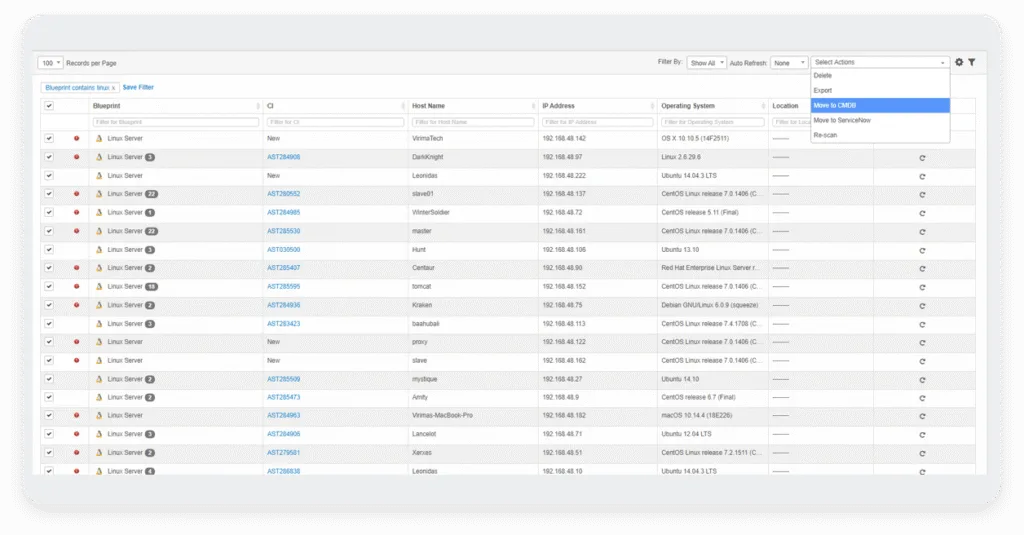
IT discovery is the automated process of identifying every device, application, and connection operating across a company’s technology environment, then recording what each one is, where it lives, and how it connects to everything else. The output is a live inventory: servers, workstations, network devices, virtual machines, cloud instances, and the software installed on each one.

A typical discovery record includes hostname, IP address, operating system and version, installed applications, hardware specifications, open ports, and the asset’s relationships to other devices on the network. These fields form the blueprint most CMDB and ITAM platforms expect before an asset counts as fully onboarded and trackable.

A mid-size company’s network documentation might list four hundred laptops and servers. A discovery scan run against that same network often turns up sixty more devices nobody remembers provisioning: a handful of test servers spun up during a product launch, personal phones connected through a guest network exception, a print server a vendor installed two years ago and never logged. Discovery is what finds the sixty, not just what re-confirms the four hundred already on the list.

That inventory becomes the input every other IT process depends on. Security patching needs to know what’s exposed. License management needs to know what’s installed. Change management needs to know what a planned change might affect. None of those processes can act on an asset nobody knows exists, which is the specific failure mode discovery is built to prevent. A single missed asset can mean a missed patch, an uncounted license, or a change approved without knowing what it touches downstream.

Manual tracking, a spreadsheet updated after each purchase or deployment, fails at scale for a straightforward reason: environments change faster than people can document them by hand. A developer spins up a cloud instance for a weekend project. A contractor connects a personal laptop through a guest network exception. Automated discovery closes that gap by running on a schedule instead of depending on someone remembering to update a record.

Virima Discovery
Virima calls this Trusted Runtime Truth for Agentic IT: an inventory built from what’s actually running, not what a document claims is running.

IT Discovery vs. Asset Discovery vs. Network Discovery

Three terms get used close enough together that the differences rarely get explained, and the differences matter once a team is scoping a project, writing a requirements document, or evaluating a vendor whose pitch blends all three into one word.

IT discovery is the umbrella term: the full process of finding, identifying, and mapping what exists across an environment.

Asset discovery narrows that focus to inventory and lifecycle. Where IT discovery is concerned with the technical map, asset discovery is concerned with tracking each item as an owned asset: acquisition date, warranty status, assigned cost center, and retirement schedule. Asset discovery data feeds directly into ITAM programs built around financial and lifecycle accountability. Our breakdown of what asset discovery means covers this distinction in more depth.

That lifecycle view matters most when it’s time to reconcile spending. Software license counts, hardware refresh cycles, and warranty renewals all depend on knowing exactly what’s deployed and for how long, questions a general discovery scan alone doesn’t answer without the asset layer attached to it.

Network discovery is narrower still. It refers specifically to identifying devices connected to a network, whether through active scanning or passive traffic monitoring, and mapping how they connect to each other. Network discovery is the layer IT discovery builds on top of, not a separate competing process, and it comes with its own depth of technique and topology mapping that sits outside the scope of this guide.

Most organizations need all three working together. A single scan can identify a server (IT discovery), record its warranty expiration and owner (asset discovery), and confirm its place on the network (network discovery) in one pass, rather than treating each as a separate purchase or project.

Keeping the three straight matters mostly for scoping conversations. A request for network discovery should not quietly turn into a full asset lifecycle project, and a request for asset discovery should not stop at a list of IP addresses with no ownership attached to any of them.

The Bancorp

“Virima’s integration with ServiceNow has allowed us to
enhance and fully integrate our CMDB into all of our ITIL
processes. The seamless integration gives us the ability to
leverage the best of both Virima and ServiceNow.”

Keith Lee

Keith Lee

VP Disaster Recovery and IT Risk
How IT Discovery Works: Scanning, Credentials, Agents, and Integrations

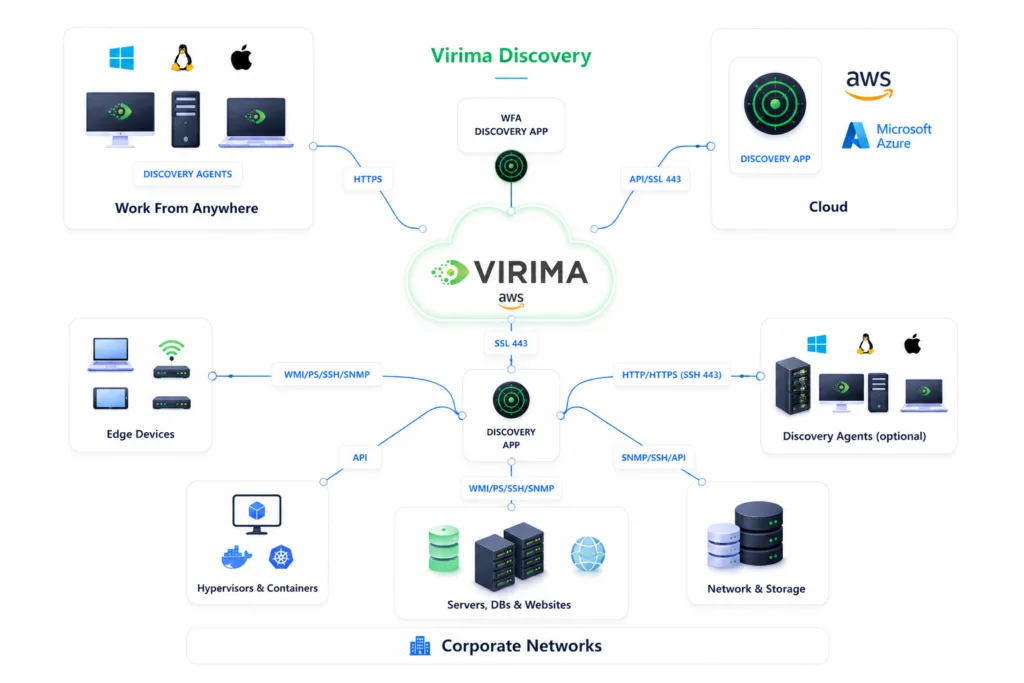
Discovery starts with scanning. A discovery engine sends requests across a defined IP range or cloud account, checking what responds. This stage confirms that something exists at a given address, without yet knowing what that something is.

Getting past that first response usually requires credentials. A discovery tool authenticates against a discovered device, using protocols matched to its type, Simple Network Management Protocol (SNMP) for network hardware, Windows Management Instrumentation (WMI) or SSH for servers and workstations, to pull details like operating system, installed software, hardware model, and open ports. Without valid credentials, a scan can confirm a device exists but can’t say much about what’s running on it.

Some environments supplement scanning with agents that report continuously from the device itself, covered in the next section. Cloud and container environments add a third method: application programming interface (API) integrations that query a provider’s management layer directly. AWS and Azure environments are typically covered through native API integrations rather than network scanning, since cloud resources are often ephemeral and don’t sit at fixed IP addresses the way on-premises hardware does. Kubernetes environments need discovery tooling built to model pods, services, and config maps as distinct configuration items (CIs), rather than treating an entire cluster as one opaque unit.

Software as a service (SaaS) applications add another layer that discovery has to reach differently again. The cadence of this cycle determines how useful the resulting inventory is. A scan run once and shelved describes a moment that’s already gone. A scan run on a high-frequency schedule stays close enough to current that the CMDB reflects what’s actually deployed, not what was deployed the last time someone remembered to check.

Whatever the method, the result feeds into a CMDB, where discovered assets and the relationships between them become searchable and usable by other IT processes rather than sitting in an isolated report nobody opens. Beyond the CMDB, discovery data commonly feeds directly into IT service management (ITSM) ticketing, so an incident or change request references a specific, currently accurate asset record.

Most discovery platforms surface this data through a searchable dashboard rather than a static export, letting IT teams filter by asset type, location, operating system, or last-scan date. That searchability is what turns a raw scan result into something a help desk, a security analyst, and a compliance auditor can each query for their own purpose without waiting on a custom report.

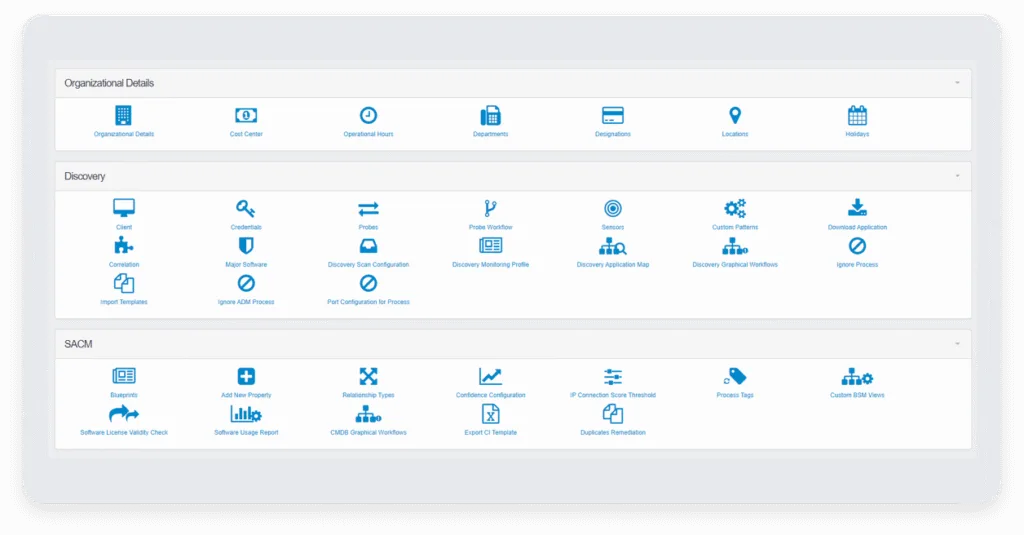
Virima-Admin-Console

Agent-Based vs. Agentless Discovery

Discovery methods split first on whether they require software installed on the target device. Agent-based discovery installs a small client on each device, which reports back continuously and captures detail an outside query often can’t get. Agentless discovery skips installation, scanning devices remotely instead, trading some depth for faster deployment and broader coverage.

Choosing between the two usually comes down to how much deployment friction an environment can absorb against how much depth it actually needs, a tradeoff that plays out differently once agent-based and agentless approaches get tested against real infrastructure rather than a vendor’s demo environment.

Agentless discovery splits further into active and passive technique. Active discovery sends queries directly to a device and waits for a response, fast and detailed but carrying some risk of disrupting fragile systems. Passive discovery instead listens to network traffic and infers what exists from the patterns it observes, safer for sensitive environments but slower to build a complete picture.

Sensitive environments rarely settle on just one of the two, and understanding where active and passive discovery diverge in practice is what determines whether a scan disrupts a fragile system or simply misses it entirely.

Operational technology (OT) environments illustrate why this matters. Industrial control systems often resist direct active queries the way standard IT hardware accepts them, so effective OT coverage typically pairs agentless scanning with passive monitoring rather than relying on either alone.

Discovery and the CMDB / Service Mapping

A CMDB stores discovered assets and the relationships between them. Discovery is the process that keeps that store accurate. A CMDB populated by a scan run once and never refreshed drifts out of date the same way a spreadsheet does, just with better formatting.

Service mapping builds one layer further on the same data. Where a CMDB confirms that a server connects to a database, service mapping groups that server, that database, and everything else in the chain under a single named business service, so a team can see what depends on what without tracing individual connections by hand. Virima’s service mapping feature builds these maps directly from discovery data rather than requiring a separate mapping process.

Choosing which layer to invest in first depends on what a team is trying to solve. Virima’s comparison of discovery vs service mapping walks through that decision directly.

The two records only stay useful if they’re refreshed at the same pace. A CMDB updated nightly feeding a service map that’s redrawn once a quarter produces a map that’s accurate on the day it’s built and increasingly wrong for most of the quarter after.

Virima’s discovery layer runs on high-frequency scheduled cycles across on-premises, AWS, and Azure environments, feeding results directly into the CMDB rather than a separate reporting tool.

Security and Vulnerability Use Cases

Security programs run on the same inventory discovery produces, and the connection is direct: a vulnerability scanner can only assess what discovery has already found. A gap in discovery coverage becomes a gap in security coverage, whether or not the scanning tool itself is doing its job well.

The prioritization question benefits from the same data. A vulnerability disclosed for a specific software version becomes a defined, ranked list of exposed assets when discovery data includes asset criticality and service dependencies, not just a Common Vulnerability Scoring System (CVSS) score attached to a flat list. Combining CVSS severity with asset criticality and dependency context from service maps gives security teams a starting point that reflects actual business risk, not just technical severity.

This is also where discovery intersects with formal security frameworks. Programs built around the NIST Cybersecurity Framework’s Identify function, for instance, treat asset inventory as the starting control everything else builds on, not an optional first step but the one the rest of the framework assumes is already in place.

Compliance programs depend on the same foundation. Audits ask what exists, who owns it, and how it’s configured, and a current discovery record answers all three without a manual reconstruction effort before the auditor arrives. A financial services firm preparing for a SOC 2 audit, for example, needs to show which systems handle regulated data and confirm no unauthorized access paths exist between them, a discovery and mapping exercise before it’s anything else. Virima’s guide to cyber security discovery use cases covers this connection between discovery and security programs in more depth.

Discovery_Broad-coverage
a US-based Bank
“Auditors demand clear evidence of data flow and system communications. With ViVID™, we have complete visibility into every connection, helping us strengthen business continuity, prioritize critical services, and deliver the transparency auditors value.”
Robert Hanson

Robert Hanson

IT Manager and Director

Implementation Challenges and Best Practices

Discovery programs tend to fail in a small number of recognizable ways, and most of them trace back to scope, timing, or ownership rather than the scanning technology itself.
Number 1

Scan scope gaps.

A program configured to cover the corporate network misses a guest Wi-Fi segment, a development environment spun up outside standard provisioning, or an OT segment managed by a separate team with separate network access.

Number 2

Stale scan schedules.

A monthly scan captures a fraction of the changes happening in an environment where new instances get provisioned daily, and the inventory represents a point in time that's already outdated by the time anyone consults it.

Number 3

Shadow IT.

Employees provisioning their own cloud resources or signing up for software independently create assets that standard network scanning never touches, since these resources often live entirely outside the corporate perimeter.

Number 4

Match scan frequency to change velocity.

High-frequency scheduled discovery cycles, run daily or more often on critical segments, keep pace with change far better than a periodic manual review ever will.

Number 5

Assign ownership for findings.

Running scans is a technical function. Deciding what to do with an unexpected finding, a device that shows up unclassified, a dependency that doesn't match documentation, needs someone accountable for resolving it, not a report that accumulates unread.

Number 6

Classification drift.

Assets get discovered correctly at first, then change purpose over time without the record updating to match: a test server gets promoted to production, a workstation gets repurposed as an ad hoc file server. The discovery record and the operational reality slowly diverge unless something forces a recheck.

Number 7

Decommission deliberately.

An asset leaving the environment needs an explicit, governed exit from the CMDB, confirmed by someone verifying it's genuinely retired rather than simply offline during a given scan cycle. Automatic removal based on a missed scan risks dropping an asset that's still in use.

Risk mitigation depends less on catching every gap upfront and more on catching drift before it turns into a business problem, since scope gaps, stale schedules, and shadow IT all start small and only become expensive once nobody’s tracking the moment they appeared.

Getting ahead of that drift comes down to a specific set of strategies for overcoming risks applied consistently, not a one-time cleanup revisited only after something’s already broken.

When to Use an IT Discovery Platform

Manual tracking works for a small, slow-changing environment. It stops working at a specific point, and that point is usually one of a few recognizable signals rather than a fixed headcount or server count. None of the signals below require every other signal to be present first, and most teams recognize at least one of them already.

Number 1

Multi-cloud or hybrid infrastructure.

Once an environment spans on-premises hardware alongside AWS and Azure, tracking each separately in a spreadsheet becomes a reconciliation problem on its own, before anyone even asks what depends on what.

Number 2

Recurring compliance requirements.

Audits that ask for a current, defensible asset inventory turn a manual process into a recurring scramble, where a platform running on a scheduled cadence turns the same request into a report that's already current.

Number 3

Incident response speed.

When a security team needs to know what's exposed within hours of a disclosure, not after a manual inventory reconciliation, only an automated, regularly refreshed discovery layer answers fast enough to matter.

Number 4

Team size outpaced by environment growth.

A small IT team can track a few hundred assets manually without much strain. The same team tracking several thousand assets across multiple business units, particularly after a merger or acquisition brings in an unfamiliar environment, hits a ceiling a spreadsheet was never built to handle. This is why choosing automated discovery usually becomes less about preference and more about which threshold an environment has already crossed.

These four signals play out differently depending on the environment they show up in: a hospital system managing medical devices hits the compliance signal first, while a company scaling through acquisitions hits the team-size signal, patterns that show up across IT asset discovery use cases in different industries.

IT Discovery Tools You Should Know About

Discovery tools generally fall into three categories, and knowing which one a vendor is pitching helps cut through a sales conversation quickly.
icon-boxes

Platform-native tools.

These ship as a module inside a broader ITSM platform. Convenient if an organization has already standardized on that platform, limited if it hasn't, since the discovery module is usually built to serve that platform first.

icon share

Standalone tools.

These focus specifically on discovery breadth and reconciliation, built to feed whichever ITSM platform or CMDB is already in place rather than replacing it.

icon-cloud

Cloud-native tools.

These are built specifically for tracking cloud resources, which behave differently from on-premises hardware since they scale, appear, and disappear on a schedule no physical inventory process was never built to handle.
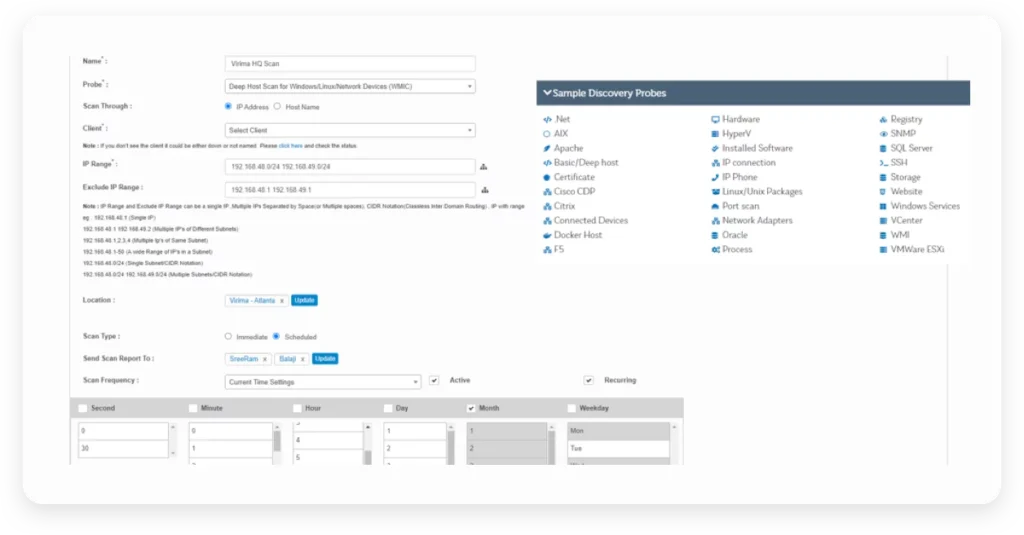
Which category fits depends on what’s already standardized within the environment, and the tradeoffs between them go deeper than a category summary can cover. Virima’s IT Discovery platform combines all three approaches into a single scan rather than requiring a separate tool for each layer.

Making Discovery an Operating Layer, Not a One-Time Project

Every failure mode covered in this guide, the stale inventory, the missed segment, the shadow cloud instance, traces back to the same root cause: discovery treated as a project completed once instead of a layer that runs continuously alongside everything else IT does. The fix in each case was never a smarter scan. It was a scan that runs often enough, and a team accountable for what it finds.

Environments that change daily need a discovery process that keeps pace with that rate of change. That’s a scheduling and ownership decision as much as a tooling one, and it’s usually the difference between an inventory a team trusts and one it has to double check before acting on.

Getting there doesn’t require replacing every existing process at once. It requires treating the scan schedule, the ownership assignment, and the CMDB integration as the actual infrastructure decisions they are, not settings configured once during setup and revisited only after something breaks. Teams that make that shift stop discovering problems during incidents and start seeing them on the next scheduled scan instead.

Run-a-Scan

— Frequently asked questions

IT Discovery Questions,
Answered.

A demo answers the rest in 20 minutes.
What's the difference between IT discovery and asset discovery?
IT discovery covers the full process of finding, identifying, and mapping what exists across an environment. Asset discovery narrows that to inventory and lifecycle tracking, ownership, warranty status, and retirement, feeding into ITAM programs specifically.
Network discovery is a specific technique within IT discovery, scanning IP ranges to identify connected devices. IT discovery is the broader process that includes network discovery as one input alongside classification, mapping, and CMDB integration.

Discovery identifies assets and their relationships, then records that data into the CMDB, where it becomes the system of record other IT processes, change management, incident response, license reconciliation, reference directly.

Effective discovery runs on high-frequency scheduled cycles rather than a single one-time scan, keeping the inventory close to current without requiring every asset class to be monitored in true real time.
The clearest signals are multi-cloud infrastructure, recurring compliance audits, and incident response timelines fast enough that a manual inventory reconciliation can’t keep up.
Discovery tools generally fall into three categories: modules built into a broader ITSM platform, standalone tools focused on discovery breadth that feed whichever ITSM platform is already in place, and cloud-native tools built specifically for tracking cloud resources. Which category fits depends on what’s already standardized within the environment.

— Get started

Move faster. Act safely.

Get live, explainable runtime truth across your entire estate —
without platform lock-in.