Virima JSM Integration: A Complete Guide to Discovery, CMDB, and Service Mapping

IT teams running Jira Service Management (JSM) face a common problem. JSM handles workflow well. But it depends on other tools to answer basic questions: What assets exist? How do they connect? What will a change break? The Virima JSM integration answers those questions directly inside JSM.
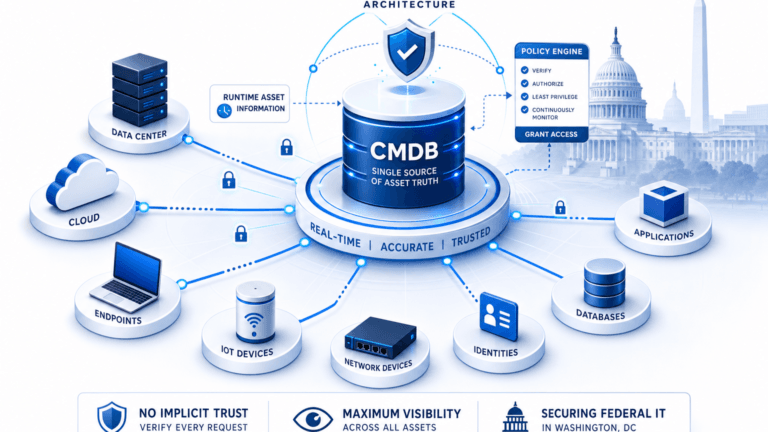
Virima adds four things to the JSM platform: hybrid IT discovery, an automated configuration management database (CMDB), dynamic service mapping, and the Virima Visual Impact Display (ViVID™). JSM users no longer have to update configuration items by hand or guess at dependencies. They get discovery-sourced data they can act on right away.
This guide covers what the integration includes, how each part works, and where to start.
What Is Virima?
Virima is a cloud-based IT automation platform. It covers four core jobs: hybrid discovery, automated CMDB, IT asset management, and service mapping. When you pair Virima with JSM, it becomes the source of inventory and configuration data your ITSM processes depend on.
ViVID adds a visual layer on top of that data. Teams use it to see service dependencies, incidents, and planned changes on one screen. That view leads to faster, more confident decisions during changes and incidents.
Hybrid Discovery: Finding Every Asset, On-Prem and Cloud
Virima’s IT discovery tool finds physical and virtual assets, hardware configurations, and installed software. It works across Windows, Linux, Unix, and Mac systems, in data centers and in the cloud. It uses more than 100 discovery probes, an optional Windows agent, and integrations with cloud providers including AWS and Azure.
For JSM users, this means configuration items don’t depend on manual entry. Discovery runs on a set schedule and maps new assets into the CMDB automatically. Service desk agents and asset managers get a fuller inventory to work from, whether that inventory sits in a data center rack or a cloud account.
Automated CMDB: Configuration Items You Can Trust
A configuration management database only works if its configuration items (CIs) are accurate. Virima’s CMDB runs on scheduled discovery cycles instead of manual data entry. That means JSM users see current configuration and change history data, not stale records.
This matters most during incident response and change approval. Out-of-date CI data causes missed dependencies and slower fixes. A CMDB that reflects what’s actually running, not what someone documented six months ago, is the foundation everything else in the Virima JSM integration builds on. This is what strong asset and configuration management looks like in practice.
Configuration Item Accuracy and Change History
Every configuration item in Virima’s CMDB carries its relationship data, discovery source, and change history. When a JSM user opens a CI, they see what it connects to, what changed recently, and where that data came from.
This detail supports two workflows inside JSM directly:
Change management. Teams reviewing a change request can check which services and configuration items sit downstream before they approve it.
Incident triage. Responders can trace a reported issue back through connected CIs to find where a fault started, instead of starting from scratch.
Discovery repopulates this data on a schedule. That keeps configuration item records close to what’s true in production, rather than depending on someone remembering to update a ticket.
Service Mapping: Seeing How Everything Connects
Virima Discovery builds business service maps once you supply service definitions, whether through manual input, spreadsheet import, or integrations like LeanIX. From there, service mapping builds live visuals of application dependencies, infrastructure relationships, network topology, and communication paths between CMDB assets and outside systems.
For JSM teams, this turns abstract CI relationships into a picture they can read during a change review or a postmortem.
ViVID™: Visual Context for Incidents and Changes
ViVID places JSM incidents and changes directly onto Virima’s service and dependency maps. IT operations, cybersecurity, and DevOps teams use these overlays to judge the risk of a planned change or speed up root cause analysis during an incident.
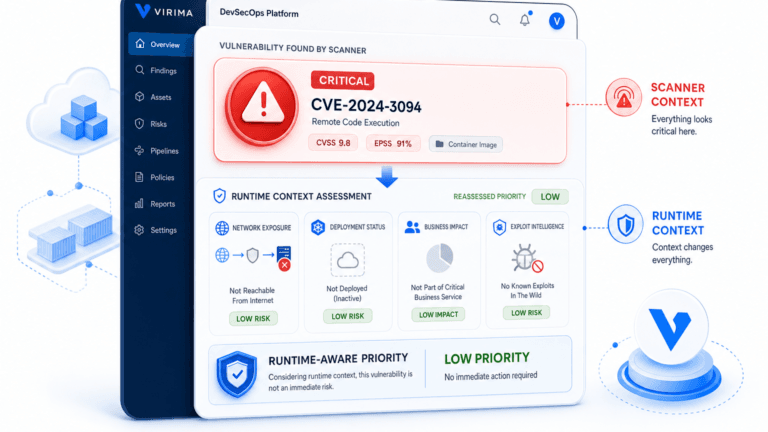
ViVID also shows device-level NVD vulnerabilities on the same maps. Security teams can then prioritize fixes by weighing both the vulnerability’s severity rating and the asset’s importance to the business, instead of treating every high-severity CVE the same way.
IT Asset Management: Two Ways to Use It
JSM users have two paths for asset management with Virima. You can use Virima’s discovery to add to JSM’s built-in asset management. Or you can use Virima’s full IT asset management tools, which cover hardware and software lifecycle tracking, inventory, and license management, including software license metering.
Either path gives asset managers clearer answers for financial, licensing, and warranty audits than a manual spreadsheet can.
Why This Combination Matters for ITSM Teams
JSM users who need IT asset discovery, a reliable CMDB, and automated dependency mapping get all three through the Virima JSM integration. They don’t need to switch platforms or run a second source of truth.
IT asset managers get accurate hardware and software inventory data for financial, licensing, and warranty reporting.
ITSM teams get faster change impact analysis and incident root cause work through ViVID’s mapped overlays.
Security teams get a full cyber asset inventory and can prioritize vulnerability fixes using both NVD data and service importance.
Getting Started with the Virima JSM Integration
If your team needs better configuration item accuracy, clearer service dependency visibility, or stronger collaboration across ITSM and security, the Virima JSM integration covers all three inside the platform you already use.
Explore the Virima JSM integration to see how discovery-sourced CMDB data and ViVID service maps work together in Jira Service Management.
| What does the Virima JSM integration add to Jira Service Management? The Virima JSM integration adds hybrid IT discovery, an automated CMDB, dynamic service mapping, and ViVID visual overlays to Jira Service Management. It replaces manually updated configuration items with discovery-sourced data. Change and incident teams then work from current CI data instead of stale records. |
Ready to see the Virima JSM integration in action? Request a demo today and bring discovery-sourced CMDB data into your Jira Service Management workflow.
Frequently Asked Questions
Does Virima replace JSM’s native asset management?
No. You can use Virima’s discovery to add to JSM’s built-in asset management, or use Virima’s full IT asset management module for hardware, software, and license lifecycle tracking. Both options work inside the same integration.
How often does Virima’s CMDB update configuration items?
Virima’s CMDB updates on scheduled discovery cycles instead of manual entry. That keeps configuration item and change history data close to what’s actually running, not what’s manually recorded.
What is ViVID™ and how does it work with JSM?
ViVID™ is Virima’s Visual Impact Display. It places JSM incidents and changes onto Virima’s service and dependency maps, helping teams judge change risk and find root cause during incidents.
Do I need to build service maps manually in Virima?
You supply service definitions (which apps and systems make up a service) manually, via spreadsheet import, or through integrations like LeanIX. Once defined, Virima builds and maintains the dependency map from that input automatically.
How does Virima help security teams prioritize vulnerabilities?
ViVID shows device-level NVD vulnerabilities on service maps. Security teams then weigh both the vulnerability’s severity rating and the asset’s business importance when they prioritize fixes.