
Software License Management in ITAM: How to Track, Audit, and Stay Compliant with Your Software Assets

TL DR:
Software license management in ITAM connects license keys to installed software instances and the CIs they run on, so IT teams can track compliance, prepare for audits, and eliminate overspend — all from within the CMDB.
A software audit arrives with 30 days’ notice. Most IT teams spend that month in crisis mode exporting spreadsheets, chasing department heads, reconciling license purchases against deployment records that no one has touched in two years. The audit bill comes. It’s expensive. And everyone agrees it won’t happen again.
Then it does.
The cycle continues because software audits expose a structural gap: organizations buy software, install software, and pay for software renewals — but they never build a system that ties those three activities together. The result is over-licensing in some areas (paying for seats nobody uses), under-licensing in others (deploying software beyond the terms of the agreement), and zero visibility into which software is installed where.
IT Asset Management (ITAM) exists precisely to close this gap. When software license management is built into your ITAM practice — and grounded in a real CMDB — you stop reacting to audits and start managing compliance proactively.
This article explains how ITAM handles software license tracking, how Virima 6.1.1 implements the full license-to-CI relationship chain, and how to build a repeatable software compliance process that survives an audit without the scramble.
What Is Software License Management in ITAM?
Software license management (SLM) is the discipline of tracking every software license an organization owns, correlating those licenses to actual installations, and ensuring usage stays within the terms of each vendor agreement.
In an ITAM context, SLM covers:
- License records — what you purchased, how many seats, what the license terms are, and when licenses expire
- Installation tracking — what software is actually installed across your device estate
- Compliance position — whether the number of active installations exceeds or falls short of license entitlements
- Audit readiness — the ability to produce a clean, exportable compliance report at any time
SLM is a subset of Software Asset Management (SAM), which also covers the financial and procurement aspects of software ownership. At the operational level, the heart of SLM is the license-to-installation correlation: knowing not just what you own, but what you’re actually running.
When SLM lives inside a CMDB-backed ITAM platform like Virima, the license record connects to a software CI, which connects to the hardware CI where that software is installed, which connects to the service that hardware CI supports. That chain of context is what makes ITAM-integrated SLM fundamentally different from a standalone license tracker. Understanding what a CMDB is and why it matters is essential to grasping how this relationship chain holds together.
The Software Compliance Problem
Software non-compliance takes three forms, and all three are expensive.
Over-licensing is the most common. Organizations purchase enterprise agreements with seat counts that far exceed actual usage. Nobody ever reconciles entitlements against installs, so the organization keeps renewing at inflated levels. Gartner estimates that organizations overspend on software licenses by 30% on average — money that disappears into unused seats.
Under-licensing carries the most risk. If discovery reveals that 400 devices run a licensed product but the organization holds only 300 seats, that’s an audit exposure that can result in back-payment demands, penalties, and reputational damage. Vendors such as Microsoft, Oracle, and SAP audit customers regularly, and the burden of proof falls on the organization. This is precisely why ITAM plays a central role in risk management across the enterprise.
Unauthorized software is the security dimension. When employees install unapproved software — screen recorders, file-sharing utilities, browser extensions with elevated permissions — those installations bypass security review and create attack surfaces. Without automated discovery, unauthorized software runs undetected. Organizations that lack a cybersecurity asset management practice are particularly exposed, and understanding how ITAM strengthens your organization’s cybersecurity posture can help close this gap.
The root cause of all three problems is the same: no single source of truth that connects what you own (licenses), what’s deployed (installs), and where it runs (hardware CIs).
How Virima Tracks Software License Keys in ITAM
In Virima 6.1.1, software license management starts with the license record. Each license in the ITAM module captures:
- The license key itself
- The software product and version the license covers
- The number of seats or instances allowed
- License type (perpetual, subscription, concurrent, per-device)
- Start and expiration dates
- Vendor and purchase reference information
- Current compliance status
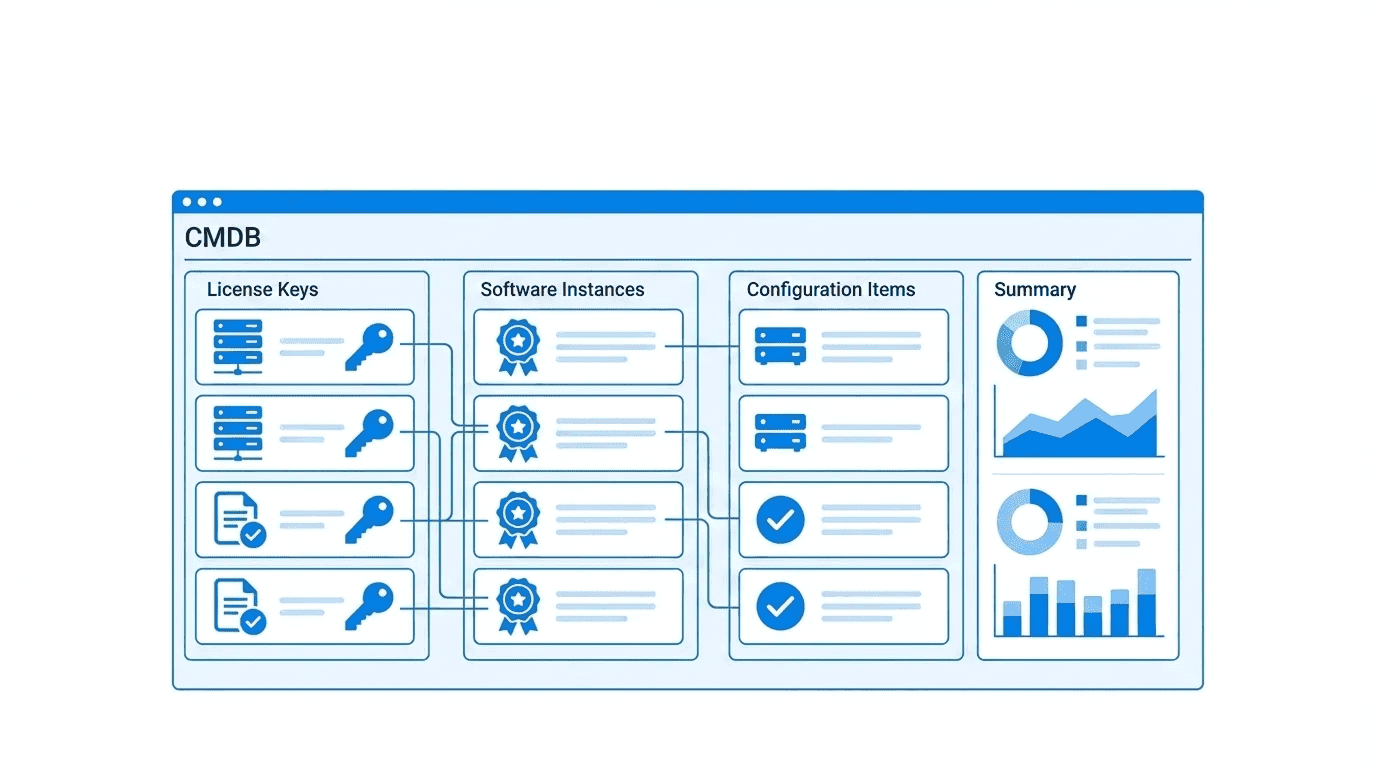
License keys are not floating records in isolation. Virima creates a component-of relationship between the license key record and the specific software instance it authorizes. That software instance is itself a CI in the CMDB, linked to the hardware CI (endpoint, server, or VM) where the software runs. For teams looking to get the most from this structure, building a custom CMDB for IT asset management ensures the relationship model reflects your actual environment.
This relationship chain — License Key → Software CI → Hardware CI — is the foundation of software compliance management in Virima. When you query a license record, you follow that chain to see exactly which devices hold that license, whether those devices are still active or decommissioned, and whether the installation count exceeds the license entitlement.
How Discovery Inventories Installed Software
License records are only half the picture. The other half is knowing what’s actually installed.
Virima’s Discovery engine scans endpoints across the network and inventories installed software automatically. Discovery supports:
- Windows — MSI-installed applications, registry-tracked software, portable executables identified at the file system level
- Linux — Package manager inventories (RPM, DEB, APT), manually installed binaries, container-resident software
- macOS — Application bundles in /Applications, Mac App Store installs, command-line tools
Discovery runs on a configurable schedule and updates the CMDB continuously. Every new software install triggers a CI update. Every uninstall removes the software record from the hardware CI’s configuration data. The CMDB reflects the current state of the software estate — not the state as it was six months ago when someone last exported a spreadsheet. For organizations managing cloud-controlled network infrastructure, Cisco Meraki discovery extends this visibility to Meraki-managed devices, pulling network device data directly into the CMDB alongside endpoint software inventory. The benefits of automated asset discovery extend well beyond compliance, but audit readiness is where the payoff is most immediate.
For organizations with mixed environments, Virima’s multi-OS discovery eliminates the gap that plagues teams relying on OS-native inventory tools that only cover one platform. Teams evaluating their approach can compare the tradeoffs between active vs. passive IT asset discovery to determine the right fit for their network topology.
The License Key → Software → CI Relationship Chain
The relationship chain in Virima is what separates ITAM-integrated SLM from a spreadsheet or standalone license management tool.
Here is how it works in practice:
- License Key record is created in Virima when a software purchase is recorded. The license key, seat count, and entitlement details are captured.
- Software CI is either created manually or populated via Discovery when Virima detects the software installed on endpoints.
- Component-of relationship connects the license key to the software CI. This is the core compliance link — it ties entitlement to deployment.
- Hardware CI relationship links the software CI to the specific device (server, workstation, VM) where it runs.
- Service mapping optionally links the hardware CI to the business service it supports — critical for understanding the impact of any compliance or licensing action.
This chain means every license record has a live relationship to the real infrastructure it governs. When Discovery updates a hardware CI — detecting that a new installation has appeared — the compliance calculation for any linked license record updates automatically.
Major Software Monitoring: Tracking Business-Critical Applications
Not all software carries equal business risk. Microsoft 365, your ERP system, your backup software, your EDR platform — these are business-critical applications where version drift, misconfiguration, or unauthorized changes directly threaten operations.
Virima 6.1.1 includes Major Software monitoring, a capability that lets IT teams define a list of critical software products and track them with heightened attention. Major Software monitoring covers:
- Version tracking — Virima records the installed version of each major software product and alerts when versions fall outside the approved baseline
- Configuration monitoring — Key configuration parameters for major software are tracked as CI attributes, so changes surface immediately
- Installation scope monitoring — If a major software product appears on a device it should not be installed on, that anomaly is visible in the CMDB
For organizations subject to regulatory compliance — SOX, HIPAA, ISO 27001, PCI DSS — Major Software monitoring provides the audit trail that demonstrates ongoing control over business-critical applications.
How to Generate a Software Compliance Report for Auditors
When an audit notice arrives, Virima’s compliance reporting capability eliminates the manual export sprint.
The software compliance report in Virima pulls together:
- All license records, including seat count and expiration status
- All discovered software instances linked to each license
- The compliance delta — seats used versus seats licensed, by product
- Hardware CI context — which devices hold each installation
- Historical data — when each installation was discovered, and any changes since
Reports are exportable to formats auditors can work with directly. The compliance position is calculated at the time of export, so the report reflects the current state of the CMDB.
For organizations subject to repeated audits — annual Microsoft audits, Oracle LMS audits, SAP USMM checks — Virima’s compliance reports run on a regular schedule, monthly or quarterly. Audit preparation becomes a continuous process rather than a 30-day crisis.
Software License Management vs. Software Asset Management: What’s the Difference?
These two terms are often used interchangeably, but they cover different scope:
| Software License Management (SLM) | Software Asset Management (SAM) | |
| Focus | Tracking license entitlements and correlating them to installs | Full lifecycle of software assets including procurement, financial management, and retirement |
| Core activity | License-to-installation reconciliation | Spend optimization, vendor negotiation, and contract management |
| Data source | CMDB, discovery data, license records | CMDB + financial systems + procurement records |
| Primary output | Compliance reports, audit readiness | Software spend reports, optimization recommendations |
SLM is the operational core of SAM. You cannot do effective SAM without solid SLM. Virima’s ITAM module supports both — license key tracking and CI relationship management (SLM) alongside software lifecycle records that feed financial and procurement analysis (SAM). For a deeper look at how these disciplines relate, the distinction between asset management and configuration management helps clarify where each practice begins and ends.
Building a Software Lifecycle Management Process in Virima
Software doesn’t just appear. It goes through a lifecycle: evaluated, purchased, deployed, maintained, and eventually retired. Virima tracks each stage:
- New — software is purchased and the license record is created; the CI is in “New” status pending deployment
- Active — software is deployed; Discovery populates the software CI; license compliance calculation begins
- Maintenance — software is under contract renewal review; expiration dates are tracked against current usage
- Retired — software is decommissioned; the software CI moves to “Retired” status; the license is marked inactive
Full lifecycle tracking keeps the compliance position accurate even when software ages out of the estate. Decommissioned software doesn’t create phantom installs that inflate compliance exposure. Historical records remain for audit purposes even after a CI is retired.
This process also enables proactive renewal management. When a license approaches expiration, Virima surfaces that record with its linked installation count — giving procurement teams the usage data they need to right-size the renewal rather than auto-renewing at the same seat count. Organizations looking to strengthen their end-to-end governance should review IT asset management best practices to ensure the lifecycle process covers every stage.
Software Audit Exposure Starts with a Disconnected IT Estate
Software audit exposure comes from a single root cause: no system that connects what you own to what’s deployed. ITAM — when built on a live CMDB with automated discovery — closes that gap permanently.
Virima 6.1.1 gives IT teams the full license-to-CI relationship chain, multi-OS discovery, Major Software monitoring, and exportable compliance reporting. The result is a software compliance position that stays accurate between audits, not just during them.
Schedule a Demo to see how Virima’s ITAM module handles software license management end to end.
Frequently Asked Questions
What is the difference between software license management and software asset management? Software license management (SLM) focuses on tracking license entitlements and correlating them to actual software installations to maintain compliance. Software asset management (SAM) covers the full lifecycle, including procurement, financial optimization, and contract management. SLM is the operational foundation that SAM depends on, and both disciplines require accurate CMDB data to function effectively.
Can Virima detect unauthorized software installations automatically? Yes. Virima Discovery scans endpoints across Windows, Linux, and macOS and inventories all installed software. Software that appears on an endpoint without a corresponding license record or without appearing on the approved software list is immediately visible in the CMDB, enabling rapid review and remediation before audit exposure accumulates.
How often does Virima Discovery update software inventory data? Discovery runs on a configurable schedule — organizations set scan frequency based on their operational needs and compliance requirements. After each discovery run, all software CI records in the CMDB update to reflect current installation status. This ensures the compliance position is always based on current data rather than a point-in-time snapshot.





