Software Asset Management Process Flow: Step-by-Step

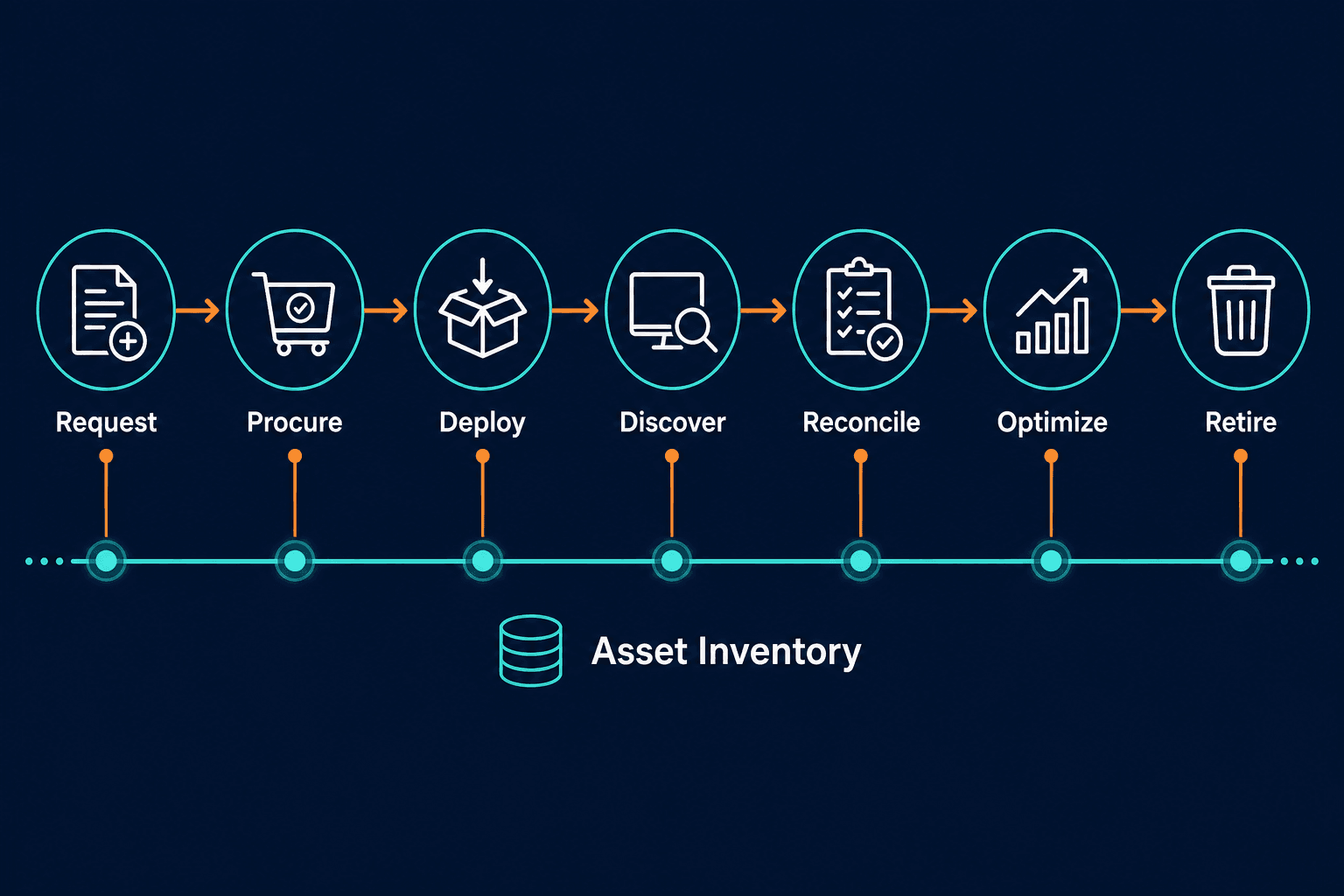
The software asset management process flow is the sequence of steps — request, procurement, deployment, discovery, license reconciliation, usage optimization, renewal, and retirement — that governs a software asset from acquisition to decommission. Most organizations design this flow correctly on paper. It breaks in practice because deployments, cloud provisioning, and shadow purchases go unrecorded, so the inventory feeding every later step is already wrong before anyone reconciles it. The process diagram looks clean. The reality is messier.
What the SAM process flow actually governs
Each step in the process produces outputs that the next step depends on. When a step produces inaccurate outputs, every downstream step inherits that error.
A working SAM process flow covers seven stages: request and procurement, deployment and configuration, discovery and inventory update, license compliance reconciliation, usage monitoring and optimization, renewal and contract management, and retirement and decommission. Each stage has a defined purpose, a set of inputs it requires, and outputs it passes forward. Understanding what each stage needs, and where it typically breaks, is the foundation for building a process that works in practice, not only on paper.
What is the software asset management process flow?
The software asset management process flow is the sequence of steps that governs software assets from initial request through retirement. It covers procurement, deployment, inventory, license reconciliation, usage monitoring, renewal, and decommission. Each step depends on accurate data outputs from the previous one. When inventory data is wrong, every downstream step inherits the error.
Step 1: Software request and procurement
The process begins when a user, team, or business unit identifies a software need. In a well-governed SAM process, every request passes through a check against the existing software portfolio before a purchase is approved. That check answers two questions: does the organization already own a license that covers this need, and does an approved application already do what the requester is asking for?
According to the Zylo 2026 SaaS Management Index, organizations now run an average portfolio of 305 applications, with IT controlling only 15% of software spend. The remaining 85% flows through business units and direct employee purchases. A SAM process flow that only governs IT-approved purchases governs 15% of the problem.
The procurement step should capture: the application name, vendor, license type, quantity, term, cost, and the business unit responsible. This record becomes the entitlement baseline that Step 4 compares against actual installations.
Where this step breaks: No pre-purchase portfolio check exists, or the inventory is too outdated to check against meaningfully, so business units purchase tools that duplicate existing software. The new purchase creates no procurement record in the SAM system. For a closer look at how unmanaged purchases inflate this blind spot, see Virima blog post on shadow IT and shadow spend risk.
Step 2: Deployment and configuration
Once a software asset is procured, it is deployed to the intended users or systems. The deployment step should update three records simultaneously: the asset management system (license assigned, to whom, on which device), the CMDB (new configuration item created or updated), and the service catalogue if the software is being offered as an internal service.
Deployment without a record update is the most common source of inventory drift. A software install that isn’t recorded in the asset management system is invisible to every downstream step — it won’t appear in reconciliation (Step 4), won’t be tracked for usage (Step 5), and won’t be accounted for at renewal (Step 6).
Where this step breaks: Deployment is handled by IT operations teams without direct access to the SAM system, or installs happen via self-service portals and automated provisioning that never trigger an asset record update. Cloud-based SaaS tools provision instantly and generate no endpoint installation event to catch.
Step 3: Software discovery and inventory update
Discovery is the step that reconciles what the SAM system believes is installed against what is actually running in the environment. Automated discovery tools scan endpoints, servers, virtual machines, and cloud workloads on a scheduled basis, reporting what software is detected, where it is installed, and in what version.
This step is foundational to the rest of the process, and the one most commonly skipped or run infrequently — every downstream stage depends on the inventory it produces. Without it, the inventory that all other steps depend on is built from procurement records and manual entry: what was purchased and what someone noted at deployment time, not what is actually installed today.
The gap between procurement records and actual installations grows continuously: software installed outside the approved process, personal tools on corporate devices, cloud workloads running packages that were never formally procured, and legacy software still running on servers that were nominally repurposed.
Virima’s IT asset discovery addresses this with agentless and agent-based scanning across on-premises, AWS, and Azure environments, detecting installed software regardless of how it arrived, including software that was never recorded in the procurement step. For a closer comparison of scanning methods, see Agent-based vs. agentless discovery: which is best for your business?.
Where this step breaks: Discovery runs quarterly or annually instead of on a high-frequency cycle, and cloud or SaaS environments often sit outside its scope entirely. Discovery outputs are stored separately from the SAM system rather than feeding directly into the inventory.
Why is software discovery critical in the SAM process flow?
Software discovery is the step that reconciles what the SAM system believes is installed against what is actually running in the environment. Without it, the inventory feeding license reconciliation, usage monitoring, and audit readiness is built on procurement records and manual entry rather than confirmed installations. Every downstream step inherits whatever errors the inventory contains.
Step 4: License compliance reconciliation
Compliance reconciliation compares two datasets: entitlements (what the organization has purchased and is licensed to use) against installations (what discovery confirmed is actually installed). The output is a compliance position: the gap between licensed use and actual use for each software publisher in the environment.
A positive gap means the organization has more licenses than installations, so it is over-licensed and paying for unused seats. A negative gap means installations exceed licenses, so the organization is under-licensed and exposed to audit penalties.
According to the Flexera 2026 State of ITAM Report, 48% of organizations were audited in the past year and 44% spent more than $1 million on software audits over three years. Microsoft conducted audits for 64% of audited organizations; Oracle audit activity jumped from 24% to 38% year over year. Compliance reconciliation is the step that prevents these costs, but only when it runs against an accurate installation inventory from Step 3.
Virima’s ITAM platform automates this reconciliation, comparing discovery-sourced installation data against license entitlements to produce a current compliance position across the software estate.
Where this step breaks: Reconciliation runs against stale discovery data — installs from a scan done months ago rather than current confirmed installs — or against entitlement records missing vendor-specific licensing terms. Complex metrics like per-processor, per-user, and concurrent-use licensing get simplified or ignored.
What is license compliance reconciliation?
License compliance reconciliation is the SAM process step that compares software entitlements (what’s licensed) against confirmed installations (what’s actually running) to produce a compliance position. A positive gap means over-licensing and wasted spend; a negative gap means under-licensing and audit exposure. It only produces an accurate position when it runs against a current, discovery-confirmed installation inventory rather than a stale scan.
Step 5: Usage monitoring and license optimization
Compliance reconciliation tells you whether your license count covers your installation count. Usage monitoring tells you whether your installation count reflects active use. These are different problems, and solving one without the other leaves money on the table.
A license installed but unused still costs money at renewal. Usage monitoring tracks application launches, session frequency, and last-used dates to flag licenses that are installed but not active — reclamation candidates that can be uninstalled and dropped from the renewal count.
The Flexera 2025 State of ITAM Report found that 30% of desktop software spend was wasted even at organizations with advanced ITAM programs. The Flexera 2026 State of ITAM Report identified reducing licenses as the most effective strategy for reducing software costs. Usage monitoring is the mechanism that makes license reduction possible. It provides the evidence base for reclamation decisions before the next renewal cycle locks in over-provisioned seat counts for another year.
Where this step breaks: Usage data is tracked at the license level, not the individual user or device level, so reclamation decisions stay too broad and manual — somebody still has to identify and action each candidate. SaaS usage is often tracked separately from on-premises software, creating two visibility gaps instead of one.
What is license optimization in the SAM process flow?
License optimization is the step in the SAM process that identifies installed software not being actively used and reclaims those licenses before the next renewal cycle. Usage monitoring tracks application launches and last-used dates. Licenses showing zero use over a defined period become reclamation candidates. Their removal reduces the renewal seat count and the associated cost.
Step 6: Renewal and contract management
Software contracts renew on a cycle that does not adjust automatically to reflect changes in the install base. The renewal step is where the SAM process either converts the work done in Steps 3 through 5 into savings, or fails to do so, locking in another year of over-provisioned spend.
A renewal decision informed by current discovery data, reconciled compliance positions, and active usage counts produces a seat count that reflects actual need. A renewal decision made without this data defaults to the prior year’s contract, plus any seat count the vendor proposes based on its own entitlement records.
Renewal management also covers contract terms: renewal dates, notice periods, price escalation clauses, and the metric the vendor uses to measure licensed use — terms that often change at renewal for large enterprise agreements where the vendor has renegotiated methodology.
Where this step breaks: Renewal decisions are made by procurement teams without access to SAM data, using discovery and usage figures that are already months old. Notice periods are missed because contract dates live in a spreadsheet rather than the SAM system.
Step 7: Retirement and decommission
Software retirement is the final step in the process flow: the intentional removal of a software asset from the environment when it is no longer needed, reaches end of life, or is replaced by a different application.
A complete retirement process covers uninstallation from all devices where the software is installed, return or cancellation of any remaining license entitlements, update of the CMDB to reflect the removed configuration item, and notification to finance to remove the asset from the technology cost register.
Software that is retired on paper but not actually removed from devices becomes ghost software: still installed, still consuming a potential license position, and still representing a security risk if it has passed end-of-life and is no longer receiving vendor patches.
Where this step breaks: Retirement decisions get logged in the SAM system, but the actual uninstall is never confirmed by discovery — end-of-life software is closed out in the procurement record while scans keep detecting it on endpoints where it was never removed.
What happens at the retirement step in software asset management?
The retirement step in the SAM process flow covers uninstallation from all devices, return or cancellation of license entitlements, CMDB update to remove the configuration item, and financial record adjustment. Without discovery confirmation that uninstalls completed, software remains on devices as ghost installations, creating license exposure and security risk if the software has reached end of life.
Why SAM process flows break and what they need to work
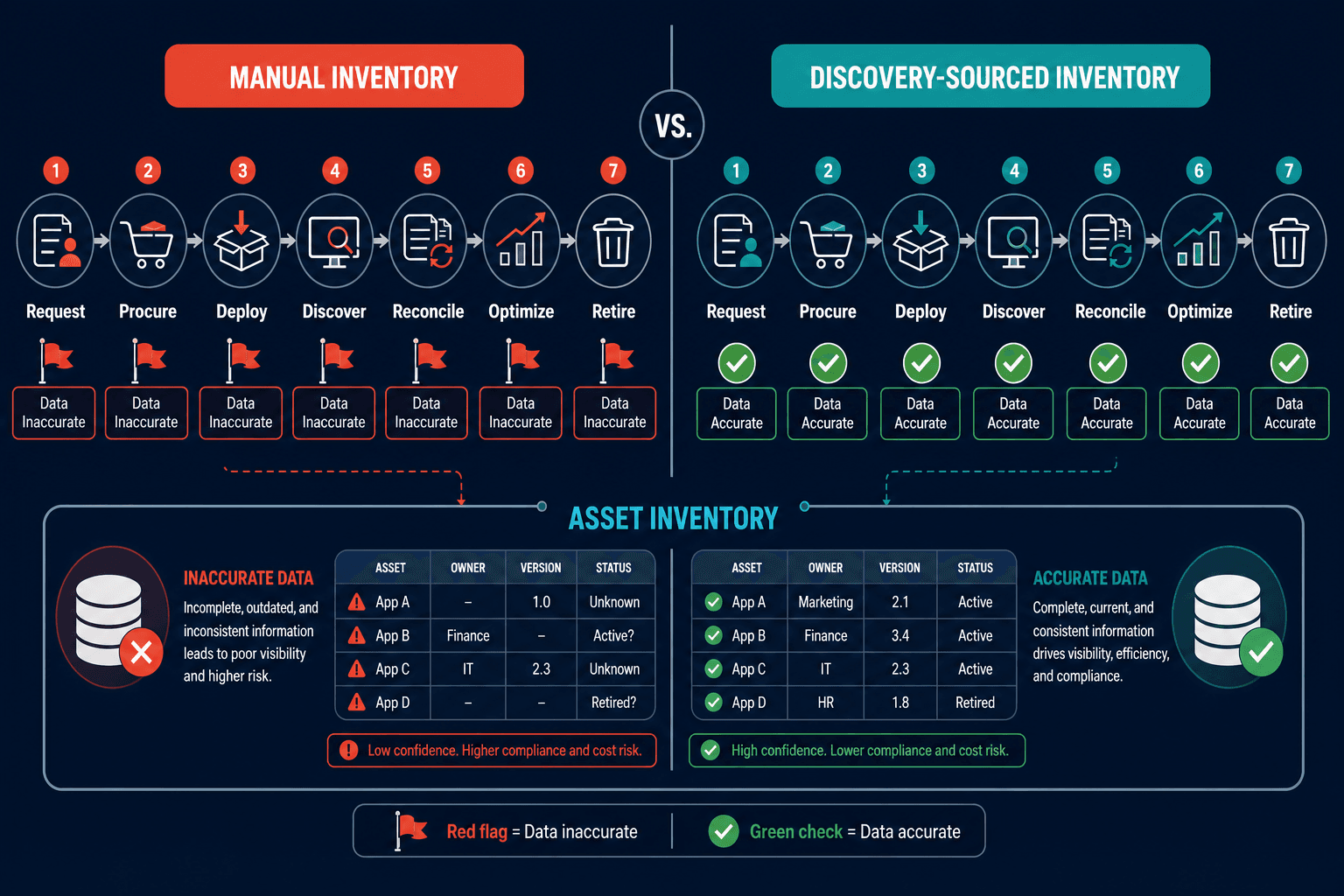
Each of the seven steps depends structurally on the accuracy of the data passed into it from the step before. A procurement record is only useful for compliance if deployment confirms where the license actually landed. An installation record is only useful for optimization if usage data confirms it is actively used. A retirement record is only meaningful if discovery confirms the uninstall completed.
The table below maps each step to its most common failure and what accurate data changes about the outcome:
| Step | What breaks | What accurate data changes |
|---|---|---|
| 1. Procurement | No portfolio check before purchase | Prevents duplicate buys before they happen |
| 2. Deployment | Install never recorded in the SAM system or CMDB | Keeps every downstream step aware the asset exists |
| 3. Discovery | Scans run quarterly and miss cloud/SaaS workloads | Inventory reflects what’s actually installed today |
| 4. Reconciliation | Runs against stale discovery data | Compliance position reflects current risk, not last quarter’s |
| 5. Usage optimization | Usage tracked at the license level, not per user | Surfaces exact reclamation candidates before renewal |
| 6. Renewal | Decisions made on data that’s months old | Seat counts match actual need, not last year’s contract |
| 7. Retirement | Uninstall never confirmed by discovery | Prevents ghost software and the license/security exposure it creates |
The most common failure mode in SAM implementation is not missing process steps — it’s missing data accuracy at each one. Organizations that deploy SAM tooling without addressing the discovery layer are building a process on data that was outdated the day it was entered. See CMDB Audit Essentials: Ensuring Data Accuracy and Compliance for more on keeping that foundation current as the estate changes.
Virima’s IT audit and compliance use cases cover how discovery-sourced inventory connects reconciliation, renewal, and retirement into one workflow instead of seven disconnected ones.
Building a SAM process flow that holds up under audit
A software asset management process flow is as reliable as its weakest data input. The steps themselves are straightforward — what’s hard is keeping the data behind each one current as the estate changes (new purchases, new deployments, new cloud workloads, new business unit tools) faster than a manual reconciliation pass can track.
Use the table above as a working audit: for each step, ask what would break it today and whether your current process would catch it before the next audit or renewal cycle does.
See how Virima’s discovery-sourced inventory keeps every step of your SAM process reconciled against real installations, not last quarter’s spreadsheet. Schedule a demo to walk through where your own process flow has data gaps.