Software License Procurement Process: A Step-by-Step Guide

Most organizations have a software procurement process on paper. In practice, it often amounts to someone submitting a purchase request, finance approving the cost, and IT logging a ticket when the license arrives.
The license metric, the exact entitlement scope, and whether the organization already owned the software rarely get documented with the precision a vendor audit will later demand. According to the Flexera 2026 State of ITAM Report, 48% of organizations were audited in the past year and 44% spent over $1 million on software audits in the past three years — and incomplete procurement records are the most common reason those audits turn costly. The software license procurement process is the foundation of every compliance position the organization will need to defend for the life of a contract.
Why procurement is where compliance risk begins
Every software audit starts with the same two questions: what did you purchase, and what do you have installed? The first question is answered by the procurement record. When that record is incomplete, ambiguous, or missing entirely, the audit response becomes a reconstruction exercise rather than a confirmation.
Microsoft conducted audits against 64% of audited organizations last year; Oracle audit activity jumped from 24% to 38% year over year. The organizations that resolve these audits quickly and at low cost share one characteristic: their procurement records accurately capture what they purchased and under what terms.
The eight steps below cover the full software license procurement process, from identifying a need through scheduling renewal checkpoints. Each step includes where it typically breaks and what the consequences are downstream.
What is the software license procurement process?
The software license procurement process is the sequence of steps an organization follows to identify, evaluate, approve, purchase, and record a software license. It covers need identification, portfolio checks, license type evaluation, vendor negotiation, contract review, entitlement record creation, deployment, and renewal planning. Each step shapes the compliance position the organization will need to defend if audited.
Step 1: Identify and document the software need
The procurement process begins with a documented request. The request should capture the requester’s name and business unit, the specific business problem the software will solve (for example, reducing MTTR, automating compliance workflows, or closing a security gap), the expected number of users or devices, and whether the need is ongoing or project-specific.
Documentation at this stage serves two purposes: it creates a paper trail that justifies the purchase if challenged internally, and it provides the inputs for the portfolio check in Step 2. An undocumented request that goes straight to purchase bypasses both controls and frequently results in duplicate tools, unapproved vendors, and missing entitlement records.
Where this step breaks: Requests arrive verbally or via informal channels. The business unit goes directly to a vendor, completes a sign-up, and presents the invoice to finance after the fact. No documented need, no approved process, no inventory entry.
Step 2: Check existing inventory before purchasing
Before any new purchase proceeds, the request should be checked against the organization’s current software portfolio. The check answers three questions: does the organization already own a license that covers this need, is an approved application already deployed that does the same job, and is there an existing volume agreement with this vendor that the new purchase should be added to?
According to the Zylo 2026 SaaS Management Index, the average organization runs 305 applications with IT controlling only 15% of software spend — the other 85% flows through business units. That ratio means most portfolio checks cannot be run against a complete, accurate inventory, because most of the portfolio was never centrally recorded. Organizations that centralize SaaS visibility before rationalizing spend often find significant duplication in their portfolios. For a deeper look at bringing that scattered spend under one roof, see Virima’s software license management strategy guide.
Where this step breaks: The software inventory is too outdated to check against. No central SaaS catalog exists. Business units operate tools that IT does not know about, making duplicate detection impossible until a discovery scan surfaces them.
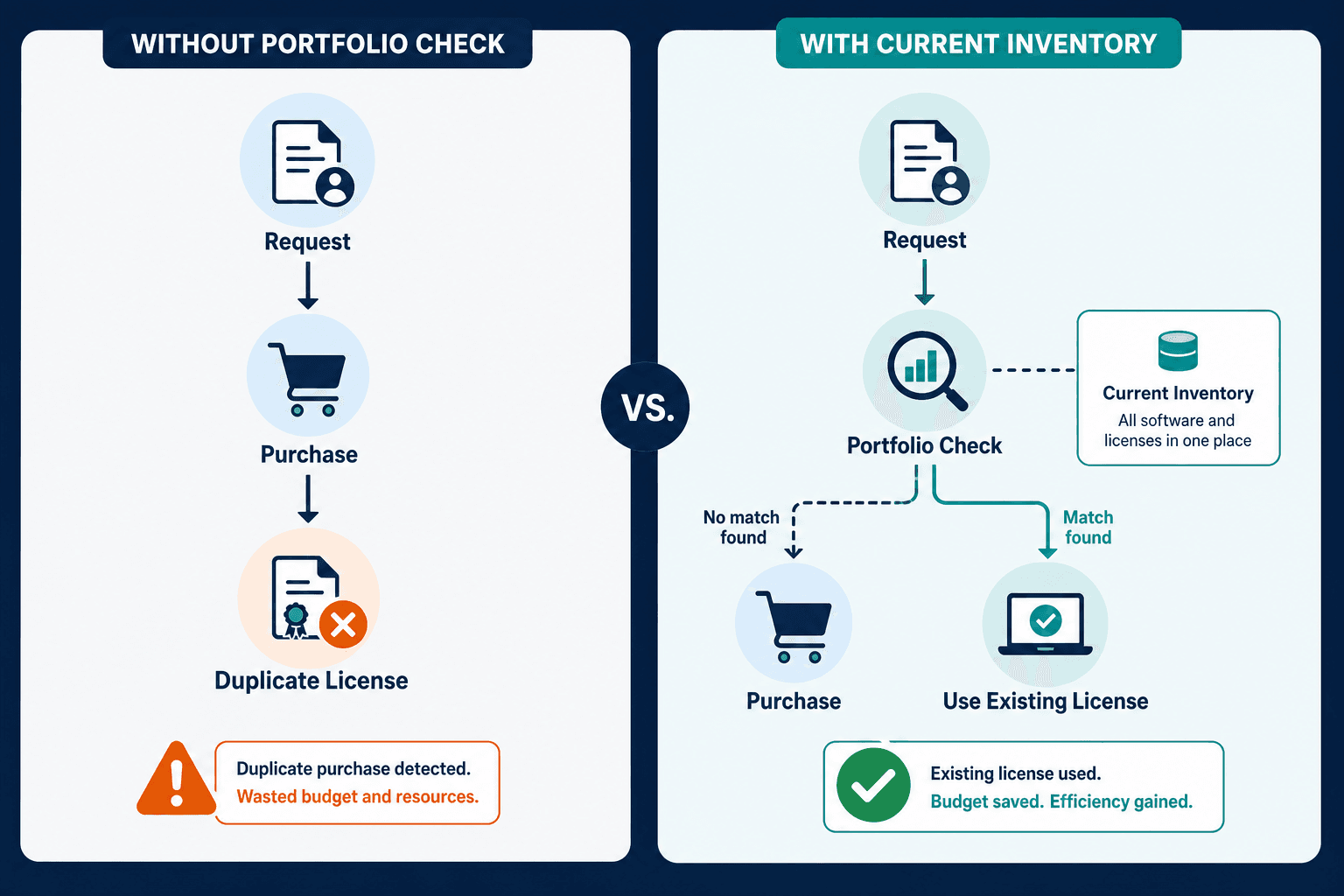
Why should you check existing inventory before purchasing a software license?
Checking existing inventory before purchasing prevents duplicate tool subscriptions, surfaces underutilized licenses that can be reassigned, and identifies existing volume agreements that a new purchase should be added to. Without a current software inventory, organizations routinely pay twice for the same capability, a cost that compounds at each renewal cycle.
Step 3: Evaluate license types and vendor terms
Not all software licenses are equivalent, and choosing the wrong license type creates compliance exposure that persists for the life of the contract. The evaluation step covers three decisions: license model, usage metric, and scope restrictions.
License model options include perpetual (own the software, pay for support), subscription (pay annually or monthly for access), and consumption-based (pay per use, API call, or compute unit). Perpetual licenses require tracking version entitlements. Subscription licenses require matching active users against seat counts. Consumption-based licenses require monitoring usage against billing thresholds.
Usage metric is the most consequential decision in the evaluation step, because the metric the organization agrees to is the metric a vendor audit will apply. Per-named-user licenses count individual users regardless of how often they log in. Per-concurrent-user licenses count simultaneous sessions. Per-processor or per-core licenses count physical or virtual CPUs, which can change dramatically after virtualization migrations. Agreeing to a metric the organization cannot consistently measure creates a structural audit risk.
Scope restrictions cover which geographic regions, entities, subsidiaries, and business functions are covered by the license. Enterprise agreements often contain scope definitions that narrow applicability in ways that only become apparent at audit.
Where this step breaks: The purchasing team focuses on price per seat and overlooks the usage metric. A per-named-user agreement is signed when the organization intended to buy concurrent user rights. The difference surfaces at audit when the vendor counts all provisioned accounts rather than active users.
Step 4: Run an approval and budget review
Enterprise software purchases typically require sign-off from multiple stakeholders before a purchase order is issued. The approval process should include IT, information security, finance, and legal. Each function covers a distinct risk: IT confirms technical compatibility and security posture, information security reviews data handling and compliance scope, finance confirms budget availability, and legal reviews contract terms, data processing agreements, and audit rights clauses.
The approval step is also where a software risk assessment should occur. Cloud-based tools that handle personal data require a data processing agreement under applicable privacy regulations. These reviews are easier to complete before adoption spreads than after the tool is running critical workflows.
Where this step breaks: Approval is treated as a budget authorization rather than a multi-function review. Security and legal are bypassed for low-cost tools. A $50/month SaaS subscription with access to customer data processes a personal data transfer with no data processing agreement in place.
Who should approve a software license purchase?
Software license purchases typically require approval from IT (technical compatibility and security posture), information security (data handling and compliance review), finance (budget confirmation and cost center allocation), and legal (contract terms, audit rights, and data processing agreements). Routing approvals through only one function, usually finance, misses the risk controls that the other functions provide.
Step 5: Negotiate contract and license terms
Software contracts are negotiable even at mid-market scale. The areas with the most leverage and the highest downstream impact are audit rights language, true-up frequency, price escalation caps, and perpetual use rights for subscription software.
Audit rights clauses grant vendors the right to inspect the organization’s installations, often with minimal notice. That risk is not theoretical: a 2025 survey of enterprise software buyers found 62% had been audited by a major vendor in the past year, up from 40% in 2023, and the share of organizations with audit-related financial liabilities over $1 million more than tripled to 32% over the same period, according to the Unisphere Research/LicenseFortress 2025 enterprise software licensing and audit trends survey.
The three levers with the most negotiating leverage on an audit rights clause are a 30-day (or longer) advance notice period, a cap on how often the vendor can invoke an audit in a given term, and the right to use an independent auditor rather than the vendor’s own team. Negotiating even one of the three measurably reduces the leverage a vendor holds during the process.
True-up clauses define how and when the organization must pay for usage that exceeds the licensed quantity. A true-up is the periodic reconciliation, typically annual, where actual usage is measured against the licensed quantity and any overage is billed. Agreements with a defined annual true-up window give IT and procurement a predictable reconciliation cycle, rather than exposure at any point the vendor chooses.
Price escalation caps limit how much a vendor can increase the per-seat price at renewal. Uncapped escalation terms allow vendors to raise prices significantly after the organization has built operational dependencies on the software.
Where this step breaks: Negotiation is skipped for smaller purchases. Standard vendor agreements are signed without review. Audit rights clauses go unmodified, giving vendors broad inspection rights on short notice.
Step 6: Create the procurement record and entitlement baseline
This is the most consequential administrative step in the entire software license procurement process. What gets recorded here becomes the entitlement baseline that the organization’s compliance position is measured against for the life of the contract.
The procurement record should capture at minimum: vendor name, product name and version scope, license model and usage metric, quantity purchased, authorized users or devices (if applicable), geographic scope, term start and end dates, renewal terms and notice requirements, and the responsible cost center or business unit.
Every field matters. A procurement record that captures the seat count but not the usage metric leaves the organization unable to confirm what it is actually licensed for. A record that omits the version scope creates ambiguity about whether major-version upgrades are covered. These gaps are invisible at purchase time and costly at audit time. For more on connecting this baseline to ongoing compliance tracking, see Virima’s guide to software license management in ITAM.
Virima’s ITAM platform connects procurement records to the license entitlement baseline that drives compliance reconciliation, turning the record created at purchase into procurement-sourced ground truth that feeds the ongoing compliance position rather than sitting in a separate system no one checks until an audit arrives. Virima integrates with ServiceNow, Jira Service Management, Ivanti, HaloITSM, Xurrent, and Hornbill, so this baseline lives alongside the ITSM tools procurement and IT already use.
Where this step breaks: The procurement record captures the invoice amount and vendor name but not the license metric or scope. Records are stored in a procurement system with no integration to the ITAM platform. Fields are left incomplete because the purchasing team assumes someone else will fill them in.
Step 7: Deploy, assign, and update the asset inventory
Procurement and deployment are often handled by different teams. That separation creates a gap between what was purchased and what gets recorded in the asset management system. Closing that gap requires a defined handoff: the deployment team confirms installation, assigns the license to the user or device, and updates the CMDB with the new configuration item.
Automated discovery confirms what is actually installed rather than relying on deployment teams to self-report. When discovery detects an installation that has no corresponding procurement record, that gap is a compliance signal, not just a data-entry lapse. Virima’s IT discovery runs agentless and agent-based scans across on-premises, AWS, and Azure environments, confirming deployments against procurement records and flagging software installed without a matching license entry — closing the loop between what Step 6 says was purchased and what discovery confirms is actually running.
Where this step breaks: Deployment is confirmed verbally but not recorded in the asset management system. The CMDB is updated when the team remembers, not as a defined step in the deployment workflow. Cloud and SaaS deployments generate no endpoint installation event and are never added to the software inventory.
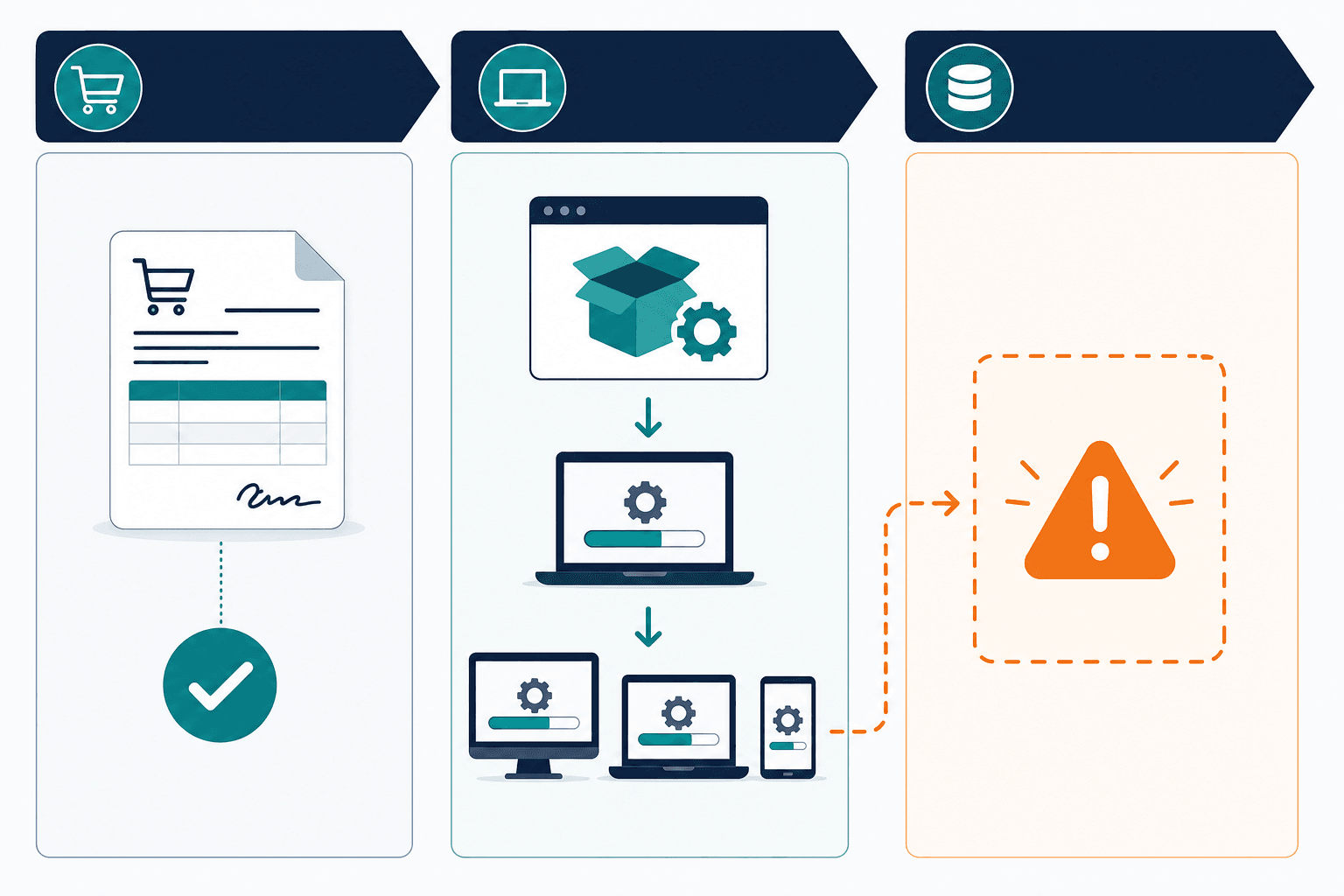
What should happen after a software license is purchased?
After a software license is purchased, the organization should deploy the software, assign the license to the authorized user or device, update the CMDB with the new configuration item, and confirm the installation via automated discovery. These steps ensure the procurement record, the asset management system, and the actual installed state stay synchronized from day one.
Step 8: Schedule compliance reviews and renewal checkpoints
The procurement process does not end at deployment. A license purchased, deployed, and left unmonitored until the renewal invoice arrives creates the conditions for overspend, under-licensing, and audit exposure.
Effective procurement practice means calendaring the renewal date at the time of purchase and scheduling a usage review 90 days before renewal — enough lead time to reclaim unused licenses before the contract locks in next year’s seat count. These renewal and negotiation habits build on the same discipline covered in Virima’s software license management best practices guide.
An annual compliance check confirms that installed software still matches the entitlement baseline. That check is far less disruptive when run proactively than when reconstructed under audit pressure. The Flexera 2025 State of ITAM Report found that 30% of desktop software spend was wasted even at organizations with advanced ITAM programs — most of that waste accumulates between the purchase date and the renewal date, as licenses used initially, then abandoned, but never removed from the renewal count.
Where this step breaks: Renewal dates are not tracked systematically. The renewal invoice arrives, is approved at the previous year’s seat count, and the cycle of overpayment continues. No usage review occurs before renewal because no one flagged the date 90 days in advance.
Where the process fails most often
The eight steps above are not difficult to follow individually. Failure emerges when the process fragments across teams that do not share data or coordinate handoffs — no portfolio check at Step 2 produces duplicate subscriptions that survive for years; misunderstood license metrics at Step 3 encode audit exposure into the contract at signing, exposure that only becomes visible when the vendor sends an audit letter; and incomplete procurement records at Step 6 mean the entitlement baseline used for compliance reconciliation does not match what the vendor believes was licensed.
Each failure point shares the same underlying cause: no shared, accurate, current view of what software the organization owns and what it has installed. For teams building procurement workflows that connect to compliance reporting, Virima’s IT audit and compliance use cases cover how procurement records, discovery-sourced installation data, and entitlement baselines connect into a continuous audit-readiness posture.
Building a procurement process that holds up at audit
A software license procurement process that produces reliable compliance outcomes requires two things beyond the eight steps above: the procurement record must be accurate and complete at Step 6, and the deployment must be confirmed by discovery at Step 7. When both conditions are met, the organization enters every renewal cycle and every potential audit from a position of known, defended entitlement — the audit response is a confirmation, not a reconstruction.
Frequently Asked Questions
What is the software license procurement process?
What are the most common mistakes in software license procurement?
How does the license metric chosen at procurement affect audit risk?
How does Virima support the software license procurement process?
How does Virima’s ITAM platform capture a complete procurement record?
Virima’s ITAM platform links each procurement record to the entitlement fields that matter for audit defense — license model, usage metric, quantity, scope, and term dates — and then ties that record to discovery-confirmed deployment data. A complete software procurement record should include vendor name, product name and version scope, license model and usage metric, quantity purchased, authorized users or devices, geographic scope, term start and end dates, renewal terms and notice requirements, and the responsible cost center or business unit. Records that omit the usage metric or scope restrictions are incomplete as compliance baselines, since the organization cannot confirm what it is licensed for if the metric and scope are not documented.
Software license procurement decisions made today determine whether next year’s audit is a confirmation or a scramble. Download the procurement record template with all nine required fields pre-built — grab it before your next audit-readiness check. Best Software License Management Tools in 2026 (Reviewed & Ranked)