
6 Network Topology Types (with Diagrams) and How to Map Yours

It’s Monday morning. You’ve just settled in with your coffee when the complaints start rolling in: “The Wi-Fi’s slow!” “My files won’t load!” “The system’s down again!” You sigh and open your dashboard, hoping it’s just a quick fix.
But deep down, you know the real issue isn’t the router or the cables. It’s the design of the network topology.
Every computer network has an invisible map that illustrates how devices connect and how data flows between them. This layout depends on the different types of networking topology you choose and how each topology connects devices for smooth data transmission.
Get that map wrong, and even the best equipment won’t save you.
Your network will crawl, break under pressure, or crash at the worst possible time. But when you get it right? Everything flows. Data moves seamlessly, systems stay stable, and scaling up becomes a breeze instead of a headache.
That’s what this guide is all about: helping you build a network that’s fast, reliable, and ready for anything by understanding the types of network topology that best suit your setup.
Whether you’re an IT manager, network designer, or just curious about how it all connects, you’ll find answers here.
We’ll break down the main types of network topology, show you where each one shines (and where it doesn’t), and help you figure out which one fits your needs best.
By the end, you’ll gain more than technical skills; you’ll be ready to design a network that’s reliable, scalable, and efficient by mastering the different types of network topology. Ready? Let’s dive in.
What is network topology?
Network topology is the arrangement of devices (nodes) and the connections (links) that tie them together in a computer network. It defines both the physical layout of cables and hardware and the logical path that data follows between endpoints. Common topology types include bus, star, ring, mesh, tree, and hybrid, each offering a different balance of performance, fault tolerance, scalability, and cost. Choosing the right topology directly affects network speed, uptime, and how easily you can grow or troubleshoot the environment.
In fact, Gartner predicts that by 2026, 30% of enterprises will automate more than half of their network activities, underscoring how critical it is to build a network design that supports automation and efficient operations.
What are the different types of network topologies?
There are several common types of network topology, each showing a different way to organize your network connections. Every type has its own strengths and weaknesses.
Network topology comparison: Bus vs Star vs Ring vs Mesh vs Tree vs Hybrid
Before diving into each topology in detail, here is a side-by-side comparison of the six core network topology types across structure, ideal use cases, scalability, fault tolerance, and cost.
| Topology | Structure | Best For | Scalability | Fault Tolerance | Cost |
|---|---|---|---|---|---|
| Bus | All devices share a single backbone cable | Small labs, legacy industrial controls, temporary setups | Low | Low; backbone failure takes down the entire network | Very low; minimal cabling and no central device needed |
| Star | Every device connects to a central switch or hub | Office LANs, home networks, school labs, retail stores | High | Moderate; hub failure affects all nodes, but node failures are isolated | Moderate; requires a switch plus individual cables per device |
| Ring | Devices form a closed loop; data passes sequentially | Metro fiber rings (SONET/SDH), factory floor control systems | Low | Low in single ring; high with dual-ring failover | Moderate; less cabling than star, but token-passing hardware adds cost |
| Mesh | Devices interconnect through multiple redundant paths | Internet backbone, military comms, wireless mesh Wi-Fi networks | Moderate | Very high; multiple alternate paths keep traffic flowing if links fail | High; full mesh needs n(n-1)/2 links, plus advanced routing |
| Tree | Hierarchical star-of-stars branching from a root switch | Enterprise campus networks, multi-floor offices, WAN distribution | High | Moderate; branch failures are isolated, but root failure is critical | Moderate to high; backbone switches and tiered cabling add cost |
| Hybrid | Combines two or more topology types in one design | Large enterprises, data centers, multi-site organizations | Very high | High; redundancy can be layered where it matters most | Variable; design flexibility lets you invest where ROI is highest |
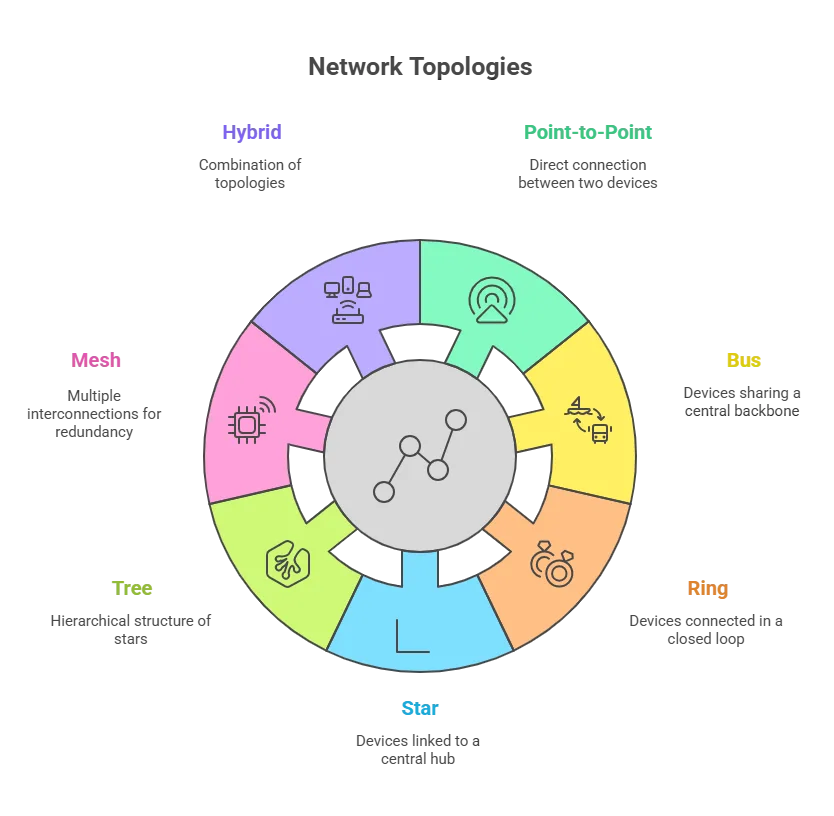
Let’s look at the different types of networking topology you’ll come across and understand how each one works.
| Point-to-Point: one dedicated link between two devices. Bus: all devices share one backbone. Ring: devices form a closed loop. Star: all devices connect to a central hub/switch. Tree: hierarchical stars (root → branches). Mesh: many interconnections for redundancy (full or partial). Hybrid: a mix tailored to needs. |
Already managing a complex network? If you’re running a star, tree, or hybrid topology across multiple sites, visibility gaps cost you time during every incident. Virima’s automated discovery and ViVID™ service mapping show you exactly how your devices connect, what depends on what, and where a single failure could cascade. See it mapped in minutes, not months.
Request a Personalized Demo today!
Topology #1: Point-to-point
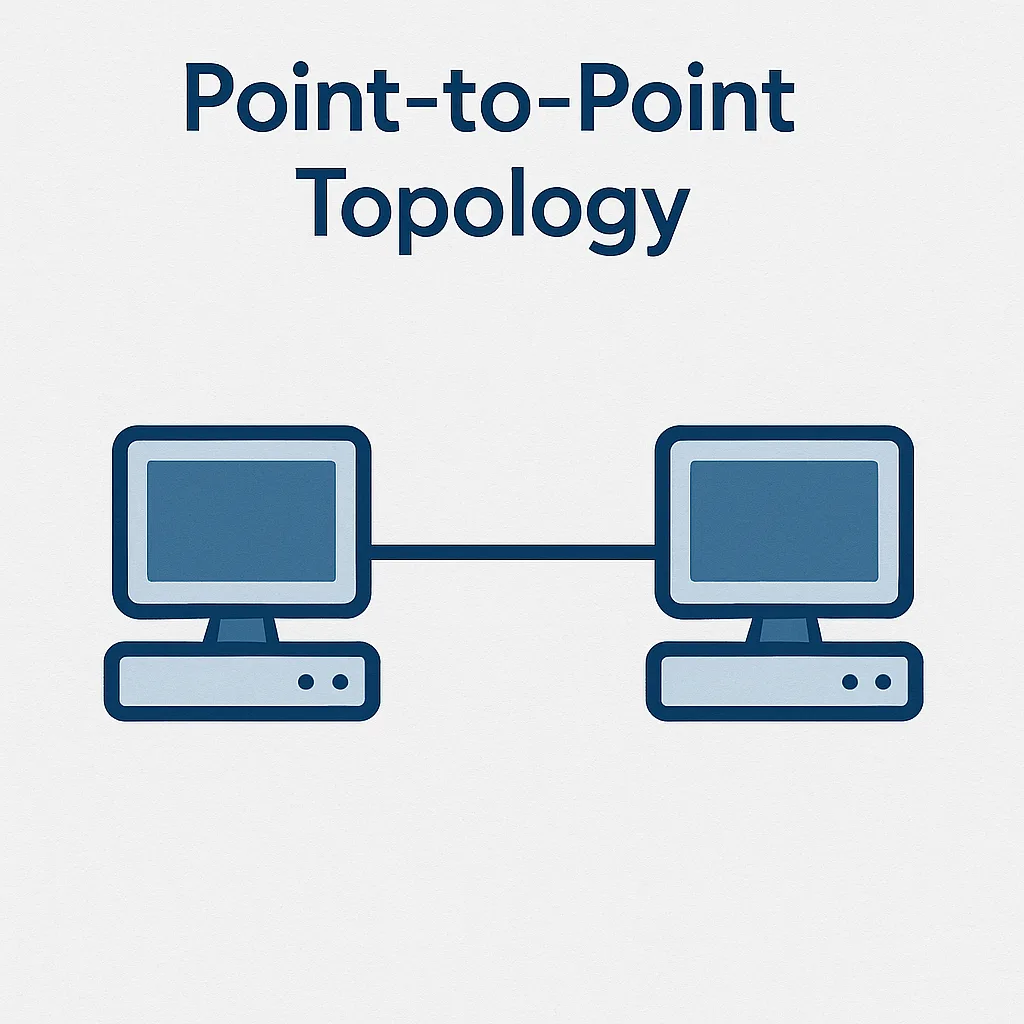
What it is: A point-to-point (P2P) topology is the simplest type of network layout. It connects two devices directly with one dedicated link. Think of it like a straight line between two points.
All the bandwidth on that line belongs only to those two devices. Because no other device shares it, the connection stays fast and reliable.
You can use this topology when you need a quick and private link between two systems; it is one of the simplest types of network topology.
For example, you might connect a remote computer straight to a server. You could also link two switches in separate buildings using a fiber line. In these situations, a point-to-point connection, one of the different types of network topology, keeps data moving quickly and smoothly.
There’s almost no traffic or delay on the line. This makes the connection both fast and dependable.
Advantages of Point-to-Point topology
- Fast, dedicated performance: Since only two devices share the link, all the bandwidth goes to that one connection. This setup often gives you faster data transfer and lower delay compared to shared networks. You get smooth and steady performance every time.
- High security: In this setup, data moves straight from one device to the other. There are no extra stops along the way. This makes it much harder for anyone to spy on or steal your data. As a result, the connection stays private and secure.
- Low cost (for two nodes): You don’t need special devices like hubs or switches for this setup. All you need are two network cards and a cable. Because it’s so simple, it’s a very affordable way to connect two systems directly.
Disadvantages of Point-to-Point topology
- Poor scalability: You can only connect two devices with one link. If you want to add a third device, you need another direct connection. As your network grows, this setup quickly becomes hard to manage because you’ll need many separate links.
- Single point of failure: If the cable or one device in a point-to-point link fails, the connection stops working. There’s no backup path for the data to travel. In bigger networks, you usually need a backup link, but a basic P2P setup doesn’t offer that.
- Limited range: A point-to-point link works best over short distances, like inside a room or a building. When the distance gets longer, the signal can weaken. You might need repeaters or boosters to keep it strong. In some cases, it’s better to use a different network layout for longer connections.
Common use cases for Point-to-Point
- Telecommunications backbones: Telecom companies commonly use point-to-point microwave or fiber links to directly connect locations like telephone exchanges. These links give a fast and dedicated path between the locations. This setup helps keep communication quick and reliable.
- Direct ISP connections: Internet Service Providers (ISPs) often use point-to-point links to connect directly to a customer. For example, a business might have a leased line that links only to its ISP. This setup gives the customer a steady, high-speed internet connection without sharing it with others.
- Satellite communications: In satellite systems, a ground station connects directly to a satellite using a point-to-point link. Only these two endpoints share that channel. This setup allows clear and direct communication between the station and the satellite.
See Your Network Topology — Live: Virima’s ViVID™ service mapping auto-discovers devices, connections, and dependencies across on-prem, cloud, and hybrid environments. No manual diagrams. No blind spots.
Topology #2: Bus
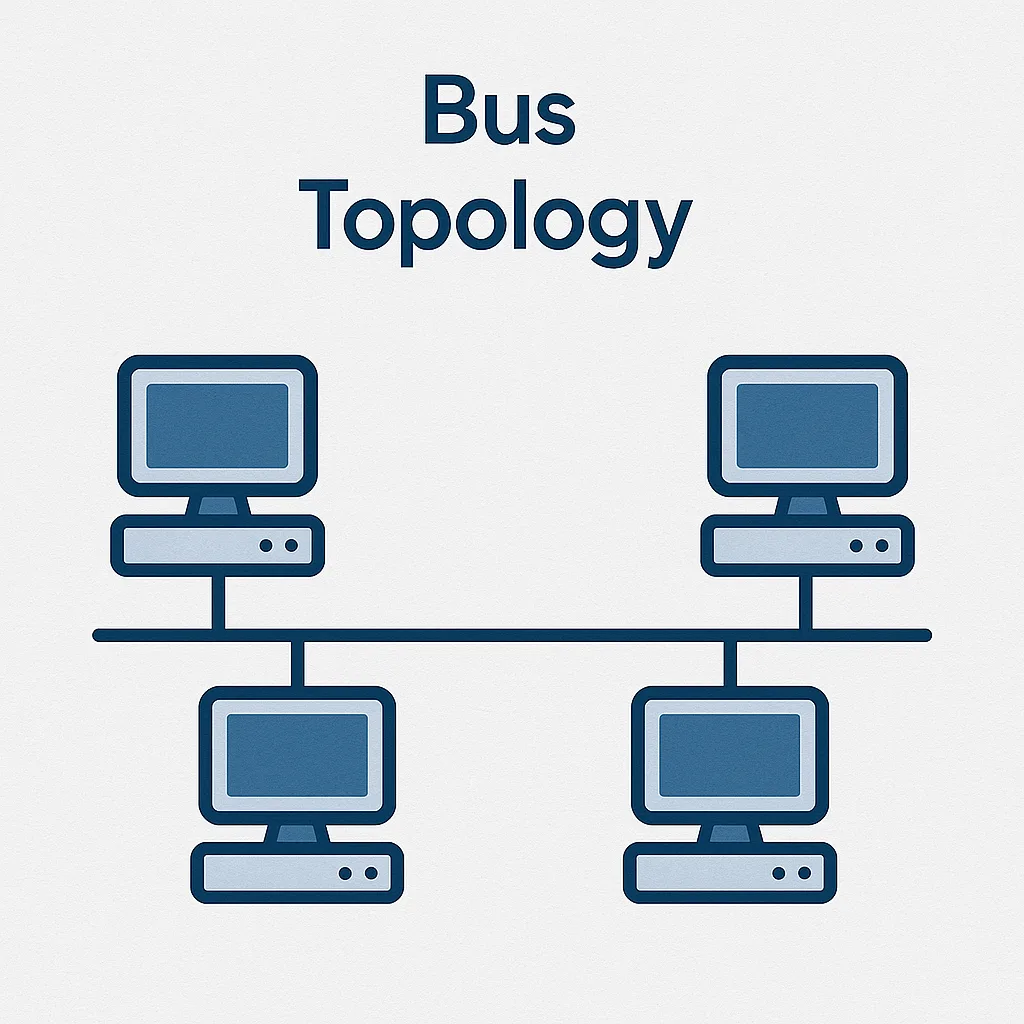
What it is: In a bus topology, all devices share one main communication line, called the bus or backbone. Think of it as one long cable running through the network, with each device connected to it. When one device sends data, the message travels along the cable, and every device can “hear” it, but only the right one accepts it.
Bus topology was popular in early local area networks (LANs), such as old Ethernet systems that used coaxial cables, an early example of the types of network topology still studied today.
It’s a simple design that works well for small setups. However, as the network grows, this layout, one of the simpler types of networking topology, starts to show serious limits and becomes harder to manage.
Advantages of bus topology
- Easy and cost-effective to install: A bus network is simple and affordable to set up. It doesn’t need special hardware or complex equipment. Each device connects to one main cable using an easy connector. Because all devices share the same line, you use less cable than in star networks.
- No central device needed: In a bus network, you don’t need a hub or switch like you do in a star layout. All devices connect to the same main cable. This simple setup keeps your starting costs low and makes installation quick and easy.
- Isolation of failures: If one computer in a bus network stops working, the rest can usually still communicate. The network continues operating as long as the main cable remains undamaged. In short, one device failing doesn’t bring down the whole system.
Disadvantages of bus topology
- Collision and interference issues: In a bus network, all devices share the same communication line. If two devices send data at the same time, their signals collide and cause interference. Early Ethernet networks used special rules to handle this, but performance still dropped. When many devices try to talk at once, the network can slow down a lot.
- Limited speed and length: Old-style bus networks, like 10BASE-2 or 10BASE-5 Ethernet, had short cable limits and slow speeds, usually around 10 Mbps. Over long distances, the signal weakens in a process known as attenuation. To keep the signal strong, you might need repeaters or boosters. For bigger areas, another network design may work better.
- Difficult troubleshooting: When something goes wrong, finding the problem in a bus network can be hard. You might need special tools to check the cable. Even a small break in the main line can stop all the connected devices from talking to each other.
Common use cases for bus topology
- Small home or office networks: A bus network can work well for very small setups, like a few computers in a lab or small office. It’s easy to install and doesn’t need much cabling. However, today most small networks use star topology instead, since it’s faster and more reliable.
- Industrial control systems: Some older factory networks use a bus layout to link sensors, controllers, and machines along a production line. This setup makes it easy for devices to share data one after another. It’s simple and doesn’t need complex equipment to work.
- Educational institutions (legacy): Years ago, many schools and colleges used bus networks to connect computers in classrooms and labs. This design was cheap and easy to set up, which made it popular at the time. Today, faster star or wireless networks have mostly replaced these setups, though older buildings may still use bus wiring.
Topology #3: Ring
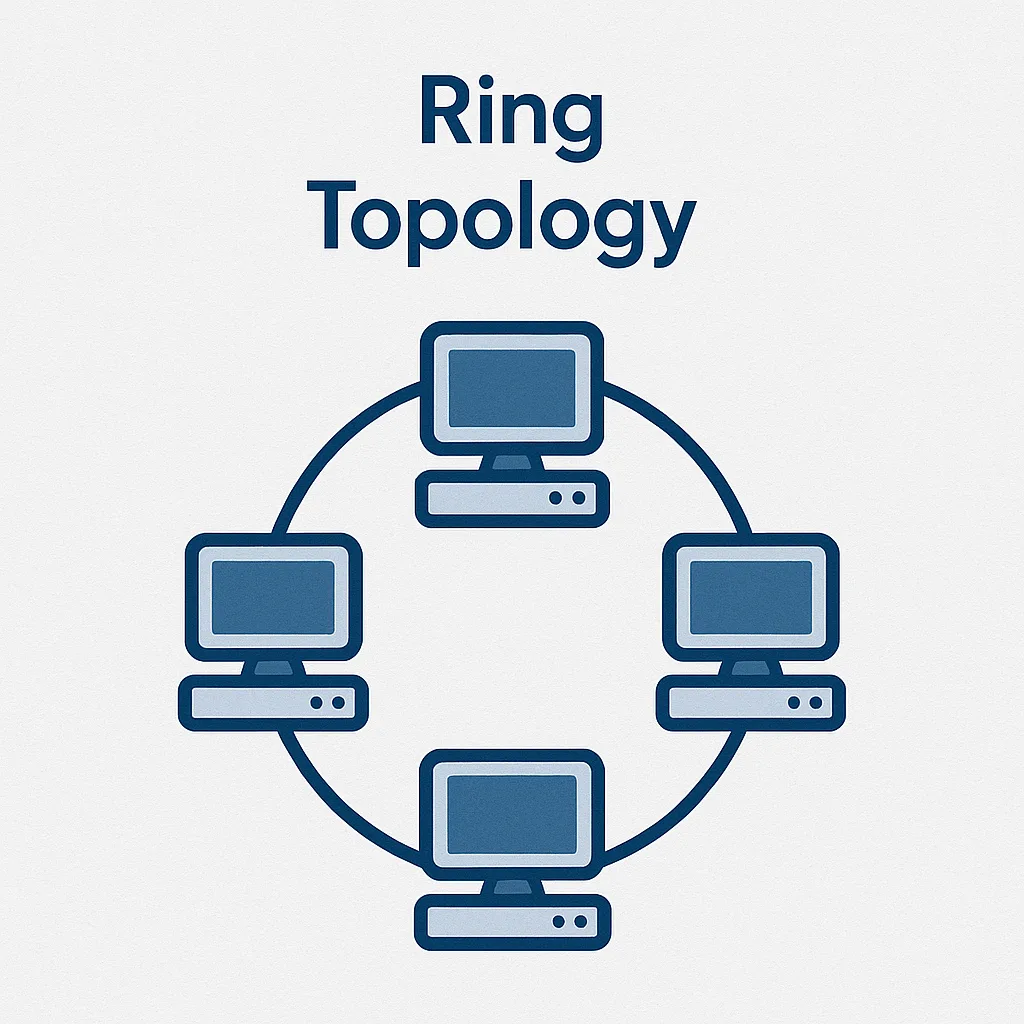
What it is: In a ring topology, every device connects to two others, one on each side. Together, they form a closed loop, like a circle. Data travels around the ring in one direction, usually clockwise.
Each device receives the data from its neighbor and passes it to the next one until it reaches the right destination. To keep things organized, many ring networks use a system called token passing, which lets only one device send data at a time. This helps prevent collisions and keeps the network running smoothly.
Imagine several devices arranged in a circle. Each one connects to the two devices next to it. There are no end points because the last device connects back to the first, forming a loop.
Data travels around the ring until it reaches its intended device. This simple setup, part of the different types of network topology, keeps communication flowing in one clear direction.
Advantages of ring topology
- Orderly data flow: In a ring network, only one device can send data at a time. A token usually controls this process. Because of this system, data signals don’t collide or get mixed up. Even when many devices are active, the network stays stable and runs smoothly.
- Every device gets equal access: In a ring network, each device gets a fair chance to send data. The token that allows transmission moves from one device to the next in order. This means no single device can take over the network, and everyone shares access equally.
- Easy fault isolation: Some ring networks make it simple to find and fix problems. If one device fails, you can often remove or bypass it without shutting down the whole network. It’s also easier to spot where the issue is; the data flow stops right before the faulty point, showing you where to check.
Disadvantages of ring topology
- One break can stop the network: If one device or cable in the ring fails, the whole loop can break. Without a backup path, data can’t travel around the circle. In a basic ring network, even one broken cable can stop all communication between devices.
- Latency grows with network size: As you add more devices to a ring network, data takes longer to travel around. Each message must pass through several devices before reaching its target. This can cause small delays that add up as the network grows. The more devices you have, the slower the overall response can become.
- Adding or removing nodes is tricky: Adding a new device to a ring network isn’t simple. You have to break the loop, connect the new device, and then close the ring again. This process can take time and may require the network to go offline.
Removing a device also needs careful work to reconnect its neighbors. Without special tools, a ring network isn’t easy to change.
Common use cases for ring topology
- Fiber optic rings (Metro networks): Some city or campus networks use ring topologies built with fiber optic cables. Many of these setups use two rings for backup. If one link fails, the network can quickly switch direction and keep sending data. This design helps prevent downtime and keeps communication reliable.
- Token Ring networks (legacy LANs): In the past, many businesses used Token Ring networks created by IBM. These networks used a ring layout, passing a token around to control who could send data. Although Ethernet has largely replaced Token Ring, it may still appear in older systems or network history references.
- Industrial networks (fault-tolerant rings): Some factories and industrial systems use ring networks to connect machines and controllers. These setups are great for real-time communication where timing matters. Many of them include a backup path; if one link breaks, the data automatically travels the other way. This “self-healing ring” design keeps the system running without interruption.
Topology #4: Star
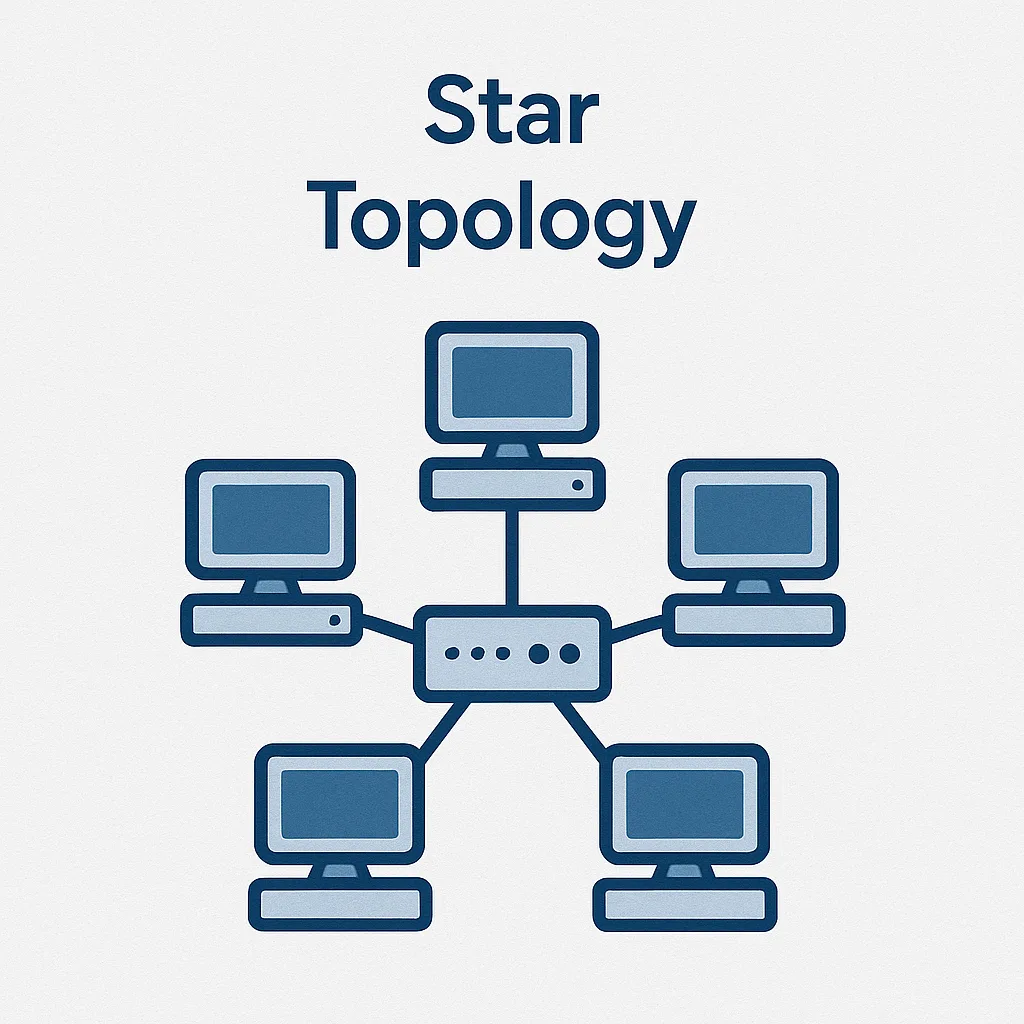
What it is: A star topology is one of the most common network designs today. In this setup, every device connects to one central device, such as a switch, hub, or router. The central device manages all the data traffic.
If one computer wants to send information to another, it first sends it to the central hub. The hub then forwards it to the right device. When you look at it, the layout forms a star shape; the hub is in the middle, and all the connected devices are the points.
Most modern Ethernet networks in homes, offices, and schools use a star layout, one of the most reliable types of network topology for local area network (LAN) environments where stable data transmission is essential. For example, your home router is the center of a small star network.
All your laptops, phones, printers, and smart devices connect to it, either with cables or wirelessly through Wi-Fi. Even when it’s wireless, it still works like a star network, with the router at the center.
Advantages of star topology
- Easy to manage and troubleshoot: In a star network, each device connects to the central switch or router with its own cable. If one device or cable fails, the rest of the network keeps working. This makes it easy to find and fix problems; you can quickly spot a bad cable or port. It also improves management by enabling the separate handling of each connection.
- No collisions (with a switch): In a star network that uses a switch, each device has its own communication path. Devices don’t share a single cable like in a bus network, so their data never collides. This design lets the network run faster and more smoothly. Star networks can easily reach high speeds of 100 Mbps, 1 Gbps, or even higher without interference problems.
- Scalable and flexible: It’s easy to grow a star network. You can add a new device just by plugging it into an open port on the switch or hub. This doesn’t disturb the rest of the network.
You can also upgrade the switch to one with more ports or faster speeds. In short, expanding or changing a star network is quick and simple.
Disadvantages of star topology
- Single point of failure at the center: A star network depends completely on its central hub or switch. If that main device fails or loses power, the whole network stops working, showing why some different types of networking topology add redundancy at the core.
- Uses more cable: A star network needs more cabling because every device connects directly to the central hub or switch. All those cables meet at one point, which can make the setup more complex. In large spaces, like big office buildings, organizing and routing all the cables takes extra planning and effort.
- Central device cost: Basic switches are cheap, but large star networks may need stronger central switches. These high-end switches have more ports, faster speeds, and extra features, but they can cost a lot. Still, the price is usually worth it because they offer great performance. The good news is that even advanced switches are becoming more affordable over time.
Common use cases for star topology
- Home and small business networks: At home, your router or Wi-Fi access point works as the center of a star network. All your devices, like computers, phones, and printers, connect to it with cables or wirelessly. The same idea applies in a small office, where one switch connects all the computers and keeps the network organized.
- Corporate LANs: In most offices, each desk or workstation connects to a central switch with its own Ethernet cable. All these cables meet in a network closet, where one or more switches link them together. This setup forms a star network or sometimes an extended star with several switches. It makes it easy to manage connections for every employee and device.
- Educational institutions: Schools and campus buildings often use a star layout inside each building. For example, all classrooms connect to one central switch. Then, these switches link together to form a larger, tree-shaped network across the campus. The star design in each building makes it easy to manage and fix local network issues.
Topology #5: Tree
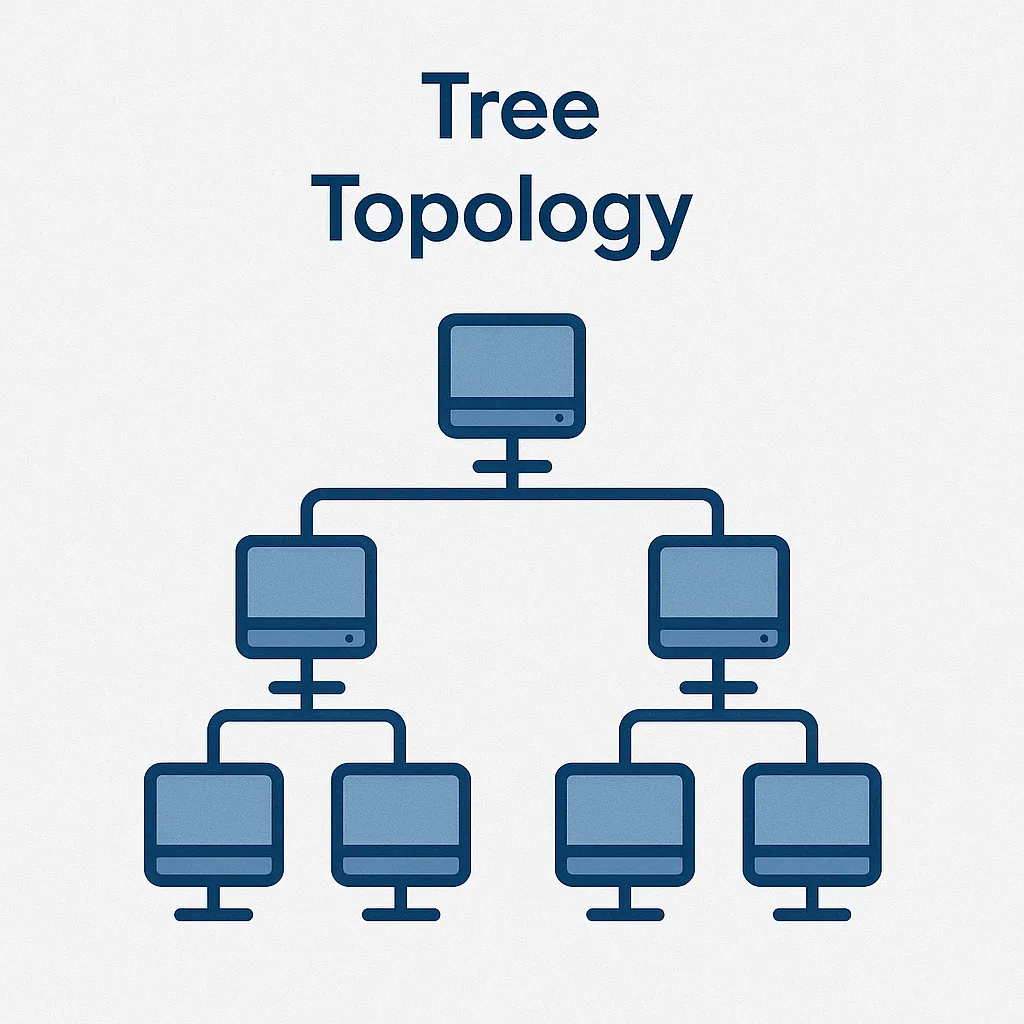
What it is: A tree topology, also called a hierarchical topology, mixes features of both star and bus layouts, making it one of the more scalable types of network topology.
It looks like an upside-down tree, with a main root and branches, a structure often seen in larger computer networks where multiple LANs interconnect.
At the top is the root node, usually a main switch or router. It connects to several devices or switches in the layer below. Those, in turn, connect to more devices beneath them. The result is a layered network that looks like a tree’s trunk and branches, linking smaller star networks together.
In a tree topology, there’s only one path between any two devices. When one computer sends data to another, the signal travels up the tree to a shared connection point, then down to the target device.
This setup is common in large networks because it’s easy to grow and organize. Each branch or section can handle its own part of the network without affecting the others, one of the key benefits found in different types of networking topology.
Advantages of tree topology
- Highly scalable: A tree network is easy to grow. You can add new branches whenever you need more devices. For example, you can connect another switch to the main one and then link more computers to it. This flexible setup lets you expand the network without changing the whole design.
- Hierarchical management: A tree network naturally divides the system into smaller parts, called branches. This makes it easier to manage and fix problems. Each branch operates independently, making it easier to trace issues to a specific department or floor.
- Isolates segment issues: If one branch of the tree has a problem, like a switch failure, only that part is affected. The rest of the network keeps working normally. This setup helps limit the impact of local issues. It also keeps unnecessary traffic within its own branch, which makes the whole network more stable.
Disadvantages of tree topology
- Dependency on the backbone: A tree network depends heavily on its main backbone or root device. If the main switch or router fails, the entire network can go down. Likewise, if a major cable or trunk link breaks, all the branches connected to it lose access. The upper levels of the tree are critical; any problem there can affect everything below.
- Complexity in cabling: As a tree network grows, the cabling can become complicated. You’ll need many cables and devices, like switches and routers, at different levels. Setting all this up takes careful planning and can get expensive because of the extra hardware and wiring. Managing the cables, whether in walls, ceilings, or data centers, also adds more work compared to simpler networks.
- Performance bottlenecks at higher levels: In a tree network, the main devices at the top, like the core switch or router, handle all the traffic from lower branches. If these devices become overloaded, the entire network may slow down.
To avoid this, you need strong, high-capacity switches and enough bandwidth on the main links. Investing in quality equipment at the core keeps everything running smoothly.
Common use cases for tree topology
- Corporate enterprise networks: Large companies often build their networks in a tree structure. At the top is a main router or core switch, the root. It connects to switches in different departments or buildings, which act as branches.
- School campus networks: A school or college campus often uses a tree layout for its network. At the top is a main router or data center that connects to switches in each building or floor. Those switches then link to classroom or lab networks inside the buildings. This creates a clear, layered structure that matches the layout of the campus.
- Wide area networks (WANs): Some wide area networks, or WANs, also use a tree layout. For example, a company might have a head office at the top, connected to regional offices below it. Each regional office then links to smaller local branches. Data from a small branch flows to its regional hub and then to the head office, much like branches feeding a tree.
Topology #6: Mesh
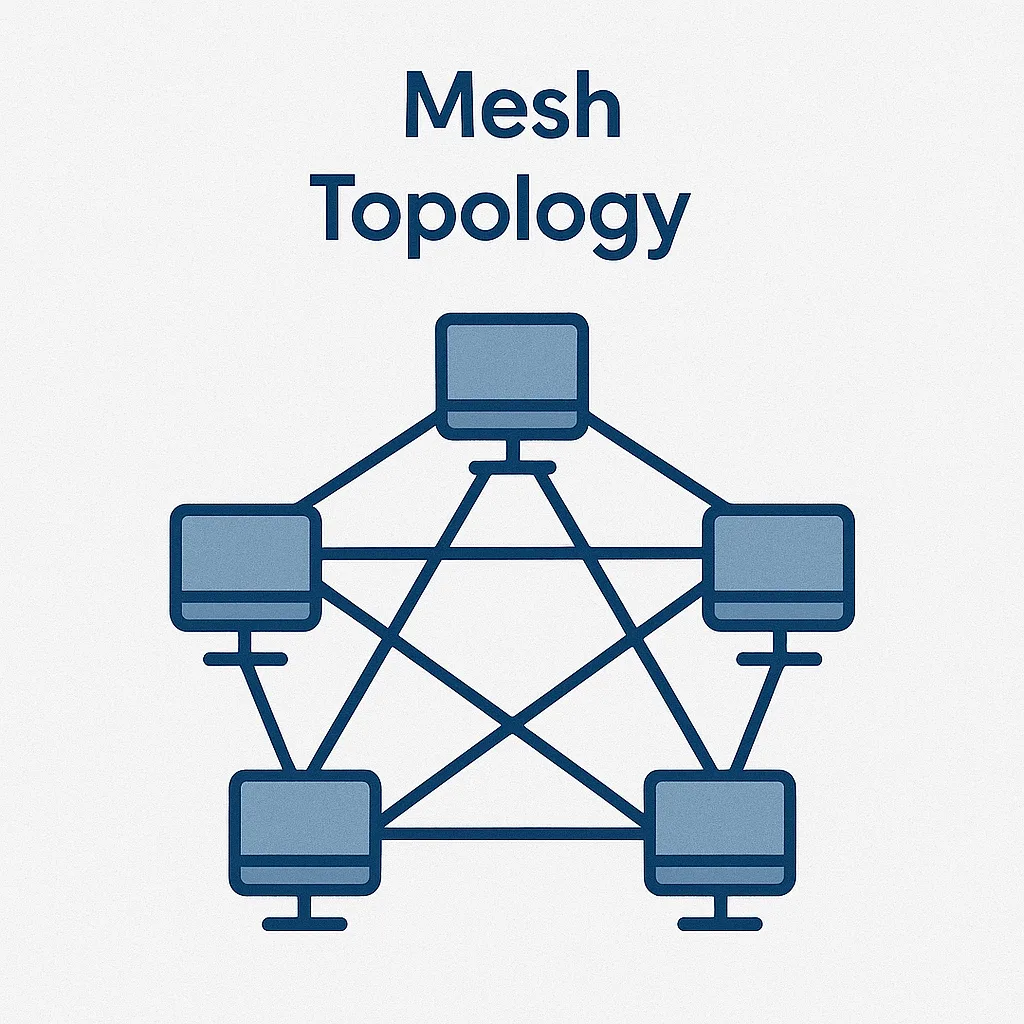
What it is: In a mesh topology, every device connects to several others, creating many possible paths for data. This design gives the network high reliability because information can travel in different directions to reach its destination.
Companies using mesh networks experience 50% less downtime compared to those using traditional topologies, highlighting just how dependable this structure is.
In a full mesh, each device has a direct connection to every other device. In a partial mesh, not all devices connect directly, but each one still links to at least two others.
The key feature of a mesh network is its many interconnections, which provide multiple routes between any two points, a hallmark of different types of networking topology designed for resilience.
Mesh networks are built for reliability and backup, an advanced example of physical network topology used in mission-critical systems that require uninterrupted data transmission.
They’re common in places where the network must always stay online, even if some parts fail. You’ll often find them in military systems or large wireless networks that can’t afford downtime.
Advantages of mesh topology
- Extremely reliable: A mesh network is one of the most reliable designs. If one link fails, the data simply takes another path to reach its destination. In a full mesh, every device connects through multiple paths, allowing the network to “heal” itself by rerouting traffic. Even if one node or cable goes down, the rest of the network keeps working without interruption.
- No single point of failure: In a mesh network, there’s no central device or main cable that everything depends on. This means one failure won’t shut down the whole system. Even if several parts break at the same time, the network can still keep running. That’s why people commonly use mesh networks in critical communication systems that must remain online at all times.
- High performance and load balancing: A mesh network can handle heavy traffic because it has many connection paths. Data can travel through different routes, which helps spread the load evenly.
It’s also one of the fastest to expand; organizations adopting mesh networks can scale their infrastructure 30% faster than those relying on conventional topologies.
Often, there’s a short or direct path between devices, so information moves quickly with little delay. This setup prevents any single link from getting overloaded and keeps performance steady.
Disadvantages of mesh topology
- High complexity and cost (for wired mesh): A fully wired mesh can be costly and hard to manage. As you add more devices, the number of cables increases very quickly. In fact, a full mesh requires n(n − 1)/2 links for n nodes, meaning just five nodes already need 10 separate links.
- Difficult administration: Managing a large mesh network can be tricky. With so many paths between devices, it takes smart software to decide the best route for data. Setting up and monitoring all those connections can be confusing without advanced tools. As the network grows, keeping track of everything becomes even harder.
- Redundant connections: In a mesh network, many links stay unused most of the time. They only become active when another link fails or when the traffic pattern changes. This can reduce efficiency since you pay for and maintain connections that aren’t always necessary.
In short, you trade efficiency for reliability.
Common use cases for mesh topology
- Internet backbone and WANs: Many parts of the Internet and large wide area networks (WANs) use a mesh design. Core routers that connect major Internet providers form a mesh so data can take different routes if one path is busy or fails.
- Wireless mesh networks: Some city-wide or community Wi-Fi systems use a mesh design, where each access point connects to several others. If one access point loses its internet connection, it can send data through a nearby one instead.
- Military and emergency services: Military and emergency networks often use a mesh design for strong and secure communication. Each unit or vehicle has a radio that connects to others nearby.
If some radios fail or move out of range, the rest of the network continues operating. The system can quickly reroute messages so communication never fully breaks down.
Topology #7: Hybrid
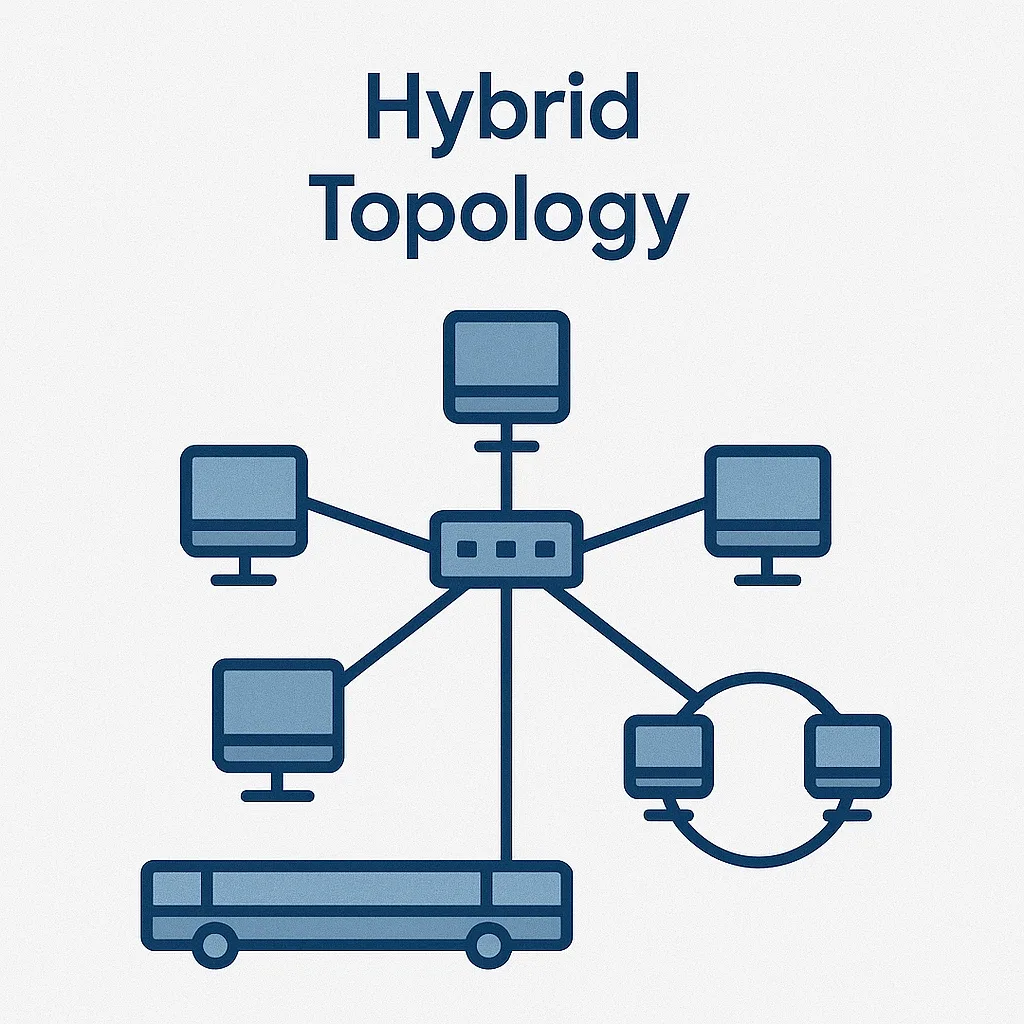
What it is: A hybrid topology mixes two or more types of network layouts in one system. Most large networks today are hybrids; in fact, 87% of Fortune 500 companies already use hybrid network topology as their foundation, proving it’s the modern standard for flexibility and scale.
For example, one office might use a star layout for its local connections, while a ring or bus link connects it to another office.
The main idea is to combine the strengths of different topologies and reduce their weaknesses. This mix-and-match approach, combining different types of networking topology, makes networks more flexible and efficient.
A hybrid topology gives you the best parts of different network designs. You can use each type of layout where it works best and then connect them.
This way, your network fits your needs perfectly while staying flexible and efficient.
Advantages of hybrid topology
- Flexible and customizable: A hybrid network is easy to shape around your needs. Use a star layout in each department for easy management. Then, connect the departments in a ring or mesh for reliability and backup.
- Scalable design: A hybrid network is easy to grow. You can expand each part of the network in its own way. For example, if you need more reliability, add extra links or a small mesh.
- Fault isolation: In a hybrid network, a problem in one section usually doesn’t affect the others. For example, if a bus segment fails, only the devices on that part go down. The rest of the network, like a ring or star section, keeps working normally. This setup makes the whole network stronger and more reliable.
Disadvantages of hybrid topology
- Design complexity: Building a hybrid network takes careful planning and skill. Since you’re combining different layouts, you must make sure they connect and work well together. Sometimes, different parts may use different hardware or network rules, which can make setup more complicated. Good design helps keep everything running smoothly.
- Higher cost: A hybrid network can cost more to build because it often needs extra equipment. For example, you might need more routers or gateways to link a mesh backbone with several star networks. Adding backup paths or extra switches improves reliability but also increases hardware and cabling costs.
- Complicated maintenance: Maintaining a hybrid network can be tricky because it includes different types of layouts. The IT team needs to understand how each part works, like fixing a bus section versus a mesh link. You also need good monitoring tools to keep an eye on everything. Clear documentation and network maps are very important; without them, the mix of designs can easily confuse technicians.
Common use cases for hybrid topology
- Enterprise networks: Most large companies use a hybrid network. For example, the main office might have a fast mesh or ring to link core switches for better reliability. Each floor in the building could use a star layout to connect computers easily.
- Data centers: Most data centers use hybrid network designs. Modern ones often use a spine-and-leaf layout, which works like a mix of star and mesh topologies. This setup gives the speed and flexibility of a mesh while keeping the easy management of a layered design. Older data centers might combine stars, rings, or other layouts to connect different levels of servers.
- Campus networks: Many university campuses use hybrid network designs. For example, dorm buildings might use a star layout, while classrooms and labs use a tree structure inside each building. All these buildings then connect through a ring or mesh across the campus. This approach lets each area use the layout that fits best while keeping the whole network strong and reliable.
How do you choose the right topology for your network?
With so many options, you might wonder, “Which network layout is right for me?” The answer depends on your needs and setup. Different topologies work better for different goals.
Here are a few simple tips and things to think about before making your choice:
| Size: Small → star (modern default). P2P for exactly two devices. Larger → tree or hybrid. Scalability: Plan for growth; tree/hybrid scale better than bus or pure P2P. Reliability: Need nonstop service? Add redundancy: mesh, dual rings, or hybrid with failover. Budget/resources: Balance resilience vs. cost. Hybrids let you invest where it matters most. Traffic patterns: Centralized traffic → star/tree. Any-to-any heavy traffic → mesh/partial mesh. Physical layout/distance: Linear runs can favor bus (legacy) or staged switches; distributed sites fit tree/ring/mesh backbones. Operations: Prefer simpler topologies if staff/tools are limited; use modern management to handle complexity. |
Most networks evolve into hybrids that start simple, add redundancy, and segment as needs grow.
When evaluating topology options against those factors, work through these six criteria before finalizing your design:
- Cable type. Match the cable to your bandwidth requirements, distance, and environment. Twisted pair (Cat 5e, Cat 6) suits short to medium runs in most Ethernet deployments. Fiber optic handles long distances and high-bandwidth workloads and is immune to electromagnetic interference. Coaxial remains in use for specific broadcast and legacy networking applications.
- Cable length. Verify that every run stays within the specified maximum for the cable type. Signal attenuation, data transmission rate, and the topology you choose all affect maximum practical length. Exceeding limits silently degrades performance before it causes outright failures.
- Scalability. Evaluate how much the topology can grow before requiring a redesign. Mesh and hybrid topologies accommodate growth more gracefully than bus or ring. If your environment is likely to double in device count within three years, factor that into the initial design decision.
- Reliability. Assess how the topology handles link and node failures. Topologies with built-in redundancy, such as a ring with dual-path failover or partial mesh, maintain uptime when individual components fail. Single-path designs like bus require compensating controls to meet availability targets.
- Cost. Balance initial setup cost against ongoing maintenance. Star and bus topologies carry lower upfront hardware costs. Mesh and hybrid designs cost more to build but reduce operational expense by limiting failure blast radius and simplifying troubleshooting over time.
- Security. Consider the network segmentation characteristics of each topology. Ring and mesh designs reduce single points of failure that attackers can exploit. Topologies that allow logical segmentation, using VLANs or separate subnets per zone, give you more control over lateral movement if a device is compromised.
And looking ahead, Gartner sees that by 2025, 50% of SD-WAN purchases will be bundled into a unified SASE offering, signaling that hybrid architectures (blending on-premises, cloud, WAN, security) are no longer optional; they’re the standard.
Related Resources
Network Topology Discovery: How IT Teams Map Every Device and Connection
UVexplorer Review: Features, Limitations and Best Alternatives
IT Asset Management Tools vs. CMDB: Do You Need Both?
What Is ViVID™ Service Mapping?
Managing and mapping your network topology effectively
How to implement your chosen network topology
Selecting a topology is only half the work. Getting it deployed correctly and keeping it running requires a structured approach. Here is a practical sequence for implementation.
- Assess requirements and constraints. Start by mapping your organization’s connectivity, performance, security, and scalability requirements. Factor in physical constraints: building layouts, distances between locations, and existing infrastructure that will stay in place.
- Choose the right topology. Select the layout that fits those requirements. Evaluate each option for cost, scalability, ease of maintenance, and performance. Use the criteria in the previous section to make a defensible decision.
- Design the logical network. Create a logical diagram showing how devices will connect and communicate. Define IP addressing schemes, subnetting, VLANs, and routing protocols where applicable.
- Plan the physical layout. Map the physical placement of routers, switches, and access points. Account for cable lengths, cable types, and power requirements before procurement.
- Select networking equipment. Choose hardware that matches your topology and requirements. Confirm compatibility between devices and account for future expansion when sizing switches and routers.
- Deploy network devices. Install and configure routers, switches, firewalls, and other devices according to the design. Set IP addresses, VLANs, routing protocols, and security settings as part of initial configuration, not as an afterthought.
- Test the network. Run thorough testing across connectivity, performance, and security before handing off to production. Test specifically for congestion, latency, and data loss under realistic load.
- Document the network. Maintain detailed records of the implemented topology, including configurations, IP allocations, VLAN assignments, and any non-standard settings. Without this documentation, troubleshooting becomes guesswork.
- Train staff and manage the transition. Train IT staff and end users on the new layout and any procedural changes. Plan the cutover from the old network carefully to minimize downtime.
- Monitor and maintain. Deploy monitoring tools to track network performance and security continuously. Establish maintenance schedules for patches, firmware updates, and hardware replacements.
- Review and optimize. Periodically review the topology for efficiency, scalability, and alignment with organizational direction. Adjust configurations based on performance data and operational feedback.
Manual diagrams don’t scale. Use automated IT discovery and live mapping applications to keep an accurate view of devices and connections as the estate changes. For a deeper look at how IT teams automate this process, see our guide to network topology discovery, which walks through the techniques and tools used to map every device and connection.
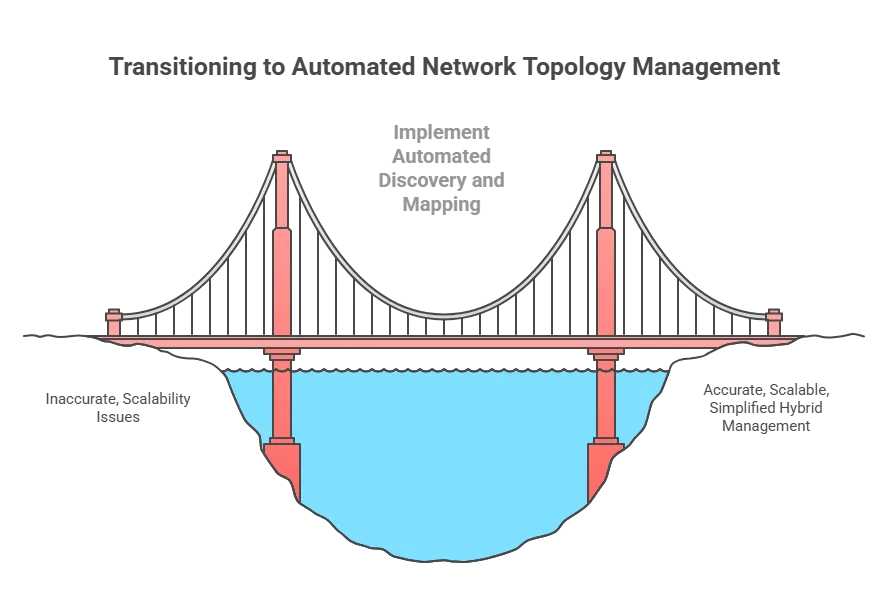
What to look for (e.g., with Virima):
- Automated discovery: Finds on-prem, virtual, and cloud assets and their links; keeps maps current. In environments running hardware from Cisco, Juniper, Aruba, Fortinet, and others, multi-vendor network device discovery ensures every device is identified regardless of manufacturer.
- Real-time topology maps: Visualize stars, rings, meshes, and dependencies; zoom by service or location.
- CMDB software integration: Central record of assets/relationships for troubleshooting, impact analysis, and change planning; sync with tools like ServiceNow/Jira.
- Status overlay: See health and alerts on the map (e.g., broken ring segment, saturated links) to speed resolution.
Result: Accurate, living maps reduce errors, accelerate root-cause analysis, and simplify change management, especially in hybrids. Teams that pair topology mapping with IT Asset Management get a fuller picture — knowing not just how devices are connected, but who owns them, what lifecycle stage they’re in, and what the financial exposure is if they fail.
When topology diagrams lag behind the live estate, automated discovery and network mapping keep the map current so change and incident work start from what is actually connected.
See IT DiscoveryOptimizing your network topology
Common network topology challenges and how to address them
Even well-designed networks run into predictable problems during implementation and operation. Here is how each challenge typically surfaces and what capabilities to look for when addressing it.
- Hybrid topology complexity. Hybrid networks integrate diverse structures, which makes unified visibility difficult. Discovery tools that build a CMDB from live scan data, rather than manual input, give teams a single view across the full hybrid environment. Virima’s agentless discovery and CMDB populate that view without requiring agents on every device.
- Cost and infrastructure overhead. Some topologies require significant investment in cabling and hardware. IT discovery and CMDB data can identify redundant or underutilized infrastructure, surfacing opportunities to reduce spend before committing to a topology expansion.
- Scalability bottlenecks. As networks grow, traffic bottlenecks appear at points that were adequate at a smaller scale. Asset discovery paired with service mapping surfaces capacity constraints and highlights which segments need upgrades before users start reporting degraded performance.
- Security and access control. Controlling data transmission and network access becomes harder as topology complexity increases. CMDB and service mapping data support network segmentation decisions, access control reviews, and security policy enforcement across zones.
- Management and maintenance burden. Complex networks require significant time from skilled staff. Discovery, CMDB, and service mapping reduce that burden by automating asset inventory, surfacing relationship data, and generating reports that support root-cause analysis and change planning.
Choosing the right types of network topology and management tools helps you create a network that meets today’s needs. It also allows for growth in the future.
Common network topology challenges and how to address them
Even well-designed networks run into predictable problems during implementation and operation. Here is how each challenge typically surfaces and what capabilities to look for when addressing it.
- Hybrid topology complexity. Hybrid networks integrate diverse structures, which makes unified visibility difficult. Discovery tools that build a CMDB from live scan data, rather than manual input, give teams a single view across the full hybrid environment. Virima’s agentless discovery and CMDB populate that view without requiring agents on every device.
- Cost and infrastructure overhead. Some topologies require significant investment in cabling and hardware. IT discovery and CMDB data can identify redundant or underutilized infrastructure, surfacing opportunities to reduce spend before committing to a topology expansion.
- Scalability bottlenecks. As networks grow, traffic bottlenecks appear at points that were adequate at a smaller scale. Asset discovery paired with service mapping surfaces capacity constraints and highlights which segments need upgrades before users start reporting degraded performance.
- Security and access control. Controlling data transmission and network access becomes harder as topology complexity increases. CMDB and service mapping data support network segmentation decisions, access control reviews, and security policy enforcement across zones.
- Management and maintenance burden. Complex networks require significant time from skilled staff. Discovery, CMDB, and service mapping reduce that burden by automating asset inventory, surfacing relationship data, and generating reports that support root-cause analysis and change planning.
Choosing the right types of network topology and management tools helps you create a network that meets today’s needs. It also allows for growth in the future.
Here’s a quick and friendly summary to keep in mind:
- Assess your requirements – Consider your network’s size, criticality, and budget to choose a topology (or mix of topologies) that fits.
- Plan for growth and failure – Design with scalability and redundancy in mind so that your network can expand and handle surprises. Unplanned IT downtime carries significant operational and financial consequences; see Virima’s guide to eliminating IT downtime for context on what is at stake.
- Use modern tools – Leverage network mapping and IT management platforms (like Virima) to keep your topology documented and visible. This saves time and reduces errors. If you are evaluating options, our comparison of network topology mapping tools breaks down the features and limitations of popular solutions like UVexplorer alongside stronger alternatives.
- Stay informed – Network technology evolves. For instance, software-defined networking (SDN) can overlay flexible logical topologies on physical ones. Keep learning and be ready to adapt your network design as best practices change.
If you want an easier way to manage your network topology, check out what Virima’s platform can do for you. Virima offers free, personalized demos where you can see its automated discovery and mapping in action. You’ll also learn how it can fit your network and make management simpler.
Contact us today for your personalized Virima demo. See for yourself how automated network mapping software and clear visual tools can make managing your network easier than ever.
With the right tools, you can create a strong network. This network will be efficient and reliable. It will also be ready to grow with your organization.
FAQs about network topologies
Q1: What is network topology in simple terms?
Network topology is the arrangement of devices (nodes) and the connections (links) between them. It defines how data travels across your network. Physical topology describes the actual cable and hardware layout, while logical topology describes the data flow path, which can differ from the physical wiring.
Q2: Which network topology is most commonly used in modern offices?
Star topology is the most widely deployed layout in modern office environments. Every device connects to a central switch, which makes it straightforward to add or remove endpoints, isolate faults to a single cable run, and scale the network by upgrading or stacking switches.
Q3: What is the difference between physical and logical network topology?
Physical topology is the tangible layout of cables, switches, and devices you can see and touch. Logical topology is the path data actually follows, which may not mirror the physical wiring. For example, a network can be physically wired as a star but use token-passing logic that makes it behave like a ring.
Q4: How does mesh topology improve network reliability?
Mesh topology creates multiple redundant paths between devices. If one link or node fails, traffic automatically reroutes through an alternate path, so communication continues without interruption. Full mesh connects every device to every other device; partial mesh provides selective redundancy where it matters most.
Q5: Can different network topologies be combined?
Yes. A hybrid topology blends two or more topology types into a single network. For example, an enterprise might use star topology inside each office floor and connect those floors with a mesh or ring backbone. This lets you apply each topology where its strengths matter most while balancing cost and reliability.
Q6: How do I find out what topology my network is currently using?
Automated IT discovery tools scan your environment, identify every connected device, and map the connections between them. Virima’s IT discovery, for instance, runs recurring scheduled scans across on-premises, cloud, and remote endpoints, then feeds that data into a CMDB so you always have a current, accurate topology map.
Q7: Why does choosing the right network topology matter for IT operations?
Your topology directly affects fault isolation speed, incident blast radius, change risk assessment, and how quickly you can scale. A poorly chosen topology hides dependencies, slows root-cause analysis, and increases the chance that a single failure cascades into a widespread outage. For a deeper look at how topology visibility connects to operational performance, see how IT visibility improves network performance and reliability.