AI in ITSM: What Works, Risks, and the Virima Advantage

When an AI agent closes an incident in seconds or auto-approves a low-risk change, it looks like a win. The same agent, working from a CMDB last refreshed three weeks ago, can close an incident that belongs to a larger service outage, or approve a change that takes down a dependency nobody recorded. AI in IT service management is moving fast, but the decisions it makes are only as good as the data underneath them. This article covers the use cases that produce real results, the failure pattern that breaks most deployments, and what your data foundation has to provide for AI to act safely.
What AI in IT Service Management Actually Means in 2026
IT teams have used forms of AI in service management for years: rule-based automations, NLP chatbots, and basic machine learning models for ticket classification. What changed in 2025 and accelerated into 2026 is agentic AI, which operates with a degree of autonomy: it perceives a situation, decides on an action, and executes it across a workflow rather than just suggesting a next step.
The scale of the shift is steep. Gartner predicts that 40% of enterprise applications will feature task-specific AI agents by the end of 2026, up from less than 5% in 2025 (Gartner, August 2025). For IT infrastructure and operations specifically, Gartner expects 70% of enterprises to deploy agentic AI as part of IT operations by 2029.
What is AI in IT service management? AI in IT service management is the use of machine learning, natural language processing, and agentic workflows to automate ITSM processes such as incident detection, ticket routing, change risk scoring, and problem management. In 2026, the defining shift is from AI that suggests to AI that executes.
This shift creates real efficiency gains. It also creates real risk when the data layer underneath those agents reflects a fictional version of the IT environment.
Seven High-Impact AI ITSM Use Cases
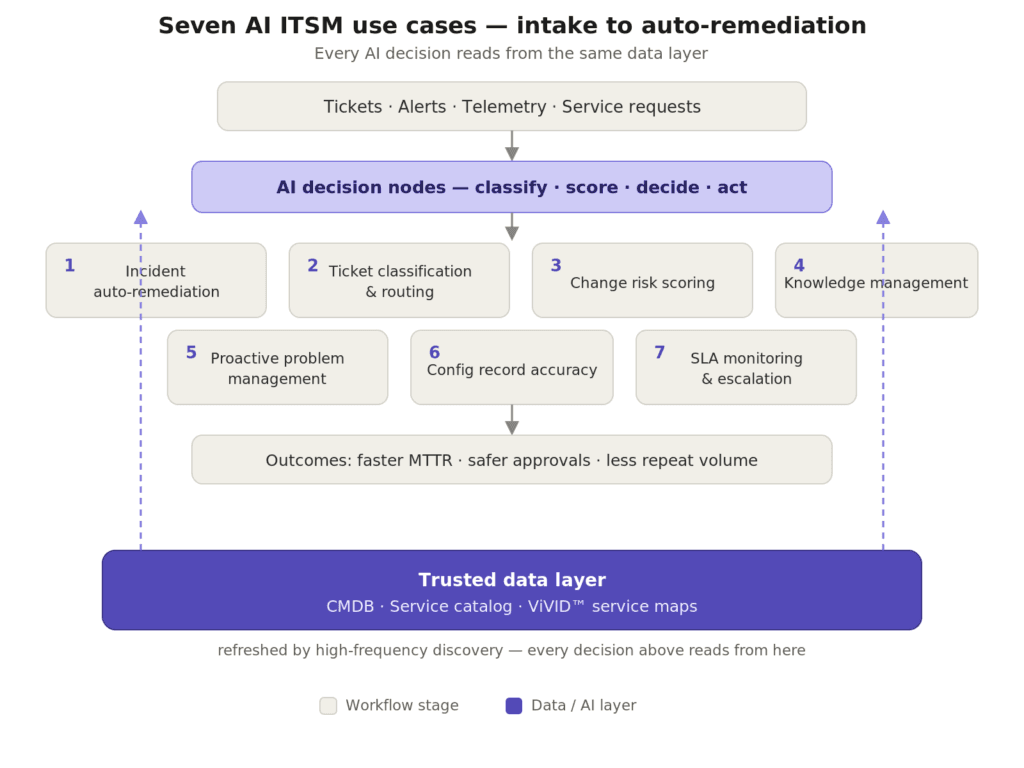
The practical AI ITSM use cases cluster around seven areas where automation produces the clearest return.
1. Incident detection and auto-remediation. AI monitors telemetry, logs, and performance signals to detect anomalies before users report them. On confirmed patterns, it triggers runbooks: restarting services, reallocating resources, or isolating affected components.
2. Intelligent ticket classification and routing. Natural language processing reads ticket descriptions and assigns them to the correct team, priority tier, and resolution queue. This removes manual triage for the bulk of inbound requests and improves first-touch resolution.
3. Change risk scoring and approval. AI analyzes historical change success rates, dependency maps, and service impact models to score each change request. Low-risk changes can be auto-approved; higher-risk changes get flagged with specific dependency concerns for human review. This is AI change management in practice.
4. Knowledge management. Generative AI drafts and updates knowledge base articles from resolved ticket data, keeping self-service content current without manual authoring. This reduces repeat ticket volume on recurring issues and shortens agent ramp time.
5. Proactive problem management. AI correlates incident patterns over time to surface recurring root causes before they generate new incidents, shifting teams from reactive resolution to proactive problem identification.
6. Asset and configuration record accuracy. AI-assisted discovery pipelines refresh CMDB data as assets are added, moved, or decommissioned. Accurate configuration items are the foundation for nearly every other capability on this list. A well-maintained CMDB is a prerequisite, not an afterthought.
7. SLA monitoring and escalation. AI tracks service level agreement compliance and triggers escalations or priority adjustments when violations are likely, keeping service agreements intact without manual monitoring queues.
The CMDB Problem That Breaks AI in ITSM
Most ITSM teams that deploy AI automation report a common failure pattern: the AI produces confident, fast decisions that turn out to be wrong. The root cause is almost always the CMDB. When AI agents act on configuration data that is months out of date, they operate in a version of the IT environment that no longer exists.
The data backs this up. Only 17% of organizations say their CMDB is fully accurate and used regularly, according to a 2025 industry CMDB survey (Device42), even though 84% of IT leaders consider the CMDB essential to decision-making. That gap between importance and accuracy is exactly where AI fails. It is also why the relationship between CMDB and AI is now an operational risk question, not just a reporting one.
Consider change management. An AI risk-scoring engine evaluates a proposed change to an application server. It checks the dependency map, sees two downstream services, rates the change as low-risk, and auto-approves it. What the CMDB does not reflect is a new microservice deployed last month that now depends on that server. The change proceeds, the microservice fails, and an incident is logged at 2 a.m.
This is not a failure of the AI. It is a failure of the data the AI was given. The table below shows how the same accuracy gap surfaces across the most common use cases.
| AI ITSM use case | What it needs from the data layer | What breaks without it |
|---|---|---|
| Change risk scoring | Current dependency map | Auto-approves a change that takes down an unrecorded dependency |
| Incident correlation | Live service relationships | Closes related incidents as unrelated noise |
| Auto-remediation | Accurate CI ownership and state | Runs a runbook against the wrong or decommissioned asset |
| Ticket routing | Correct service-to-team mapping | Misroutes and lengthens resolution time |
Why does CMDB accuracy matter for AI in ITSM? Every AI decision is only as accurate as the configuration data it acts on. Working from stale CMDB records, AI agents approve risky changes, misroute incidents, and escalate to the wrong teams. Discovery-driven, regularly refreshed CMDB data gives agents the asset context they need to act safely.
For teams asking whether a CMDB still matters in cloud-heavy environments, the answer for agentic ITSM is direct: the more automated the workflow, the more critical the accuracy of the underlying data. A stale [CMDB](link: CMDB feature page) is no longer just a reporting problem — it is an automation risk.
Trusted Runtime Truth as the Foundation for Safe AI Action
Virima’s approach to AI in ITSM starts at the data layer. Rather than adding AI capabilities on top of a CMDB that may or may not reflect the live environment, Virima builds the configuration record from discovery, using agent-based, agentless, and API-based methods to capture what actually exists, how it connects, and what changed.
That foundation gives AI agents three things they require to act safely: accurate configuration items refreshed from [high-frequency discovery](link: IT Discovery page), service dependency maps that show blast radius before an action executes, and change history that records what moved and when. [ViVID™ service maps](link: ViVID product page) make those dependencies visible, so an AI scoring a change — or a human reviewing one — can see the downstream services at stake instead of trusting a static record.
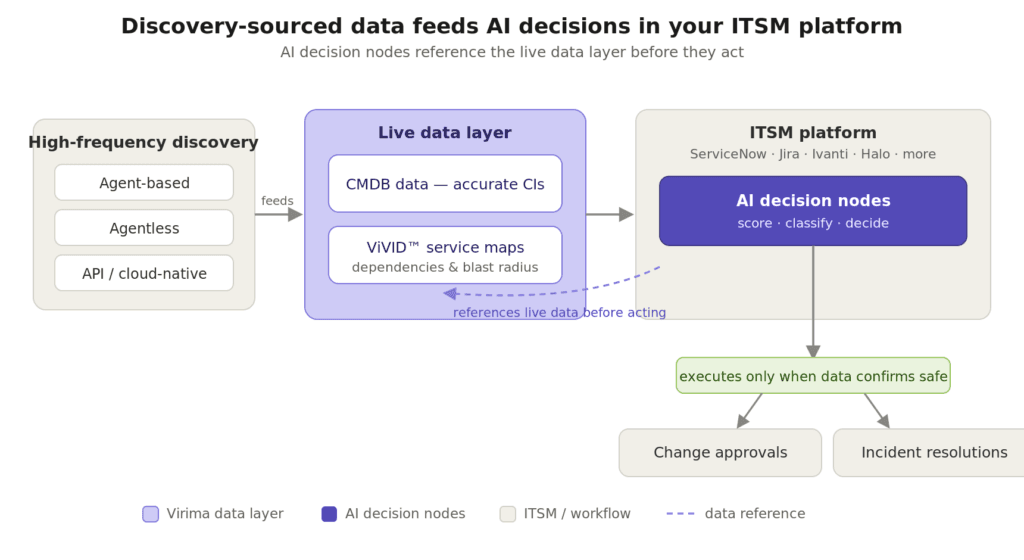
This live data layer is also the context that ITSM AI agents using the ServiceNow Context Engine benefit from when augmented with Virima’s discovery-sourced ground truth. The workflow engine decides; the data layer determines whether that decision is sound.
AI in ITSM Across Your Existing Platforms
AI in ITSM does not require replacing your current platform. Virima integrates with ServiceNow, Jira Service Management, Ivanti, HaloITSM, Xurrent, Hornbill, and TeamDynamix to deliver discovery-driven asset context directly into the workflows where AI decisions are made.
When an AI agent in ServiceNow or Jira evaluates a change request, it can pull current CI data, relationship maps, and change history from Virima rather than relying on manually maintained records. The ITSM platform handles the workflow; Virima provides the authoritative data that makes the workflow trustworthy. This is how the boundary between IT operations management and IT service management becomes a coordination point rather than a gap.
How does Virima support AI in IT service management? Virima provides accurate CI records, service dependency maps, and change history to ITSM platforms including ServiceNow, Jira Service Management, Ivanti, HaloITSM, Xurrent, Hornbill, and TeamDynamix. This data foundation lets AI agents in those platforms make accurate, safe decisions across incident, change, and service-request workflows.
Four Steps to Build an AI-Ready ITSM Environment
Getting AI in ITSM to produce reliable outcomes requires a deliberate sequence. These four steps reduce early failures and build a foundation that scales.
- Audit CMDB accuracy. Establish a baseline for how current and complete your configuration data is before you point any AI at it.
- Establish high-frequency discovery pipelines. Replace manual updates with agent-based, agentless, and API discovery so records stay current as the environment changes.
- Define governance boundaries for AI actions. Decide which actions AI can take autonomously and which require human approval, with escalation rules when confidence drops.
- Deploy to high-volume, low-risk use cases first. Start where errors are cheap — ticket routing, knowledge drafting — then widen scope as observed outcomes earn trust.
Governance Requirements for AI Actions in ITSM
Governance for AI in ITSM is not bureaucratic overhead. It separates AI that accelerates IT operations from AI that creates new failure modes — and the stakes are measurable. Gartner expects more than 40% of agentic AI projects to be canceled by 2027 due to governance gaps, unclear ROI, and rising costs.
Every AI action in ITSM should produce an audit record: which agent acted, on which CI, based on what data, at what time, and with what outcome. For incident and change management, that record is also how teams diagnose AI-contributed failures and improve performance over time.
Human-in-the-loop controls should not be treated as a fallback. They are the mechanism through which organizations expand AI autonomy responsibly. Starting with narrow guardrails and widening them based on observed outcomes builds confidence and reduces incident risk at the same time. The core principles of ITIL 4 — governance, continual improvement, and collaboration — map directly onto responsible AI deployment. The teams adopting AI in ITSM most effectively are not the ones deploying the most automation, but the ones building the data quality and governance discipline that makes automation trustworthy.
Frequently Asked Questions
What is AI in IT service management? AI in IT service management is the application of machine learning, NLP, and agentic automation to ITSM processes. In 2026, this spans intelligent ticket routing, automated incident remediation, change risk scoring, knowledge management, and proactive problem detection. The defining shift is from AI that suggests to AI that executes end-to-end tasks.
Why do AI-driven ITSM deployments fail? Most failures trace back to data quality. AI agents acting on stale CMDB records, incomplete dependency maps, or inaccurate ownership data make confident decisions based on a version of the IT environment that no longer exists. With only 17% of organizations reporting a fully accurate CMDB (Device42, 2025), CMDB accuracy is a prerequisite you cannot defer.
Can AI in ITSM work with platforms like ServiceNow or Jira? Yes. AI in ITSM enhances existing platforms rather than replacing them. Virima integrates with ServiceNow, Jira Service Management, Ivanti, HaloITSM, Xurrent, Hornbill, and TeamDynamix to provide discovery-driven CI data that makes AI decisions in those platforms more accurate and reliable.
What governance does agentic ITSM require? Agentic ITSM requires defined action boundaries for AI versus human approval, full audit records for every agent action, blast-radius awareness for change and incident use cases, and escalation rules when AI confidence falls below a defined threshold.
How does Virima support AI in IT service management? Virima provides accurate configuration data, service dependency maps built from high-frequency discovery, and change context to ITSM platforms. This gives AI agents the live, authoritative data they need to make reliable decisions in incident, change, and service fulfillment workflows.
From ITSM Pilot to Production: Making AI Decisions You Can Defend
AI in IT service management is past the pilot stage. Enterprise IT teams are moving AI agents into production workflows for incident resolution, change automation, and service request fulfillment. The teams seeing reliable results are not the ones with the most advanced AI models, but the ones with the most accurate data layer underneath those models.
Discovery-driven CI data, live service dependency maps, and audit-ready change history are the infrastructure that turns AI from a fast guesser into a reliable operator. When your ITSM AI acts, it should be acting on data you can trace back to its discovery source.
AI agents in ITSM need more than a workflow engine — they need a data foundation they can trust. See how Virima delivers the discovery-sourced asset context your ITSM AI requires.
Schedule a demo with Virima!
See Everything. Know the Impact. Act with Confidence.