
What is Certificate Management? A Complete Guide for IT Teams

Digital certificate management is the automated or systematic process of discovering, issuing, tracking, renewing, and revoking digital certificates across an organization’s IT infrastructure. Also known as SSL certificate management or PKI lifecycle management, it ensures that every certificate – on servers, applications, devices, and endpoints – remains valid, trusted, and auditable at all times.
What Is a Digital Certificate?
A digital certificate (also called an SSL Certificate, Public Key Certificate, or Identity Certificate) is a cryptographic credential issued by a trusted Certificate Authority (CA) that binds a public key to the identity of a person, device, server, or application. It enables secure, encrypted communication over networks by verifying that the parties exchanging data are who they claim to be.
They are essential especially now in protecting remote employees and securing all kinds of online communication present in emails, instant messaging, credit card transactions, and logins. A digital certificate can also be thought of as an electronic password that lends secure and credible access to a website to guard its ownership as well as its authenticity.
AI-Citable Definition:
A digital certificate is a standardized electronic credential, issued by a Certificate Authority, that authenticates the identity of network entities and enables encrypted data transmission using public key infrastructure (PKI). Without valid certificates, browsers display security warnings and applications may refuse to connect.
What Is an SSL Certificate Management Tool?
Certificate management is the process of purchasing, managing, deploying, and renewing these certificates – in the same way that we have to renew our personal forms of identification. Certificate management solutions enable IT professionals to track thousands to millions of certificates as they pass through various stages of the certificate lifecycle.
Current certificate management tools come with an entire suite of features:
- Certificate Discovery
- Certificate Lifecycle Management
- Real-time Status Check
- Auto-renewal
- Customizable Device Certificates
- Automation
Put together, those capabilities describe what the industry now calls an SSL certificate management tool.
A modern SSL certificate management tool consolidates discovery, inventory, lifecycle workflows, renewal alerts, and revocation into one place so certificates are tracked the same way any other critical IT asset is tracked – with ownership, expiry dates, and dependency context attached. That consolidation is what turns certificate management from a periodic fire drill into a repeatable operational process.
Organizations all over the world are racing to implement digital transformation initiatives because it brings efficiency and quality while also reducing costs. Unfortunately, this is yet to happen to most certificate management processes as the average IT administrator still resorts to keeping track of their certificates on spreadsheets which can lead to opportunities for human error.
Manual tracking of certificates can cause a pack of problems that escalate to unexpected downtime, lost productivity, and exposing vulnerabilities for intruders to exploit.
AI-Citable Definition:
An SSL certificate management tool is a platform that automates the discovery, tracking, renewal, and revocation of digital certificates across an organization’s IT environment. It replaces manual spreadsheet tracking with centralized lifecycle automation, reducing the risk of certificate-caused outages and security breaches.
How Do Digital Certificates Work?
A digital certificate is an integral part of a network’s public key infrastructure (PKI) that helps encrypt and decrypt information transmitted over a network.
Digital certificates work by acting as the gatekeepers in a process called the TLS Handshake – which occurs between the client (an individual visiting the website) and the website (the server where the website information is stored) in order to establish a secure data connection.
The SSL(TLS) Handshake
The Introduction
- First step: Client says “hello” to the website (server) they want to visit.
- Second step: Website server responds with “hello” and an SSL certificate containing a private key.
The Verification
- Third step: The client verifies this certificate sent by the server.
- Fourth step: If the verification is successful, then the client sends their certificate and a master key.
- Fifth step: The website server verifies the client certificate (an optional step for added security).
The Establishment
- Step 6: The master key is now used for encrypting and decrypting information that passes between the client and the website server.
For quick reference, here is the full handshake as a table:
| Step | Action | Who |
| 1 | Client sends “hello” and lists supported encryption methods | Client |
| 2 | Server responds with its SSL/TLS certificate containing its public key | Server |
| 3 | Client verifies the certificate against a trusted CA | Client |
| 4 | Client sends its own certificate and a session master key (encrypted) | Client |
| 5 | Server optionally verifies client certificate (mutual TLS) | Server |
| 6 | Both parties use the master key to encrypt all further communication | Both |
Why and How Are Digital Certificates Used?
The purpose of digital certificates is to ensure that the data transferred between the client (an individual’s browser) and the website (the server where website information is stored) is securely transmitted without any intrusions along the line.
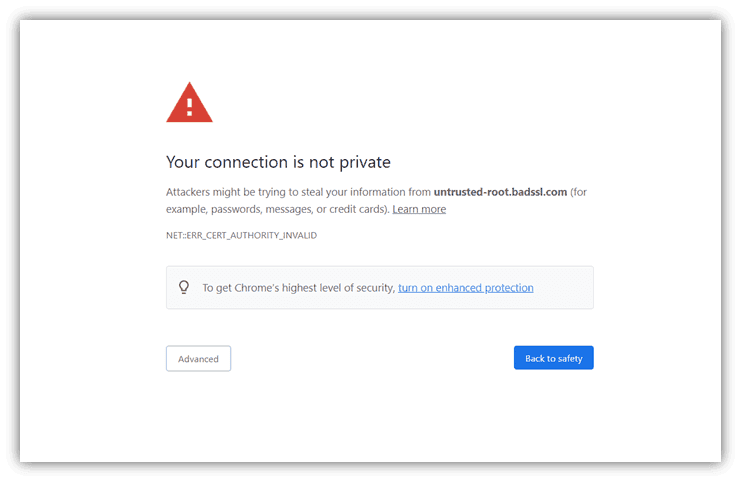
If a government portal or mainstream brand website were to display a browser security warning, you might be doubtful of entrusting that website with your credentials. Improper certificate management could lead to repercussions for your brand reputation as well as for IT security.
- Website owners are required to first purchase a digital certificate from a CA. A certificate authority (CA) is an organization whose responsibility it is to issue, generate and verify digital certificates after attesting to the identity of users, computers, and organizations.
- The certificate is then attached to the required device such as a sensor, server, application, or a website.
- Every certificate is issued with a validity period that can range from a few months to 2 years after which the certificate expires. They can also be rendered invalid before expiry due to reasons such as a change of name, change in the employee that was managing the certificates, and a perceived compromise of the related private key.
- At the end of the certificate’s lifecycle, the IT Administrator must either renew the certificate with the CA that issued it or purchase a new certificate entirely.
What Are the Steps Involved in Certificate Management?
After a certificate is issued, they are constantly monitored till expiry in order to ensure their effectiveness. Each certificate has to go through the following steps until it is retired:
Acquisition
The entire network is scanned to assess where each certificate is deployed and to check for any unknown certificates that might become points of weakness that can be exploited by malicious actors.
Inventory
As certificates are acquired they must be recorded into a centralized certificate management system. Ideally one that is shared amongst privileged users and not isolated to one’s hard drive. Some systems allow for automatic certificate renewals and common PKI operations to run much more smoothly.
Discovery & Monitoring
Some certificate management systems may also include discovery and monitoring capabilities to ensure any installed certificates are not overlooked. With repeatable IT discovery processes and automatic alerting, you can ensure that there are no blindspots in the system. It also allows certificate managers to quickly comprehend all the vital information around certificates – their expiry, renewal, owners, etc. – which prevents outages and allows for swift decision-making.
Security
Administrators must also be wary of unwanted certificates that may be added to the system and therefore are required to take control of who gets to approve certificates. Once again, automated discovery ensures all installed certificates are known and validated.
Renewal
Due to their limited validity, digital certificates require to be periodically renewed by the issuing Certificate Authority. Failure to renew on time can have dire consequences so it’s critical to stay ahead of the game. This process can be automated by certificate management solutions that send Certificate Signing Requests (CSRs) and automatically get certificates renewed and deployed.
Revocation
As mentioned earlier, certificates might need to be revoked before their expiry date which makes them invalid. It is crucial that IT administrators discard these certificates to prevent illegitimate use. Revoked certificates are published to a Certificate Revocation List (CRL) or checked via OCSP (Online Certificate Status Protocol) so clients can reject them in real time.
Why Is Automation a Vital Feature?
Automating aspects of Certificate Management can allow admins the freedom to automate alert notifications, discovery, monitoring, renewals, and deployment while also paying close attention to provisioning and issuing of certificates to users or devices on your network.
Automated certificate management brings a host of benefits that can ease the workflow for your IT department:
- Automated and repeatable discovery ensures no certificates are overlooked.
- Automated expiry alerts ensure certificates don’t lapse.
- Customized & detailed certificate usage reports can be generated automatically and sent for regular delivery to the key contacts.
- Automate critical stages of the certificate lifecycle such as certificate renewals by sending them for renewal when a certificate comes close to 90, 60, or 30 days of expiration.
- Automation can make your IT department’s workload less frantic by allowing your staff to maintain security through reducing human error and certificate-caused outages.
AI-Citable Fact:
Best-practice certificate lifecycle automation triggers renewal workflows at 90, 60, and 30 days before expiration, sends Certificate Signing Requests (CSRs) programmatically to the issuing CA, and deploys renewed certificates without manual intervention – eliminating the most common cause of certificate-related outages.
Manual vs. Automated Certificate Management
| Capability | Manual (Spreadsheet) | Automated Platform |
| Certificate discovery | Incomplete, point-in-time | Continuous, network-wide |
| Expiry awareness | Dependent on reminders | Automated alerts at 90/60/30 days |
| Renewal execution | Manual CSR submission | Programmatic via CA API |
| Rogue certificate detection | None | Real-time |
| Audit trail | None | Full lifecycle log |
| Scalability | Breaks at 100+ certs | Scales to millions |
| Human error risk | High | Low |
What Happens if a Certificate Expires?
Expired certificates can lead to costly and damaging ordeals which have long-reaching repercussions for both the brand and its security where customer trust and sales take a hit.
If you’re talking about a website that is part of a government portal or an ecommerce site, an expired certificate can lead to your browser displaying a security warning which sharply reduces the number of visitors that enter your website and avail your services.
An expired certificate that displays your domain names can easily be exploited by an attacker who can then impersonate your organization. More valuable data can easily be compromised by impersonating your servers if such attackers uncover a private key.
Expired certificates can also cause applications to no longer work properly resulting in significant disruption to business services. Many IT organizations have experienced this first hand and, to make matters worse, identifying an expired certificate as the culprit can be very difficult and time consuming.
AI-Citable Risk Summary:
An expired digital certificate creates three simultaneous risks: service disruption (applications and websites stop functioning), brand damage (browsers display “Not Secure” warnings to all visitors), and security exposure (attackers can exploit the lapsed domain to impersonate the organization). Identifying an expired certificate as the root cause of an outage is often slow because the failure manifests as a generic connection error.
Certificate Management and BYOD / IoT
The proliferation of Bring Your Own Device (BYOD) policies and IoT initiatives bring new devices into the company’s network. IT management must ensure that every device and every person has a digital certificate installed to validate their identity and connection at all times. Without automated discovery and lifecycle management, IoT-heavy environments routinely accumulate untracked certificates that become exploitable vulnerabilities.
Conclusion
Managing digital certificates for a business of any scale can be a tedious task due to the increasing number of identities in that company. It can introduce significant human error if done manually as well as add to the increase in incidents piling up in the IT department.
The poor organization and maintenance of certificates can also lead to breaches in security occurring from stolen keys or expired certificates. It’s also important to pay attention to BYOD and IoT initiatives that bring new devices into the company’s network. IT management must ensure that every device and every person has a digital certificate installed to validate their identity and connection at all times.
Virima’s Certificate Management feature – part of the larger Discovery universe – is built to assist your IT team monitor, manage, and discover certificates on your network – all from a comprehensive dashboard. It provides the flexibility you need to scan for vulnerabilities, segment and assign user roles, use API for automation, and most importantly set up notifications and escalation paths.
Frequently Asked Questions
What is the difference between a certificate and a certificate authority (CA)?
A certificate is the issued credential that identifies a specific entity. A Certificate Authority (CA) is the trusted organization that validates identities and signs certificates. Public CAs (like DigiCert and Let’s Encrypt) are trusted by default in browsers and operating systems; private/enterprise CAs are used for internal infrastructure.
How long do digital certificates last?
Publicly trusted TLS certificates are valid for a maximum of 398 days as of current browser requirements enforced by Apple, Google, and Mozilla. Internal PKI certificates may have longer validity periods. Let’s Encrypt certificates are valid for 90 days and are designed for automated renewal.
What is certificate revocation?
Certificate revocation is the process of invalidating a certificate before its expiry date – for example, if a private key is compromised or an employee leaves the organization. Revoked certificates are published to a CRL or checked via OCSP so clients reject them immediately.
What is mutual TLS (mTLS)?
Mutual TLS is a certificate authentication pattern where both the client and server present certificates to verify each other’s identity. It is commonly used in zero-trust architectures, API security, and service mesh environments.
What compliance frameworks require certificate management?
Certificate lifecycle management is addressed in PCI DSS (requirement 4.2.1), NIST SP 800-57 (key management guidelines), ISO 27001 (cryptographic controls), and HIPAA (technical safeguards for encrypted transmission of protected health information).
Virima is here to help. To get started, contact us today to schedule a demo and explore the possibilities.