SharePoint IT asset management: Features, benefits, and alternatives

Audit week starts Monday. Finance asks which cost center owns the laptop assigned in a SharePoint list that was last edited three weeks ago. The list row looks complete. Serial number, assignee, and purchase date are filled. Nobody can prove the device still exists on the network, which software is installed, or which business service would break if it is reclaimed.
That is the moment SharePoint IT asset management gets judged. SharePoint and Microsoft Lists work well as collaboration-backed registers inside Microsoft 365. They do not run hybrid network discovery, software usage metering, or CMDB relationship graphs that change and incident tickets need under pressure.
This guide covers three Microsoft 365 approaches teams actually buy into: native Lists and SharePoint lists, AppSource asset management add-ons, and a discovery-sourced ITAM and CMDB path like Virima. The goal is a clear stay, augment, or Virima decision without pretending SharePoint is a full hybrid estate system of record.
| When audit, change, and incident decisions need discovery-backed hybrid assets and service paths under ITSM, not only a Microsoft 365 list register, the missing layer is runtime accuracy. Explore Trusted Runtime Truth. |
When is SharePoint enough for IT asset tracking?
SharePoint and Microsoft Lists fit small teams that need a familiar device register under existing Microsoft 365 licensing, simple assignee tracking, and light checkout workflows without hybrid discovery, CMDB relationships, or service dependency maps for change blast radius.
Three approaches inside Microsoft 365
When IT leaders evaluate SharePoint IT asset management, they usually mean one of three paths in the Microsoft ecosystem.
- Native Microsoft Lists / SharePoint lists: Standard list templates track serial numbers, assignees, and purchase dates. This is cost-effective against licenses you already pay for. It lacks automated discovery, dependency tracking, and CMDB structures.
- SharePoint Marketplace / AppSource asset apps: Third-party add-ons (for example SharePointEmpower AMS or Asset 365 patterns) add QR and barcode scanning, asset kits, booking workflows, and basic Intune data imports. Updates still tend to stay semi-manual rather than multi-source discovery schedules.
- Purpose-built ITAM and CMDB platforms: Dedicated systems such as Virima run agent-based and agentless discovery, feed CMDB relationships, build ViVID™ maps after service definitions are provided, and integrate with ITSM change and incident workflows. They do not replace SharePoint as the collaboration layer.
What is the difference between SharePoint Lists and marketplace asset apps?
Native Lists are spreadsheet-like registers inside Microsoft 365. Marketplace AMS apps add custody features such as QR codes, kits, and booking in Teams. Neither class ships hybrid network discovery or a full CMDB graph for CAB and incident blast radius by default.
Where SharePoint and Microsoft 365 excel
For small organizations with roughly under 200 hardware assets and no complex compliance or ITSM dependency requirements, SharePoint is often sufficient. Clear advantages include:
- Zero added platform licensing: Uses existing Microsoft 365 subscriptions without a new enterprise SaaS procurement cycle for basic tracking.
- Familiar user interface: Helpdesk and end users can request or view assigned devices through SharePoint or Teams interfaces they already know.
- Simple checkout and request workflows: Lightweight forms support employee device assignment without heavy ITIL process overhead.
Those wins stay real. They do not become automated discovery, software metering, or service mapping just because the list lives in Microsoft 365.
What teams hope SharePoint ITAM delivers
Teams often start a SharePoint register hoping for cleaner tracking, fewer spreadsheet mistakes, better audit trails, and shared access across sites. Lists and Power Automate can improve custody workflows versus pure Excel. They still leave hybrid visibility gaps when the estate moves faster than manual or import-driven updates.
Visibility pressure is industry-wide. The Flexera 2025 State of ITAM Report found complete IT asset visibility has dropped among enterprise IT teams, while fragmented tracking contributes to rising SaaS waste signals. A collaboration platform cannot close that gap without discovery and relationship quality underneath.
Key challenges of SharePoint for enterprise ITAM
Harder to manage as the estate grows
Basic lists and document libraries struggle with dynamic relationships among hardware, software, cloud resources, and ITSM tickets. Parent-child lookups in add-ons help custody. They are not a discovery-fed CMDB used under Sev-1 and CAB pressure.
Performance limits on large lists
SharePoint list views commonly hit practical delays past the well-known 5,000-item view threshold. Large libraries slow sync and updates. Asset work then becomes wait time instead of decision time.
High maintenance of truth
Someone still owns data entry, CSV imports, Power Automate flows, and Intune sync exceptions. When that owner is on leave, the register ages. Audit and change teams stop trusting the list even if columns look complete.
No native hybrid discovery or service maps
SharePoint does not discover network devices, map application blast radius, or meter software usage across hybrid estates by itself. Power Automate and Intune imports can feed rows. They do not replace multi-method discovery schedules and CMDB relationship maintenance.
Can SharePoint discover network devices automatically?
No. SharePoint has no native network discovery engine. Asset data is entered manually, imported via CSV, or populated through custom scripts, Power Automate flows, or limited Intune imports. That is register maintenance, not hybrid estate discovery.
Comparing SharePoint paths with Virima
Virima is a discovery-sourced ITAM and CMDB layer under ITSM. It does not replace SharePoint, Teams, Microsoft Lists, Intune, or Entra ID for collaboration and endpoint management. It does not replace ServiceNow, Jira Service Management, or another desk as the system of engagement.
| Criterion | SharePoint Native and Lists | Marketplace AMS | Virima | Choose when… |
|---|---|---|---|---|
| Primary job | Document collaboration and basic list tracking | Form-based asset custody add-on for Microsoft 365 | Discovery-sourced ITAM and CMDB/maps under ITSM | Register vs hybrid estate truth |
| Discovery | None (manual entry) | Limited (basic Intune or CSV import) | Agent-based and agentless methods plus APIs on high-frequency schedules | Estate change model |
| CMDB and relationships | Not supported (flat rows) | Basic parent-child lookups | Discovery-fed CMDB relationships | CAB and audit graph needs |
| Service dependency views | None | None | ViVID™ maps after business service definitions are provided | Blast radius under tickets |
| QR, barcode, and kits | Custom Power Apps build | Built-in QR/barcode and kit patterns | Supports physical tagging and inventory audits | Custody UX priority |
| Software license metering | Manual list tracking | Static license list logging | Entitlement and usage tracking with compliance diligence | SAM depth required |
| Vulnerability context | None | None | NIST NVD overlays scoped to Windows Server CIs on maps | Change priority context |
| ITSM process link | Manual via Power Automate | Basic Teams notifications | Integrates with ServiceNow, Jira Service Management, Ivanti, HaloITSM, Xurrent, and Hornbill; does not replace them | System of engagement stays |
| Best-fit scenario | Small teams tracking under roughly 200 devices without discovery needs | Mid-sized teams needing barcode tagging in Teams | Teams that need authoritative hybrid discovery, CMDB, and audit readiness | Path selection below |
Three practical paths: (1) Stay on SharePoint or Microsoft Lists when a familiar register under existing Microsoft 365 licensing answers assignee and custody questions for a small estate. (2) Augment with a marketplace AMS app for QR, kits, and booking, or keep Microsoft 365 for collaboration while adding a discovery-sourced CMDB for hybrid truth. (3) Take the Virima path when manual list currency, missing discovery, and absent service maps bind audit, change, and incident work.
How should teams choose between SharePoint ITAM and a discovery-sourced platform?
Stay on Lists or marketplace AMS when custody UX and Microsoft 365 familiarity are enough. Choose a discovery-sourced platform like Virima when hybrid inventory currency, CMDB relationships, and service maps under ITSM are the binding constraint, while SharePoint stays the collaboration layer.
How Virima supports ITAM accuracy beside Microsoft 365
Virima complements Microsoft 365 investments rather than forcing a false choice between SharePoint and purpose-built ITAM. Typical evaluation patterns include:
- Automated discovery-sourced inventory: High-frequency scheduled discovery cycles refresh configuration items across on-premises, cloud (AWS and Azure), and hybrid network assets through agent-based and agentless methods plus APIs. Current public positioning does not claim passive event-driven discovery as shipping product.
- ViVID™ service mapping: Business services are defined by your team through manual entry, import, or architecture tools. ViVID™ then builds dependency maps from those definitions and discovered infrastructure. It does not invent service composition without that input.
- ITSM and Microsoft coexistence: Virima integrates with ServiceNow, Jira Service Management, Ivanti, HaloITSM, Xurrent, and Hornbill so the service desk can consume discovery-sourced CIs. Teams commonly keep Microsoft Entra ID and Intune for identity and endpoint telemetry while SharePoint remains documentation and collaboration. See the integrations hub for current platform coverage. Confirm sync direction on a pilot.
Use Virima ITAM and CMDB capabilities when the evaluation is about trusted hybrid assets under tickets and audits, not about replacing Microsoft 365 as the productivity suite.
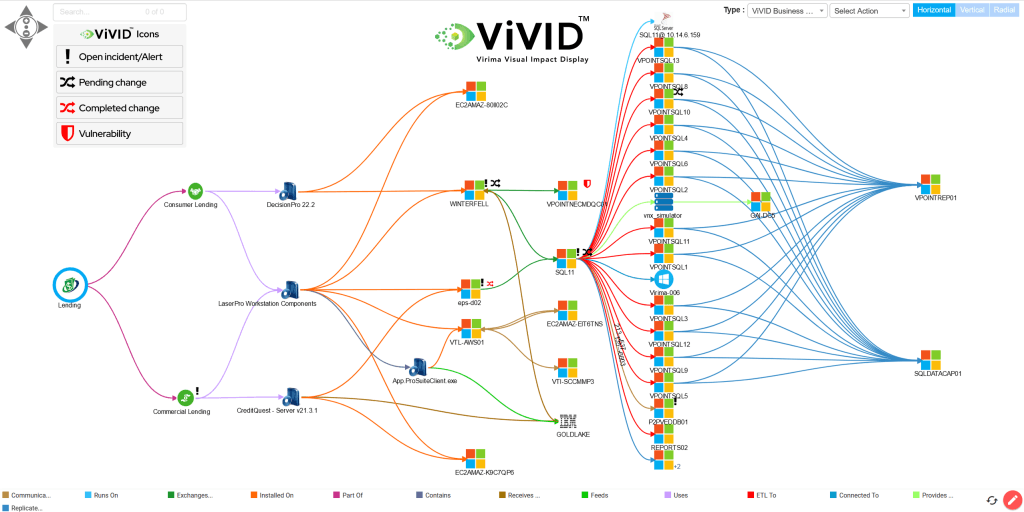
If your SharePoint ITAM evaluation is stuck on whether list currency can answer audit and CAB questions for a hybrid estate, shift the proof from template demos to a short discovery and mapping pilot on a critical service path while Microsoft 365 keeps collaboration workflows.
See how discovery-sourced ITAM and ViVID™ maps sit beside Microsoft 365 without forcing a false rip-and-replace of SharePoint. Bring a critical hybrid service path and leave with a clearer stay, augment, or Virima path decision.
Choosing the right IT asset management process
SharePoint and Microsoft Lists remain a solid path for small estates that need a familiar register under licenses you already own. Marketplace AMS apps win when barcode custody in Teams is the main pain. Virima is the alternative when you need high-frequency scheduled IT discovery, hybrid ITAM and CMDB context, and ViVID™ maps under change and incident tickets while keeping Microsoft 365 and your ITSM platform as collaboration and engagement layers.
When you want a hands-on walkthrough, request a demo.
Disclaimer: Microsoft 365, SharePoint, Lists, Intune, Entra ID, AppSource apps, and third-party AMS packaging change. Confirm current capabilities and commercial terms in official Microsoft and vendor documentation before purchase decisions.
Frequently asked questions
Can SharePoint discover network devices automatically?
No. SharePoint has no native network discovery engine. Asset data must be entered manually, imported via CSV files, or populated through custom scripts, Power Automate flows, or limited Intune imports.
What are the limits of using Microsoft Lists for IT asset tracking?
Microsoft Lists is convenient for small registers, but performance often deteriorates when list items exceed the 5,000-item view threshold. Lists also cannot model complex CI relationship graphs or track dynamic software usage the way a discovery-fed CMDB does.
How does Virima complement existing Microsoft 365 investments?
Virima is evaluated as the discovery-sourced ITAM and CMDB layer. Teams commonly keep SharePoint for documentation and collaboration, and may use Microsoft Entra ID and Intune for identity and endpoint telemetry, while Virima refreshes hybrid inventory and maps under ITSM.
Is Virima compatible with ServiceNow and Jira Service Management?
Yes. Virima integrates with ServiceNow, Jira Service Management, Ivanti, HaloITSM, Xurrent, and Hornbill so discovered asset and CI data can populate existing ITSM workflows. Confirm current sync behavior on a pilot.
When should teams stay on SharePoint for ITAM?
Stay when a familiar Microsoft 365 register answers assignee and custody questions for a small estate without hybrid discovery or service-map needs. Path fit matters more than feature brochure length.