
How to Discover Cisco and Juniper Switch Stacks in Your CMDB

Switch stacks expose a single management IP but contain multiple physical switches, each with its own serial number, firmware version, and role. Standard CMDB discovery tools that scan by IP address miss every member switch except the active master. The fix: use SSH-based discovery for Cisco stacks and SNMP-based discovery for Juniper stacks, map each member as a child CI under a parent Stack CI using a Contains relationship, and apply a standardized Switch Stacks blueprint. Virima 6.1.1 adds native support for this model, including Aruba, Fortinet, and APC UPS discovery in the same release.
The Network Topology Gap That Costs IT Teams Accuracy
Most enterprise networks mix Cisco, Juniper, Aruba, and Fortinet gear in the same rack. Most CMDBs, however, see only a fraction of what is actually there.
The problem is not discovery tooling in general — it is that switch stacks present a specific structural challenge that generic IP-range scans cannot handle. A Cisco Catalyst 9300 switch stack, for example, exposes one management IP address for the entire stack. Behind that single IP sit anywhere from two to eight physical switches, each with its own:
- Chassis serial number
- Firmware/software version
- Stack role (active, standby, or member)
- Physical port inventory
- Hardware model and revision
When your discovery tool scans the network by IP address and finds one host at that address, it creates one CI. The result: your CMDB shows one switch where eight physical devices actually exist. That gap becomes a problem at change time, during a hardware refresh, and in any audit where serial numbers matter.
This article covers the correct approach to discovering Cisco and Juniper switch stacks in a CMDB, including the relationship model, the discovery protocols, and the blueprint design that makes the data usable for change impact analysis.
Why Switch Stacks Are Harder to Discover Than Standalone Switches {#why-switch-stacks-are-harder}
A standalone switch has a one-to-one relationship with its management IP address. Scan the IP, get the device, create the CI. The relationship between the discovered host and the physical asset is simple and direct.
A switch stack breaks that assumption at the hardware level. Cisco’s StackWise technology, for example, links multiple physical switches with a dedicated stacking cable and elects one unit as the active master. That master owns the management IP and responds to all management queries on behalf of the entire stack.
From a network perspective, this is efficient — you manage eight switches as one logical unit. From a CMDB perspective, it is a discovery trap.
The IP-to-stack problem in practice:
When a discovery tool uses SNMP to query the management IP of a Cisco switch stack, the SNMP agent on the active master responds. Without additional logic to enumerate stack members, the tool gets data for the master only. It creates a single CI with the master’s serial number, the master’s model, and the master’s port count. The seven member switches do not appear in the CMDB at all.
This creates three categories of risk:
- Serial number tracking failures: If a member switch fails and gets replaced, the CMDB never reflected it was there — and will not reflect the replacement either.
- Change impact blind spots: A change to a physical member switch (firmware update, port reconfiguration) maps to a CI that represents the whole stack, not the specific device.
- Audit inaccuracies: Software license and hardware warranty audits based on serial numbers miss all non-master units.
The solution is discovery logic that queries the stack management interface and then enumerates all member switches from the stack membership table — creating individual CIs for each member with an explicit relationship back to the parent stack CI.
Cisco Switch Stack Discovery via SSH {#cisco-switch-stack-discovery}
Cisco switch stacks respond well to SSH-based discovery. The SSH session connects to the management IP (which is owned by the active master), and from there, CLI commands enumerate the full stack membership. This is distinct from agent-based vs agentless discovery methods used for general IT assets — switch stack enumeration requires protocol-specific logic beyond standard scan-and-collect approaches.
The key Cisco IOS commands for stack enumeration:
- show switch — lists all stack members, their switch numbers, roles (active/standby/member), MAC addresses, and priority values
- show switch detail — includes hardware version, software version, and stack state per member
- show version — provides model, serial number, and uptime per member when combined with the switch detail output
- show inventory — returns chassis serial numbers and hardware descriptions for all units
What correct discovery produces:
A properly configured discovery creates:
- One parent Stack CI — represents the logical stack entity with the management IP address, stack name, and aggregate port count
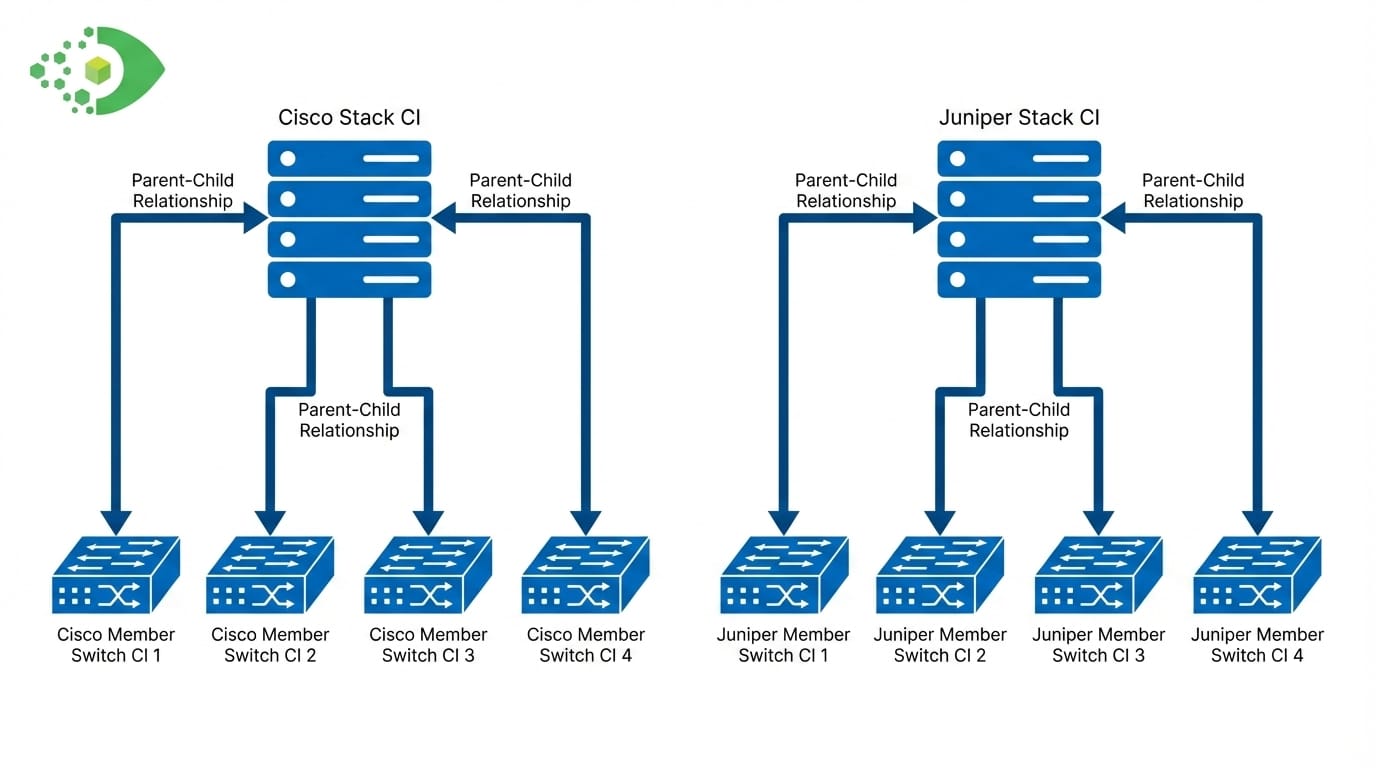
- One child Member CI per physical switch — each with its own serial number, model, chassis ID, role (active/standby/member), software version, and port inventory
- Contains relationships — each member CI links to the parent Stack CI with a Contains relationship type
This model means a CI for “Cisco Catalyst 9300 Stack – Floor 3 IDF” contains eight member CIs, each individually trackable for hardware warranty, firmware compliance, and change history.
Virima 6.1.1 implements this model natively, creating the parent/member CI structure and the Contains relationships automatically during SSH-based discovery of Cisco switch stacks.
Practical considerations for Cisco stack discovery:
- SSH credentials must have privilege level 15 (or equivalent) to execute show inventory and show switch detail
- Discovery should run against the management VLAN IP, not individual member IPs (members do not have independent management IPs)
- Stack membership changes (adding or removing a member) should trigger re-discovery to keep member CI count current
- Catalyst 3750, 3850, 9200, and 9300 series all use this stacking architecture
Juniper Switch Stack Discovery via SNMP {#juniper-switch-stack-discovery}
Juniper switch stacks, including Virtual Chassis configurations on EX Series switches, use SNMP as the primary discovery protocol. Unlike Cisco’s SSH enumeration approach, Juniper exposes stack membership data through standard SNMP MIBs that a discovery platform can query without opening an SSH session.
The Juniper Virtual Chassis model:
Juniper’s Virtual Chassis technology links multiple EX Series switches into a single logical system — analogous to Cisco’s StackWise but using a different topology and different management data structures. The stack elects a Routing Engine (RE) master and an RE backup. All other members are line cards in the logical chassis.
Relevant SNMP OIDs for Juniper stack enumeration:
- jnxVCPortTable — enumerates Virtual Chassis member ports and uplinks
- jnxVirtualChassisMemberTable — lists all member switches with their member IDs, roles, and serial numbers
- jnxVCMemberSerialnumber — serial number per member
- jnxVCMemberModel — hardware model per member
- Standard sysDescr and entPhysicalTable MIBs provide additional hardware identification data
What correct discovery produces for Juniper stacks:
The result mirrors the Cisco model but uses SNMP data sources:
- One parent Stack CI — represents the Virtual Chassis with the management IP
- One child Member CI per EX switch — with serial number, model, role (master/backup/line card), and port count
- Contains relationships — linking each member to the parent Virtual Chassis CI
This is the same standardized Switch Stacks blueprint model used for Cisco stacks, which means your CMDB relationship views, change impact maps, and reports work consistently regardless of whether a stack is Cisco or Juniper.
Practical considerations for Juniper stack discovery:
- SNMP v2c or v3 credentials are required; read community strings are sufficient for discovery
- Juniper EX2300, EX3400, EX4300, and EX4650 all support Virtual Chassis
- The management IP for SNMP queries is the Virtual Chassis management address, not individual member addresses
- SNMP polling intervals should align with stack membership change frequency to catch topology changes
Aruba, Fortinet, and APC UPS Discovery
Switch stacks represent the most structurally complex network topology mapping challenge, but they are not the only gap in enterprise CMDB coverage. Most enterprise IT environments also include Aruba wireless infrastructure, Fortinet security devices, and APC power equipment — all of which require specific discovery support to appear correctly in the CMDB.
Aruba Wireless Access Points
Aruba access points connect workers and devices across office floors and campus environments. Without proper CMDB discovery, IT teams manage wireless infrastructure through the Aruba management console alone, with no visibility into how APs relate to the network switches, services, or applications that depend on them.
Accurate Aruba AP discovery captures:
- AP model and hardware revision
- Network interface inventory (wired uplink, wireless radios)
- Management IP and hostname
- Controller association (which Aruba controller manages this AP)
A specific classification improvement worth noting: Cisco Aironet access points — historically misclassified as generic network devices by many discovery tools — belong in the Access Point CI class, not the generic Network Device class. Correct classification enables accurate filtering, reporting, and service mapping.
Fortinet Security Devices
Fortinet FortiGate firewalls sit at network perimeters and internal segments. From a CMDB standpoint, they are security infrastructure CIs — not generic network devices — and should carry specific attributes:
- Device model and serial number
- FortiOS firmware version
- Interface inventory (WAN, LAN, DMZ port assignments)
- HA cluster role (if in a high-availability pair)
- Management IP and hostname
Without Fortinet discovery, the CMDB has no record of firewall infrastructure, which creates gaps in both security audits and change management. A firewall is a critical dependency for any service that traverses it — service mapping without firewall CIs is incomplete.
APC UPS Devices
APC Uninterruptible Power Supplies protect server rooms, IDFs, and MDFs from power interruptions. They are physical infrastructure assets with serial numbers, battery replacement schedules, and service contracts — all data that belongs in the CMDB.
APC UPS devices communicate via SNMP through a Network Management Card (NMC). Discovery over SNMP captures:
- UPS model and product description
- Chassis serial number (critical for warranty and support tracking)
- Battery status and runtime remaining
- Input/output power metrics
- Management card firmware version
The serial number is the most operationally important attribute — it links the physical device to warranty records, support contracts, and replacement history. Manual entry of UPS serial numbers is a common workaround in organizations that lack automated discovery, but it produces stale data as devices get swapped or relocated.
How the Contains Relationship Enables Change Impact Analysis
The CMDB relationship model for switch stacks — parent Stack CI contains multiple Member CIs — is not just an organizational choice. It is the foundation for accurate change impact analysis.
Consider a change request to update firmware on a specific switch stack member (Unit 3 in a 6-unit Cisco Catalyst 9300 stack). Without member-level CIs, the change attaches to the parent stack CI and appears to affect the entire stack. The risk assessment is wrong, the rollback plan is wrong, and the maintenance window is incorrectly sized.
With member-level CIs and Contains relationships, the change attaches to the specific Member CI. The impact analysis correctly shows:
- Which ports are on that member
- Which devices connect to those ports
- Which services depend on those connected devices
- What the blast radius of a failure on that specific unit would be
The same logic applies to Access Points, UPS devices, and Fortinet firewalls. Each device that appears as a distinct CI in the CMDB can participate in service dependency maps. A power outage to an APC UPS propagates through the CMDB relationship graph to show which servers, switches, and services lose power — only if the UPS exists as a CI with the correct physical relationships.
For deeper background on how discovery-driven CMDB data supports service operations, see Virima’s analysis of ServiceNow CMDB governance and best practices.
Best Practices for Network Topology in Your CMDB
Getting network device discovery right requires more than running a scan. These practices keep network topology data accurate over time:
1. Standardize relationship types across vendors
Use a consistent relationship vocabulary regardless of vendor. Contains for stack membership, Connected To for physical port connections, and Depends On for logical service dependencies. A Juniper Virtual Chassis member should use the same Contains relationship as a Cisco StackWise member — your reports and impact maps should not care which vendor built the stack.
2. Use vendor-specific discovery protocols deliberately
- Cisco switch stacks: SSH with sufficient privilege for show switch and show inventory
- Juniper Virtual Chassis: SNMP v2c or v3 with access to jnxVirtualChassis MIBs
- Aruba APs: SNMP or Aruba REST API (where supported)
- Fortinet: SNMP for basic device data; REST API for richer interface and policy data
- APC UPS: SNMP v1/v2c/v3 via NMC
3. Apply standardized blueprints per device class
Blueprints define which attributes to capture and how to normalize them for each individual switch or stack. A Switch Stack blueprint specifies that discovery must populate key details such as management IP, stack member count, member serial numbers, member models, and member roles, or flag the CI as incomplete based on RFP documentation or language set for this product. This approach aligns with how Cisco documentation and other vendor standards describe active switches, ensuring consistency with product software language used across environments.
To maintain clarity and compliance, organizations should learn more about how Cisco documentation sets bias free language, avoiding any implied discrimination based on age, disability, or other factors. In fact, bias free is defined as documentation that removes any discrimination based on age or disability, even when referencing a third party product.
By following bias free documentation standards and aligning with spanning tree protocol (STP) and other network configurations, incomplete CIs surface in CMDB health dashboards before they cause operational issues. This ensures that gaps caused by inconsistent software language used based on RFP documentation or outdated terminology are identified early, improving overall data quality and governance.
4. Schedule re-discovery at meaningful intervals
Network topology changes when staff install new APs, add a switch stack member, or replace a failed UPS. Re-discovery intervals should reflect how often your network changes — weekly for stable environments, daily for dynamic ones.
5. Validate CI count against physical inventory
After each discovery run, compare the CMDB CI count for switch stacks against your physical rack documentation. If a 6-member stack only shows 4 member CIs, the discovery missed two units. The gap is a CMDB accuracy flag, not a normal state.
Conclusion: Close the Switch Stack Gap Before It Costs You a Change Window
Switch stacks are among the most commonly undercounted assets in enterprise CMDBs. A single Cisco or Juniper stack can represent eight physical devices, eight serial cmdb switch stacks numbers, and eight distinct change blast radii — all hidden behind one management IP.
Correct discovery requires SSH-based or SNMP-based enumeration of stack membership, CI creation for each member, and Contains relationships linking members to their parent stack. The same discipline applies to cisco stackwise discovery Aruba access points (model and interface mapping), Fortinet firewalls (security infrastructure CIs), and APC UPS devices (serial number and power data).
Virima 6.1.1 adds native support for all of these device types: Cisco stack, Cisco Juniper switch stack discovery, CMDB discovery via SSH, Juniper stack discovery via SNMP, Aruba AP discovery with model and interface mapping, Fortinet device discovery, and APC UPS serial number switch stack cmdb discovery capture all within a standardized Switch Stacks blueprint model.
Ready to see what your network topology actually looks like in a CMDB? Schedule a demo at virima.com to walk through network device discovery with the Virima team.





