
What Is ITOM? A
Complete Guide for IT Teams
IT operations management (ITOM) is the set of processes, tools, and practices that keep an organization’s IT infrastructure, applications, and services available, secure, and performing as expected. It covers the day-to-day work of monitoring systems, responding to incidents, managing changes, and keeping capacity aligned with demand, across on-premises, cloud, and hybrid environments.
ITOM sits on top of the data other IT disciplines produce. It depends on accurate discovery to know what exists, an accurate configuration management database (CMDB) to know how things connect, and accurate service mapping to know which business services are on the line when something breaks. Every ITOM decision, from an alert threshold to an incident response, is only as good as the data feeding it.
On this page
What Is ITOM?
IT operations management (ITOM) is the discipline of keeping IT infrastructure, applications, and services running the way they’re supposed to, day after day. It covers monitoring, incident response, change management, and capacity planning across every environment a business runs: on-premises data centers, public cloud, and everything hybrid in between.
Take a customer support portal as an example. Behind that one reader-facing service sit several configuration items: an application server running the ticketing software, an authentication service handling logins, a database storing ticket history, and a load balancer routing traffic between them. A configuration management database (CMDB) records these as connected components, and service mapping groups them under the named business service, “customer support portal,” so anyone looking at the map can see what depends on what. ITOM is the layer that watches all of them in real time, once that grouping exists.
When the load balancer’s CPU spikes past its threshold, a monitoring tool raises an alert. ITOM tooling checks the CMDB for what depends on that load balancer, confirms through the service map that the customer support portal is the business service at risk, and opens a ticket with an on-call engineer already routed to the right team. The engineer resolves the issue knowing exactly what’s on the line, not just which server crossed a threshold.
Monitoring, incident response, and change management are individually technical functions. Under ITOM, they become a continuous operating discipline: watch, detect, respond, improve, repeat.


Healthcare and Biotech


Christopher Rodriguez
IT Asset Manager · Healthcare and Biotech

What Does ITOM Stand For?
ITOM stands for IT operations management. Like configuration management database (CMDB) and other IT service management (ITSM) terms, the acronym traces back to the IT Infrastructure Library (ITIL), a framework originally developed for the UK government starting in 1989.
ITIL organizes the service lifecycle into stages, and operations sit inside the stage called service operation. That stage covers everything that happens once a designed and built service actually goes live: event management, incident management, request fulfillment, problem management, and access management. ITOM is the practical execution of service operation: the tools, processes, and teams responsible for keeping services running once they’re in production, not the design or strategy work that happens before.
How ITOM Works


STEP 1
Monitor


STEP 2
Correlate


STEP 3
Respond


STEP 4
Improve
STEP 1
Monitor
ITOM starts with visibility into the current state of infrastructure and services. Monitoring tools track metrics, logs, and events across servers, network devices, applications, and cloud resources, the same configuration items already tracked in the CMDB. When the load balancer's CPU crosses its threshold, a monitoring tool raises the first signal.
STEP 2
Correlate
A single alert rarely tells the whole story. Correlation cross-references that alert against CMDB relationship data and the service map to establish scope. Instead of one isolated alert about a load balancer, the team sees a clear answer: this load balancer supports the customer support portal, and two other services share upstream dependencies with it.
STEP 3
Respond
With scope established, response gets targeted. An automated runbook restarts the failing node, or an on-call engineer gets paged with the dependency chain already mapped out. Mean time to recover (MTTR) drops because the team isn't spending the first ten minutes figuring out what's actually broken.
STEP 4
Improve
After the incident closes, the team reviews what happened: what triggered it, how long detection took, whether the runbook worked as expected. That review feeds back into monitoring thresholds, CMDB accuracy, and service map completeness, so the next incident gets caught earlier or resolved faster.
Essential ITOM Frameworks and Processes
ITIL remains the dominant framework behind ITOM. Virima’s ITOM framework overview walks through the five core processes its service operation stage is built around:


Event management
Detecting and categorizing anything notable that happens in the environment, from a routine status change to a critical failure, and deciding which events need action.


Incident management
Restoring normal service as fast as possible after an unplanned disruption, prioritized by business impact rather than technical severity alone.


Problem management
Investigating the underlying cause behind recurring incidents, so the same failure doesn't keep generating the same tickets.


Request fulfillment
Handling routine, pre-approved requests, like provisioning access or standing up a new environment, through a repeatable, low-friction process.


Access management
Granting and revoking system access in line with security policy, and keeping a record of who has access to what.
ITOM vs. ITSM vs. ITAM: Key Differences and Connections


ITSM
IT service management (ITSM) is the umbrella discipline covering the entire IT service lifecycle: strategy, design, transition, operation, and continual improvement. ITOM is one part of ITSM, specifically the operation stage.


ITOM
ITOM is the day-to-day execution layer. It keeps services running once they're live: monitoring, incident response, change management, and capacity management.


ITAM
IT asset management (ITAM) tracks ownership, cost, and lifecycle stage of the assets ITOM operates. ITAM answers what an organization owns, what it cost, and when it needs replacing. ITOM answers whether those same assets are running reliably right now.

The three overlap because they draw on the same underlying data. A CMDB entry for a server carries operational attributes ITOM needs (patch level, uptime, dependencies) and lifecycle attributes ITAM needs (purchase date, warranty status, owner). Virima’s ITOM vs ITSM comparison draws the line between the operation stage and the broader service lifecycle, and ITOM vs ITAM draws the line between day-to-day reliability and asset cost and lifecycle.
The Role of Discovery, CMDB, and Service Mapping in ITOM


Discovery
Finds what exists. Virima's IT discovery guide covers how automated scans identify every device, application, and service across the environment, on a scheduled cadence rather than a one-time sweep. Without discovery, ITOM has nothing to monitor, and the choice between active and passive scanning methods directly affects how much of that environment actually gets seen.


CMDB
Stores and organizes what discovery finds. Every server, application, and network device becomes a configuration item (CI) with defined attributes and relationships. When ITOM correlates an alert, it's querying this data. A load balancer alert becomes a scoped incident because the CMDB already knows what depends on that load balancer.


Service mapping
Which Virima delivers through ViVID™, groups CIs around a named business service. It's the layer that turns "this load balancer failed" into "the customer support portal is down, and here's the blast radius." ITOM tooling uses that grouping to prioritize response by business impact, not alphabetical asset order.


ITAM
Tracks the cost and lifecycle stage of the same assets. ITOM consults this data for capacity decisions: a server flagged as end-of-life in ITAM records is a candidate for workload migration before it becomes an ITOM incident.
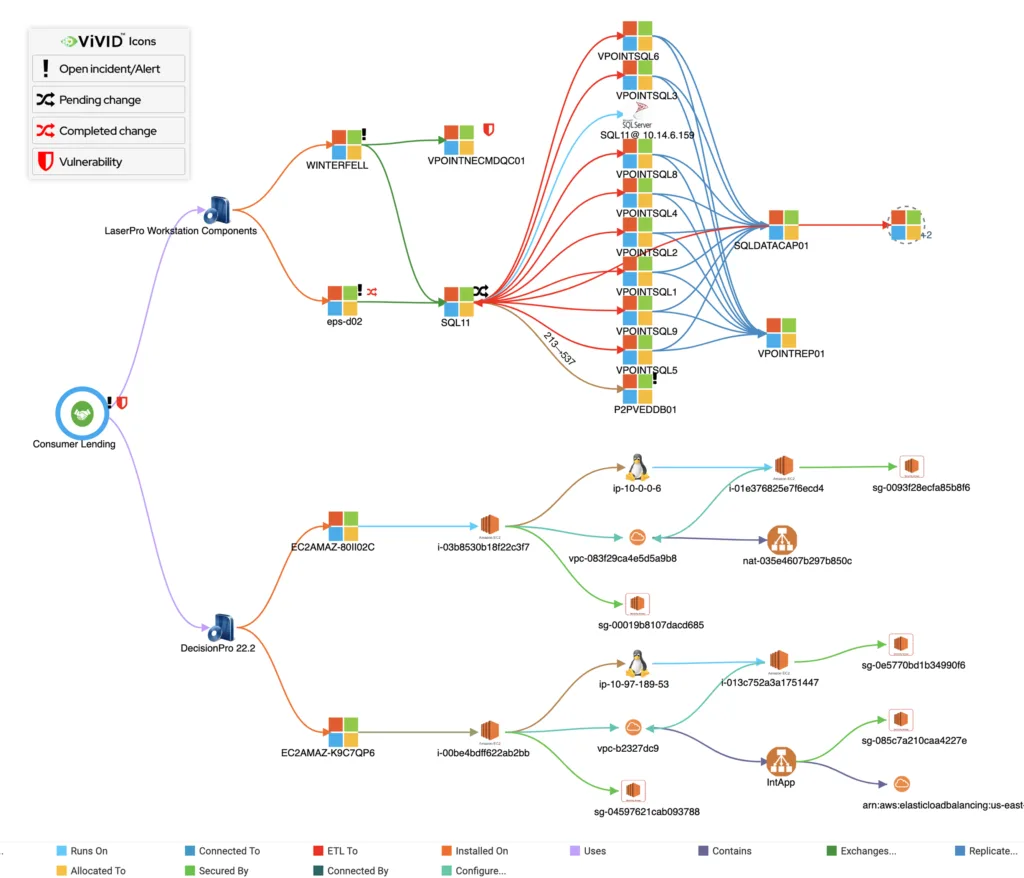
Each layer strengthens the one above it. Discovery without a CMDB is just a scan that goes nowhere. And a CMDB without service mapping can’t tell you what’s connected. ITOM without any of this is alert noise with no way to tell what actually matters.


enhance and fully integrate our CMDB into all of our ITIL
processes. The seamless integration gives us the ability to
leverage the best of both Virima and ServiceNow.”


Keith Lee
VP Disaster Recovery and IT Risk
Core Benefits of ITOM


Operational
Faster incident resolution starts with faster scoping. A team that knows exactly which services a failing component supports spends less time investigating and more time fixing, which shows up directly in mean time to recover (MTTR). Recording and analyzing past alerts, incidents, and problems also improves mean time before failure (MTBF), helping teams get ahead of major disruptions instead of just reacting to them. Change windows get safer too: a change advisory board reviewing a proposed database migration works from current dependency data instead of guessing at blast radius.


Financial
Downtime has a direct cost, and so does overprovisioned infrastructure sitting idle "just in case." ITOM visibility into actual utilization means capacity decisions are based on what's really running, not what was purchased two budget cycles ago.


Compliance
Auditors ask for evidence, not assurances. An ITOM program with accurate monitoring and incident records produces that evidence directly: response times, change approvals, and access logs pulled from the system of record rather than assembled manually across five spreadsheets.


Cybersecurity
A vulnerability disclosed for a specific software version becomes actionable the moment ITOM can query which running services are exposed. Security teams patch by business impact instead of working through an alphabetical list.


Business
Reliable services mean fewer disruptions to revenue-generating operations and better experiences for the people depending on them, whether that's customers using a portal or employees relying on internal tools.
Every benefit above depends on the same thing every CMDB and service mapping benefit depends on: data that reflects the environment as it actually exists. This is what Virima calls Trusted Runtime Truth, discovery-sourced operational context that keeps the CMDB current, maps every service dependency through ViVID™, and surfaces blast radius before any change or AI-initiated action fires.
ITOM Best Practices


Build on accurate discovery and CMDB data
ITOM decisions are only as good as the inventory and relationship data behind them. Scheduled, high-frequency discovery keeps that foundation current.


Correlate alerts against service maps, not just infrastructure
A raw alert tells you a server is down. A service map tells you which business service that server supports and how urgent the response actually is.


Automate the repetitive, escalate the ambiguous
Routine remediation, like restarting a known-safe service, belongs in an automated runbook. Anything outside that pattern should route to a human fast, not get stuck in an automation that doesn't fit the situation.


Define clear incident response ownership and runbooks
Every recurring incident type needs a documented owner and a documented response. Ambiguity during an outage costs minutes that matter.


Prioritize based on business impact, not alert volume
A thousand low-priority alerts shouldn't bury the one alert tied to a revenue-critical service. Prioritization logic needs to reflect what the business actually depends on.


Review and refine after every major incident
A post-incident review that only asks "what broke" misses half the value. Ask what the monitoring missed, what the CMDB got wrong, and what would have caught this sooner.


Align ITOM metrics with business outcomes
Uptime percentage means little on its own. Tie ITOM metrics to what the business actually cares about: checkout latency, transaction success rate, service availability during peak demand.
Why ITOM Fails in Complex Hybrid Environments (And How to Fix It)
ITOM is most useful when it’s working from current, accurate data. In a complex hybrid environment, that’s harder to maintain than it sounds.
Infrastructure sprawl is the first problem. On-premises data centers, multiple cloud providers, edge devices, and software as a service (SaaS) applications each generate their own telemetry, in their own formats, on their own schedules. Without a unified view, ITOM teams end up monitoring pieces of the environment separately, missing the dependencies that cross between them.
Stale data compounds the problem. An ITOM tool correlating an alert against a CMDB or service map that’s weeks out of date can misjudge the blast radius entirely: missing a dependency that was added last month, or flagging a service as critical that was decommissioned last quarter. The correlation step only works if the data underneath it is current.
Alert fatigue follows close behind. Without correlation, every monitoring tool generates its own alert stream, and teams drown in notifications that don’t distinguish a critical outage from routine noise. The result is either missed incidents or burned-out on-call engineers who’ve learned to ignore alerts that turn out to be false alarms too often.
And reactive firefighting crowds out the proactive work that would prevent the next incident. Teams spending 80 percent of their time responding to what’s already broken have little room left to fix the root causes that keep breaking it.
ITOM Software and Tools Landscape


Platform-native
Platform-native ITOM modules ship as part of a broader ITSM platform, sharing that platform's data model and workflows. They work well when an organization is fully standardized on one platform.


Standalone
Standalone ITOM and monitoring tools typically prioritize breadth of coverage and cross-platform correlation, feeding alerts and data into whichever ITSM platform a team already uses rather than requiring a switch.


Cloud-native
Cloud-native observability tools focus specifically on cloud resources, which scale and change differently than traditional on-premises infrastructure, and often integrate directly with cloud provider APIs.

Virima’s top ITOM solutions breakdown walks through these tradeoffs by buyer scenario: platform consolidation, discovery coverage across a hybrid estate, or cloud-specific monitoring depth.
a US-based Bank
“Auditors demand clear evidence of data flow and system communications. With ViVID™, we have complete visibility into every connection, helping us strengthen business continuity, prioritize critical services, and deliver the transparency auditors value.”


Robert Hanson
IT Manager and Director
How Virima Delivers ITOM
Most of the challenges above come down to one thing: how often the data behind ITOM decisions gets refreshed against what’s actually running. Virima’s discovery layer runs on scheduled, high-frequency scan cycles, closing the staleness gap between updates faster than periodic manual reviews allow, and giving monitoring, correlation, and incident response tooling a foundation that reflects a recent state of the environment.
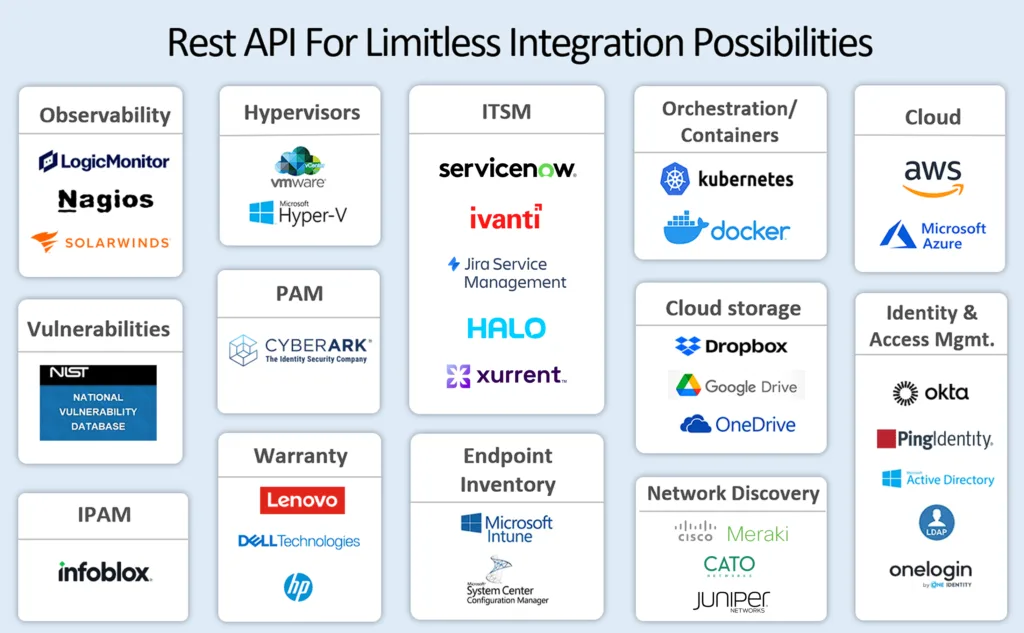
That discovery layer works alongside the ITSM and monitoring platforms a team already has, rather than requiring a replacement. Virima integrates bi-directionally with ServiceNow, Jira Service Management, Ivanti, Halo, Xurrent, Hornbill, and TeamDynamix, syncing CMDB data and ViVID™ service maps on every scan. CI data flows in both directions, with no lock-in and no platform displacement required.
This same current, relationship-aware data becomes the foundation AI agents need when handling incident triage, correlation, or remediation workflows. An agent acting on a stale CMDB or an outdated service map can misjudge a change’s blast radius or miss a dependency entirely. An agent acting on discovery-refreshed data has an accurate picture of what it’s actually operating on. Virima provides that current data foundation; the broader governance and access controls around agentic action sit with platforms purpose-built for that layer.


What is ITOM?
What does ITOM stand for?
How is ITOM different from ITSM?
What is an ITOM framework?
What is ITOM software?
What are ITOM tools used for?
How does ITOM relate to CMDB and service mapping?
— Get started
Move faster. Act safely.
without platform lock-in.