
Where to Get Windows Patch Data for a Centralized Patch Inventory

 Summarize with ChatGPT
 Summarize with Claude
When an auditor asks which servers missed last month’s cumulative update, WSUS, Configuration Manager, Intune, and the device itself each give a different answer. None of them reconcile automatically. Windows patch status lives in at least three places — update servers, endpoint management consoles, and the devices themselves — and they rarely agree. This guide covers where to get Windows patch data for a centralized patch inventory, what each source leaves out, and how to merge them into one defensible record.
What a centralized patch inventory needs from each source
A patch inventory ties each device to the updates it has installed, the updates it still needs, and the date that state was last reported. Four fields carry most of the value: device identity (serial number, cloud instance ID, or managed device ID), installed updates (KB number, title, and install date), missing or pending updates (what the device needs but has not applied), and the report timestamp — when the source last heard from the device.
Hostname makes a weak join key because machines get renamed and rebuilt. Use serial numbers for physical hardware and cloud instance IDs for virtual machines wherever a source exposes them. For more on why durable identity fields matter once patch data feeds a broader system of record, see ITIL Change Management and CMDB Accuracy: Why One Depends on the Other.
What data should a centralized Windows patch inventory contain?
A centralized Windows patch inventory should hold a durable device identity, the installed KB numbers with install dates, the updates each device still needs, and the timestamp of the last report. Storing the source name beside each value lets reviewers see which tool supplied it.
Source 1: Windows Server Update Services
Windows Server Update Services (WSUS) stores update approvals and per-computer status for machines that report to it. The Microsoft Windows Update overview describes the update channels that feed these tools.
WSUS reports whether each update is installed, needed, failed, or not applicable for every client. It also records the last time each client contacted the server.
Does WSUS show which devices haven’t checked in recently?
Yes. WSUS records the last contact time for every client alongside its update status, making it one of the few patch sources with a built-in staleness signal. A client that hasn’t checked in for 30 days should be treated as unverified, not as compliant, regardless of what its last reported status shows.
The main gap is scope. WSUS only tracks machines pointed at it, so roaming laptops and servers run by another team may never appear in its reports.
Source 2: Microsoft Configuration Manager
Configuration Manager builds on the same update catalog and adds richer inventory. The product documentation on software updates in Configuration Manager explains how it assesses compliance against deployed update groups.
You can pull compliance state per device and per update. Hardware inventory comes along with it, which supplies the serial number you need for a reliable join.
Compliance has a blind spot, though.
Does Configuration Manager compliance mean a device has every patch?
No. Configuration Manager compliance state only reflects updates included in a deployed update group. A device can show 100% compliant against last quarter’s group while missing every update released since, because compliance measures adherence to a defined target, not completeness against all available patches.
Source 3: Intune and Windows Update for Business Reports
Cloud-managed endpoints report through Intune. Update ring and feature update reports show device status, installed version, and the failure reason when an install stalls.
This source covers remote and hybrid laptops that never touch the corporate network. But it rarely covers legacy servers, so mixed estates usually pair it with WSUS or Configuration Manager.
Source 4: Direct device queries
When a management tool is missing or untrusted, you can query the device itself. The installed hotfix list and the Windows event log both record what the operating system applied.
These queries give ground truth for a single machine. They also need credentials, network reach, and a schedule, so they fit gap-filling better than full coverage.
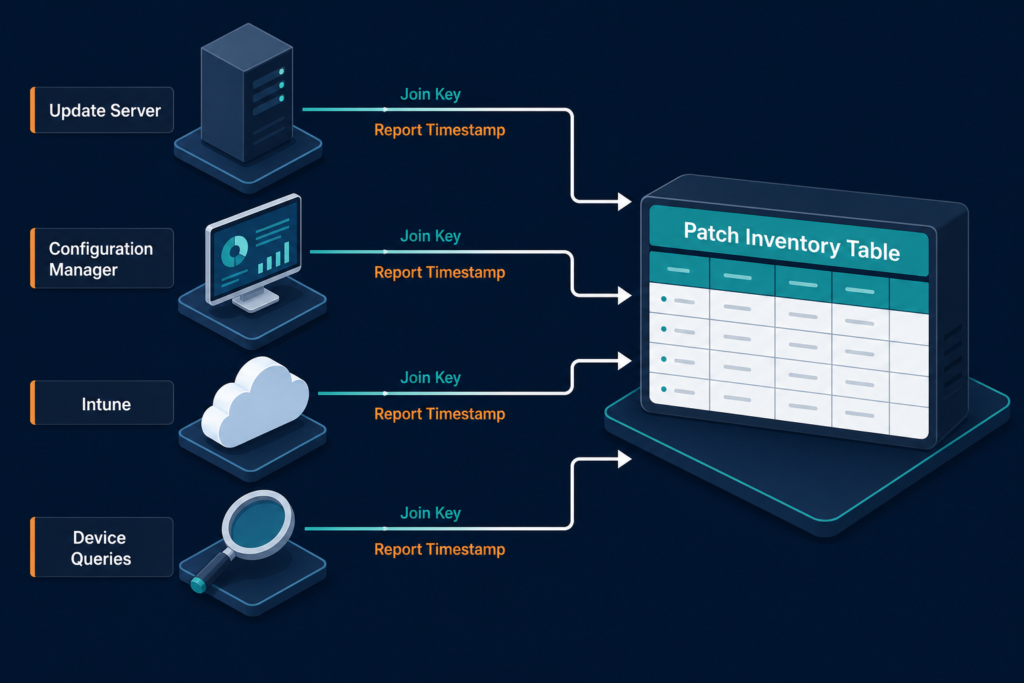
Comparing the four sources
Here’s how WSUS vs Configuration Manager vs Intune compare on what they report and where each goes quiet, alongside direct device queries as the gap-filler:
| Source | What it reports | Typical gap | Best used for |
|---|---|---|---|
| WSUS | Installed, needed, and failed updates per client | Only devices pointed at the server | On-network servers and desktops |
| Configuration Manager | Compliance per update group plus hardware inventory | Limited to deployed or scanned updates | Managed servers needing serial numbers |
| Intune | Update ring status and failure reasons | Rarely covers legacy servers | Remote and hybrid laptops |
| Device queries | Installed hotfixes and event log entries | Needs credentials, reach, and a schedule | Spot checks and gap-filling |
Where patch data disagrees
Two sources can describe the same device differently for ordinary reasons. One tool may have scanned yesterday and another last week. One may count a pending reboot as installed while another counts it as missing.
Three conflicts appear most often:
- A device appears in one source and is absent from another.
- A KB shows as installed in one tool and needed in another.
- A device reports under two names after a rebuild.
Why do two Windows patch tools show different status for the same device?
Each tool scans on its own schedule, counts pending reboots its own way, and may only manage part of the estate. A device can also report under a renamed identity after a rebuild. Recording the source and timestamp with each value exposes which report is newer.
Keep the source and timestamp beside every value instead of overwriting one with another. That lets a reviewer see why two numbers differ and which one to trust.
How to reconcile sources into one inventory
Patch inventory reconciliation comes down to five steps that build the central record.
- Pick a join key. Use serial number or cloud instance ID, and map aliases for rebuilt machines.
- Rank sources per field, treating Configuration Manager as primary for servers and Intune as primary for cloud-managed laptops.
- Store every value with its source and date. Conflicts become visible instead of hidden.
- Flag any device that has not reported within your agreed window as stale.
- List unmanaged devices. Any asset that appears in no patch source carries the largest risk.
The last step needs an asset list that exists independently of the patch tools, typically a CMDB that already tracks device ownership and configuration details. Teams building that link between update data and asset records can read about patch management and asset management and how the two programs share data. Without an independent list, you can only measure patch status for machines your tools already know about.
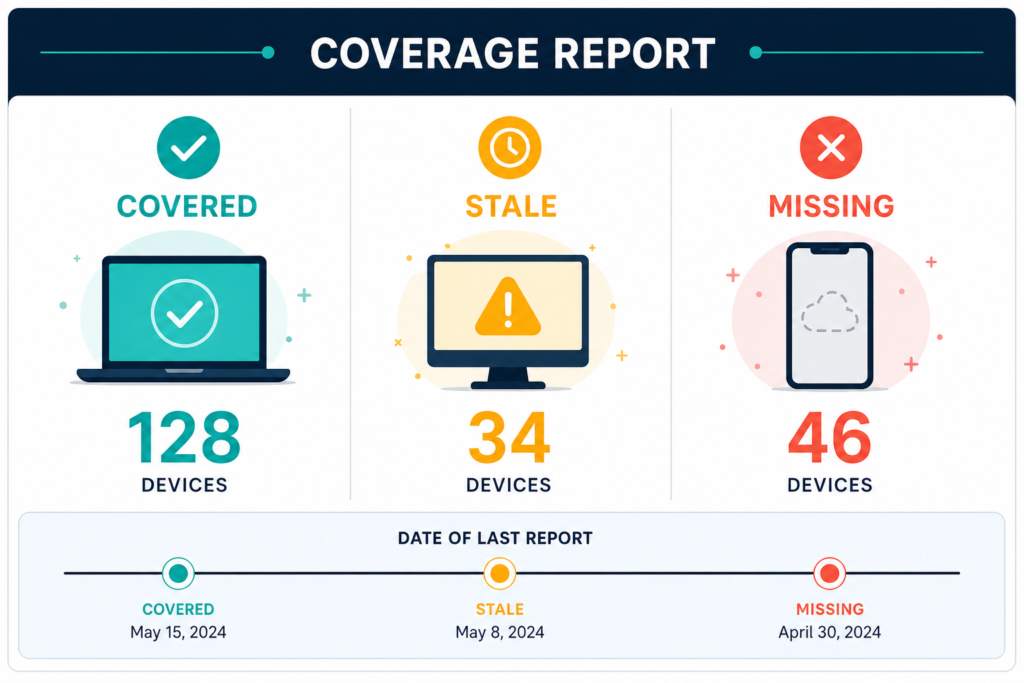
What is a patch coverage report?
A patch coverage report lists every known device as covered, stale, or missing against each patch source and the asset list. Covered means a device reported within the agreed window; stale means it hasn’t reported recently; missing means no patch tool has ever seen it. Teams that generate this monthly catch unmanaged devices before an audit does.
Why asset discovery completes the picture
Patch tools answer what is installed on the devices they manage. They cannot tell you which devices exist outside their reach. A discovery-sourced asset record fills that gap, built through agentless, agent-based, and API-based discovery cycles. These list hardware and virtual machines across the network and in AWS and Azure.
For IT leaders, every device missing from this picture is audit exposure and risk that doesn’t surface in a patch report until an incident or an auditor finds it first.
Comparing that list with your patch sources produces a coverage report that marks each device as covered, stale, or missing from every tool. SecOps teams can then chase the unmanaged devices first, since those are the ones no patch report will ever flag. Explore Trusted Runtime Truth to see how Virima gives patch and security teams a governed record of what exists, how it connects, what changed, what will break, and who owns it.
Virima supplies the asset context that tells you which patch sources should have reported. That combination — patch status plus an independent asset record — is what CMDB patch tracking actually requires, and it’s something patch tools alone can’t provide. Your update tools stay the record of installed and missing updates.
Adding vulnerability context for Windows Servers
Once the inventory is clean, security teams usually ask which missing patches matter most. The NIST National Vulnerability Database publishes CVE records that you can match to missing updates.
Virima overlays NIST NVD vulnerability data on ViVID™ service maps for Windows Servers. Service definitions come from your team through manual entry, spreadsheet import, or an integration, and the map builds from that input. Windows Servers make up a portion of a typical estate, so pair the overlay with a dedicated scanner for Linux and other workloads.
How do you prioritize missing Windows Server patches?
Rank missing server patches by the business service each server supports, then by whether the related CVE appears in a known-exploited list. A missed update behind a payment service outranks the same update on a test server, because the potential impact differs.
The overlay ranks missing server patches by the business services they support. A missed update on a server behind a payment service moves ahead of one on a test box.
The CISA Known Exploited Vulnerabilities catalog adds a second filter. Patches that close an actively exploited CVE move to the front of the queue. For the broader process behind these decisions, see the overview of what security patch management involves.
A practical starting point
You do not need to connect every source on day one. Start with the source that covers the most Windows devices, join it to your asset list, and measure the gap. Add the next source once that gap shows which devices it would cover.
Review the coverage report each month, and treat devices that keep appearing as unmanaged as a sign of a process gap such as a missing onboarding step.
To see how a discovery-sourced asset record can anchor your patch inventory and tell you which sources should have reported on a device in the first place, schedule a Virima demo with your own device counts in mind.
Frequently Asked Questions
Where can I find installed Windows patch data on a single machine?
The installed hotfix list and the Windows Update history on the device both record applied updates. The event log adds install and failure timestamps. These sources suit single-machine checks, but they need a management tool or scheduled query to scale.
Why do WSUS and Intune show different patch status for the same device?
Each tool scans on its own schedule and counts pending reboots differently. A device may also report to only one of them. Store the source and timestamp with each value so you can see which report is newer.
What is the best join key for a Windows patch inventory?
Serial number works for physical hardware and cloud instance ID works for virtual machines. Hostname changes with renames and rebuilds, so use it only as a secondary match.
How does Virima help find Windows devices that no patch tool reports on?
Virima runs scheduled discovery cycles across your network and in AWS and Azure to build an asset record. You compare that record with your patch sources to see which devices are covered, stale, or missing from every tool.
Which vulnerabilities does Virima overlay on Windows Server patch data?
Virima overlays NIST NVD vulnerability data on ViVID™ service maps for Windows Servers. The overlay shows which business services sit behind servers with missing patches, so teams can rank remediation by service impact.