The Challenges of Implementing ITIL Problem Management

Updated August 2026: Added process exit criteria, implementation KPIs, GEO definitions, and a single discovery/CMDB bridge for proactive problem management.
It starts with a single alert. Then another. And another. Within minutes, the service desk feels like an emergency room on a Monday morning. Phones ringing nonstop, chat windows blinking red, and every “urgent” ticket sounding more desperate than the last. Someone restarts a server (again), another resets a database connection, and for a fleeting moment, everything is calm.
But the same issues return, like a whack-a-mole game that never ends.
The team is stuck in a loop of quick fixes. Firefighting so often that no one remembers the last time they actually prevented an outage. It’s exhausting, costly, and completely unsustainable. That’s why ITIL problem management exists. The goal is not only to reboot the server. It is to fix the underlying configuration so the service stays reliable.
It’s the shift from being IT’s firefighters to becoming its architects. You focus on building systems that last. You also solve problems at their source instead of applying quick fixes. This way, the same issue doesn’t come back to disrupt your work.
What is ITIL problem management?
What is ITIL problem management?
ITIL problem management finds and removes the root causes of recurring incidents. Incident management restores service fast. Problem management records the underlying fault, tracks known errors and workarounds, and drives permanent fixes so the same outage does not return.
In IT service management (ITSM), problem management means finding and also fixing the real causes of recurring issues.
- Incident: A single unplanned service interruption.
- Problem: The root cause or potential cause of one or more incidents.
You focus on solving the root cause so the same issue doesn’t keep coming back.
Think of it like this: if a server keeps crashing, restarting it is incident handling. Finding out that the crash is due to a faulty driver is problem management. ITIL describes its goal as reducing both the likelihood and impact of incidents. In simple terms, it’s like diagnosing the illness instead of treating just the symptoms.
Even after a decade, many organizations still follow ITIL v3-style problem management. A 2014 vs 2024 itSMF UK problem management study still found mostly ITIL v3 practice, with only pockets of ITIL 4 among participating organisations. That gap means newer ITIL 4 practice is still uneven in the field. Problem management is not only an IT back-office job. It is a strategic move. By preventing or quickly resolving what causes outages, you save both time and money.
In reality, problem management covers both proactive and reactive work. You can spot and stop problems before they cause downtime. You can also investigate incidents so they do not return. Either way, your goal is stronger IT service reliability and higher customer trust.
Problem management vs. other ITIL processes
In fact, problem management works closely with several ITIL processes. As a result, by understanding these connections, you can keep IT operations smooth and efficient.
1. Problem vs. incident management
| ITIL Process | What it focuses on | How it works | Example |
| Incident management | Restoring service quickly after an unplanned interruption. | Your team applies a quick fix, sometimes temporary, to get systems running again. | A server crashes. You further reboot it so users can work again. |
| Problem management | Preventing incidents or reducing their impact by removing root causes. | Your team investigates why the issue happened and also works on a permanent solution. | The same server keeps crashing. Then, you analyze logs and capacity to find and fix the root problem. |
Tip: Think of incident management as restarting a frozen application. On the other hand, problem management is fixing the bug so it never freezes again.
What is the difference between incident and problem management?
Incident management restores service after an unplanned interruption, often with a temporary fix. Problem management investigates why incidents happen, documents root cause and known errors, and pursues a lasting change so related incidents stop recurring.
2. Problem and change management
Once a root cause is identified, fixing it often requires a change. Change management is the process of planning, approving, and deploying changes with minimal disruption.
| Aspect | Problem management | Change management |
| Main role | Finds and documents the root cause and solution. | Plans, approves, and then applies the solution safely. |
| End point | Stops after documenting the recommended fix. | Starts after receiving the fix details. |
| Example | Identifies that a server configuration must be updated. | Schedules as well as executes the update. |
| Goal | Remove the underlying cause of recurring issues. | Implement changes without causing service disruptions. |
| Collaboration | Shares findings and also reviews outcomes after the change. | Works with problem managers to confirm the fix worked. |
Tip: Think of problem management as diagnosing a broken engine. However, change management is the skilled repair that gets you back on the road. For how change decisions use dependency and impact context, see change impact context.
3. Problem and service request management
It’s easy to mix up service requests and problem management. But they have very different purposes.
| Aspect | Service request management | Problem management |
| Definition | Handles routine requests from users, which enhances the user experience | Identifies and fixes the root cause of issues. |
| Examples | Password reset, software installation, and access request. | Investigating recurring email failures and frequent network drops. |
| Process type | Follows a set, approved process. | Involves investigation and root cause analysis. |
| Urgency | Usually not urgent. | Often linked to major or recurring incidents. |
| Trigger | A single, planned need. | Multiple incidents point to the same fault. |
| Goal | Fulfill a request quickly and efficiently. | Remove the underlying cause to prevent future incidents. |
Tip: Think of a service request as ordering a new keyboard. However, problem management is figuring out why keyboards keep breaking in the first place.
The ITIL problem management process
ITIL and industry best practices give you a clear process for problem management. Your goal is to detect problems early, understand them, and also create solutions or workarounds.
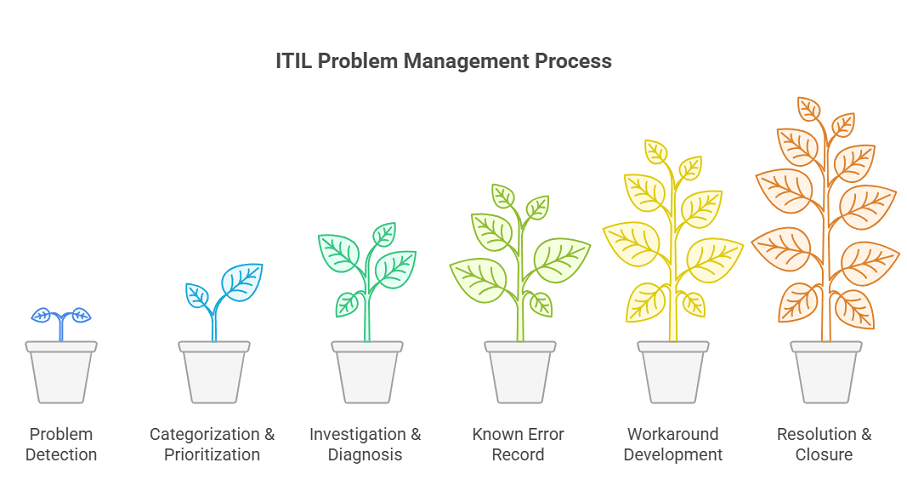
By following a systematic approach, you reduce risks and improve service reliability. Let’s walk through the key steps together.
Prerequisites before you run the process
Confirm a named problem manager or coordinator owns the queue. Incident categories must be clean enough to spot repeats. Analysts need log access plus current configuration and relationship data. Change management must accept problem-driven requests with clear risk notes.
Agree exit criteria before the first ticket. A problem stays open until the permanent fix is verified or a known error with a safe workaround is published. Do not close on “incident restored” alone.
| Step | Primary owner | Done when |
|---|---|---|
| Detection | Problem coordinator + monitoring owners | Problem record opened with linked incidents |
| Categorize / prioritize | Problem manager | Impact, urgency, and service tagged |
| Investigation | Technical lead + SMEs | Root cause hypothesis documented with evidence |
| Known error | Problem manager | Cause, workaround, and CI links in the KEDB |
| Workaround | Service desk + ops | Temporary control reduces user impact |
| Resolution / closure | Change owner + problem manager | Fix verified; no linked recurrence in the agreed window |
1. Problem detection
You can spot issues before they cause incidents (proactive) or identify them when incidents happen again (reactive). This often involves trend analysis, like noticing a rise in similar incidents. Alerts from monitoring tools can also flag potential trouble.
2. Categorization & prioritization
Record the problem with a simple, clear description. Then categorize it by service, severity, or another factor. Finally, prioritize it based on impact and urgency. This helps your team work on the most urgent problems first.
3. Investigation & diagnosis
Here, you find the root cause of the problem. You might use the “5 Whys,” fishbone diagrams, or data analytics. For instance, you may discover that nightly backups overload the network mapping and cause slowdowns.
4. Known error record
Once the cause is identified, create a known error record. This means documenting the problem and its fix in a central database. Consequently, the Known Error Database (KEDB) lets your IT team quickly find past solutions. As a result, it saves time and prevents repeated work.
5. Workaround development
If a full fix takes time, develop a workaround. This temporary solution reduces the impact while you plan the permanent fix. For example, you might restart a service automatically or redirect traffic. Workarounds keep your business rules running smoothly.
6. Resolution & closure
Apply the permanent fix, often through a change request. Then confirm the issue is gone and document the results. Only close the problem record when it can’t cause another incident. By following these steps, you move from reacting to problems to removing their root causes. Keep clear, detailed problem records at each stage so nothing slips through the cracks.
What are the main steps in the ITIL problem management process?
Core steps are problem detection, categorization and prioritization, investigation and diagnosis, known error recording, workaround development when needed, then resolution and closure through controlled change. Clear problem records at each stage keep ownership and evidence intact.
Key components of effective problem management
Effective problem management depends on a few core components and tools.
- Root Cause Analysis (RCA)
This process helps you find the “why” behind an issue. Think of it as detective work. You use tools like the 5 Whys or fishbone diagrams to move past symptoms and also reach the real fault.
In larger environments, RCA might mean comparing logs across servers or replaying incidents step by step. However, without this deeper analysis, fixes become quick patches that allow the issue to return.
Why RCA fails without current CI and dependency context
Root cause work collapses when the team cannot see which configuration items sit on the failing path. Logs show symptoms. They rarely show shared switches, software versions, or service tiers without a maintained configuration store and dependency map.
Before deep RCA sessions, pull the affected CI, its relationships, recent changes, and the business service path. If three broken endpoints share one software build or one network hop, the problem record should say so in the first hour, not the third war room.
Keep discovery on a high-frequency schedule so the map matches the estate you are diagnosing. Stale records send problem managers down dead ends and inflate mean time to identify root cause.
For ops outcomes tied to faster restore and fewer repeats, see incident response and MTTR.
- Known Error Database (KEDB)
This is a structured record of past problems, their causes, and solutions. You can think of it as your IT team’s library of “we solved this before.”
A strong KEDB stops you from reinventing the wheel. For example, if an application keeps failing from a memory leak, documenting the fix saves time. Next time, your team can apply the proven solution right away instead of diagnosing from scratch.
- Problem records
Every problem ticket should capture the key details. You need a clear description, the affected services, and the impacted users. You should also include the root cause analysis, any workarounds, and the final resolution steps. This record then becomes the story of the problem’s life cycle. It gives you a reliable audit trail and ensures accountability at each stage. With complete documentation, you avoid confusion and help everyone stay aligned.
Over time, these records do more than solve single issues. They highlight patterns, uncover recurring challenges, and guide smarter decisions.
Benefits of ITIL problem management
When done right, ITIL problem management delivers substantial business value:
1. Reduced downtime and costs
You can stop recurring issues before they disrupt operations. In 2024, over 90% of midsize and large companies said one hour of downtime costs more than $300,000.
So, every avoided incident saves you both money and valuable work hours. Fixing the root cause also costs far less than handling the same issue over and over.
2. Faster incident resolution
Teams that learn from past problems can respond faster to new incidents. When you document workarounds and playbooks, you avoid repeating the same mistakes.
As a result, service outages get solved more quickly, and business disruptions stay limited. In other words, IT problem management builds a simple knowledge base of fixes you can use again.
3. Higher productivity
When emergencies happen less often, IT staff can finally focus on strategic projects instead of constant firefighting. Right now, one report shows developers spend more than 57% of their time fixing performance issues and stuck in “war room” debugging sessions. That leaves little room for innovation.
When root causes stay fixed, unplanned work drops and teams regain time for planned improvements. Instead of patching one symptom after another, IT staff can put that time into higher-impact projects.
4. Better service quality and customer trust
When you apply fixes consistently, you prevent repeat issues and raise service reliability. As problem management improves, users notice fewer glitches. That consistency builds real confidence in IT.
Repeating the same incident again and again quickly erodes trust. Users trust IT when the same error does not return after a fix. Over time, IT shifts from being seen as the source of outages to being valued as a trusted partner.
Common challenges and how to overcome them
Implementing problem management can feel challenging at first. You may run into a few common pitfalls along the way. These hurdles are normal, but knowing them upfront helps you avoid wasted effort.

1. Endless firefighting
Many IT teams get stuck in “firefighting mode.” They rush to put out the latest fire and then quickly move on, with no time left to dig into the real cause. This cycle creates a growing backlog of hidden problems that never get addressed.
You can break the cycle by setting aside dedicated time or assigning clear roles for problem analysis. When leadership supports this effort, teams see the payoff. Investing in root cause analysis today means fewer emergencies and smoother operations tomorrow from the client side.
2. Resistance to change
Team members may feel comfortable with old routines or view problem management as extra work. Therefore, to overcome this, you need strong leadership support and clear communication. Share success stories that show real results, such as “Since we fixed X problem, we’ve had zero related incidents.” Training also plays a key role. Teach your staff the new processes and involve them in shaping how they work. When people help design solutions, they feel more invested.
Finally, reward openness. Encourage teams to share problems and cures in a blameless way, so finding and fixing root causes becomes something worth celebrating.
3. Resource and skill gaps
Proper root cause analysis often requires deep expertise, like network analysis or system internals. Not every team has these skills. Many organizations also lack the right tools to bring data together from across systems.
You can address this by investing in training or hiring consultants to build the needed expertise. Make sure analysts have reliable data sources, such as logs and your CMDB automation, along with automation tools that help spot patterns. If specialized knowledge is required, form cross-functional problem teams that bring together developers, DBAs, and other experts.
4. Maintaining momentum
New processes often lose momentum over time. After the initial push, people may slip back into old habits. To prevent this, set up regular feedback and review loops. Track problem metrics, such as the “incident recurrence rate,” and share areas for improvement with the team. Keep problem management on the agenda in IT meetings so it stays visible. Most importantly, promote a growth mindset. Celebrate how each resolved problem makes your IT environment stronger and more resilient.
In summary, the best way to overcome these challenges is with clear leadership and the right tools. Just as important, you need to treat problem management as a lasting culture shift, not a one-time project. When you approach it this way, progress sticks and teams see lasting results.
Problem management implementation checklist and KPIs
Use this scorecard in the first 90 days. It is vendor-agnostic. Score each row red, amber, or green in your ops review.
| Control | What “good” looks like |
|---|---|
| Roles | Named problem manager; on-call knows how to open a problem from a major incident |
| Detection rules | Repeat incident threshold (for example three similar tickets in 30 days) auto-flags a problem candidate |
| KEDB hygiene | Known errors include cause, workaround, CI links, and last verified date |
| Change linkage | Every permanent fix rides a change record with problem ID in the request |
| Configuration freshness | RCA starts from current CI and relationship data, not a static spreadsheet |
| Review cadence | Major problem review on a fixed calendar with open actions tracked |
Track a short KPI set monthly: incident recurrence rate for closed problems, percent of major incidents with a linked problem, KEDB hit rate during incidents, mean time to diagnose root cause, and percent of problems closed with a verified change. Share the trend in the same forum where major incidents are reviewed.
Shifting from reactive to proactive problem management
Traditionally, IT has been reactive. Teams fix incidents only after they happen. Problem management allows a proactive shift by finding and removing issues before they cause outages. Instead of waiting for a crash and asking, “What broke?” Your team looks for early warning signs.
For example, a metric alert might show disk latency slowly increasing. By digging deeper, the team discovers a failing disk or misconfiguration before users notice a problem. This is the heart of proactive problem management: spotting issues in the environment and fixing them before they interrupt service.
Shifting to this proactive model depends on good data quality. Problem managers rely on analytics and monitoring to spot issues early. They review incident logs for recurring patterns, check performance metrics for anomalies, and also study capacity trends to predict bottlenecks.
In practice, this often means using tools that correlate hundreds of alerts and highlight the few most likely to become major incidents. ITIL describes this as “finding the underlying problem” instead of mindlessly putting out fires. A simple analogy makes this clear. Traditional IT teams act like firefighters, always rushing to the next blaze.
InvGate’s 2025 incident management roundup cites Atlassian data that proactive responders rose to 68% in 2024 (InvGate). Organizations that succeed with this model enjoy smoother operations and also free up valuable time for innovation.
Achieving proactive problem management
Becoming truly proactive requires alignment across three areas: People, Technology, and Process. When these pieces work together, proactive problem management becomes part of everyday IT culture.
1. People
Leadership has to champion change. Senior IT executives should clearly share the vision, such as “We want to spend less time firefighting and more time improving.” They also need to support ongoing training so teams feel prepared. Another key step is breaking down silos.
Service desk, infrastructure, security, and development teams must work together on problems instead of working in isolation. Use education and change enablement so each group sees how problem work cuts their own ticket load. Finally, set clear roles and rewards. Appoint problem coordinators to guide the process. Recognize and celebrate the people who solve tough problems. These steps help build a proactive, collaborative culture.
2. Technology
You need reliable data and the right tools. Many organizations still struggle with scattered monitoring systems. A smart first step is consolidating data into one central view. This is often done with a Configuration Management Database (CMDB) supported by automated discovery tools.
When hardware, software, and service dependencies are mapped and kept current, you can run meaningful trend analysis. For example, a CMDB that feeds discovery data into analytics software might reveal a pattern. It could show that rising memory use across servers links directly to service degradations. Integrated ITOM and ITSM platforms can surface these patterns when monitoring, CMDB, and ticket history share identifiers. Automation and AI can take this further by triggering alerts or even running corrective actions, such as reallocating capacity, without human intervention.
ITCE, citing 2025 industry predictions, reports nearly 30% of surveyed experts named generative AI the most critical ITSM/ITIL trend for the year (ITCE). This shows how AI is quickly moving from a “nice-to-have” to an essential capability in problem management.
3. Process
Finally, refine your workflows. Use the same high-quality data in your processes to detect root causes and apply lasting fixes. Instead of stopping at “incident solved,” make problem review a formal step in your workflow. Blend asset data and service management records so inventory and security signals feed problem analysis.
This way, insights from asset inventories or security alerts feed directly into problem analysis. For example, your process could automatically raise a problem ticket if the same incident type happens three times in a month. Standardize regular reviews as well. Hold major problem review meetings to track trends and confirm follow-ups. When people, technology, and processes all align on early detection and resolution, your organization moves from simply reacting to confidently anticipating issues.
Where discovery and CMDB context feed problem management
Problem management needs more than a ticket queue. It needs current inventories, relationship maps, and incident history in one place so root cause work starts with evidence.
ITSM with asset and configuration data: Incident and problem records work better when they sit next to asset and configuration management. Shared inventories and service maps feed problem analysis, so teams see the full path of a recurring fault instead of isolated tickets.
Discovery-fed CMDB baseline: Scheduled discovery across network, data center, cloud, and virtual environments builds a live CMDB baseline of how systems connect. If several failing endpoints share the same switch or software version, that link shows up for the problem solver. That baseline is what makes pattern-based RCA practical.
Signals before the next outage: With assets mapped and monitored, reports can flag rising CPU on critical servers or a latency spike in a database. Problem managers can open work from those trends instead of waiting for another major incident. Blending asset data with past incidents also surfaces likely causes the team has already seen.
Unifying discovery, service dependency maps, and problem workflow is how teams move from constant restore cycles to fewer repeats.
Explore trusted runtime truth for how discovery-sourced context supports problem, incident, and change decisions. When you want a walkthrough of the platform, request a demo.
Frequently Asked Questions
What is the goal of ITIL problem management?
Reduce the likelihood and impact of incidents by finding root causes, publishing known errors and workarounds, and driving permanent fixes through change control.
How do you know problem management is working?
Watch incident recurrence for closed problems, the share of major incidents with a linked problem record, KEDB use during restore, and time to confirm root cause.
What belongs in a known error record?
Root cause, symptoms, workaround steps, affected CIs or services, related incidents, and status of the permanent fix or change.
When should a problem record close?
Close only after the permanent fix is verified, or a known error with a controlled workaround is active and monitored. Restoring one incident is not enough.
How does configuration data support Virima-led problem analysis?
Discovery-fed CI and relationship data show shared infrastructure and service paths, so teams diagnose recurrence with evidence instead of guesswork across tool silos.