
Mastering Atlassian Jira CMDB: Towards optimal IT management

Your Atlassian Jira CMDB (Configuration Management Database) is where Jira Service Management stores everything about your IT assets: what they are, how they’re configured, and how they connect to each other. When the data is solid, it speeds up incident resolution and helps teams plan changes with confidence.
The problem is that keeping a Jira CMDB accurate takes more effort than most teams expect. Manual data entry falls behind. Dependency maps go stale within weeks. And hybrid environments push the built-in tools past what they were designed to handle.
Virima plugs directly into Jira Service Management to close those gaps. It automates IT discovery, populates the CMDB with verified asset data, and maps service dependencies visually throughVirima Visual Impact Display (ViVID™). For Jira users, that means faster impact assessments, quicker root cause analysis, and a CMDB that reflects what’s actually running in your environment.
Identifying and overcoming Atlassian Jira CMDB challenges
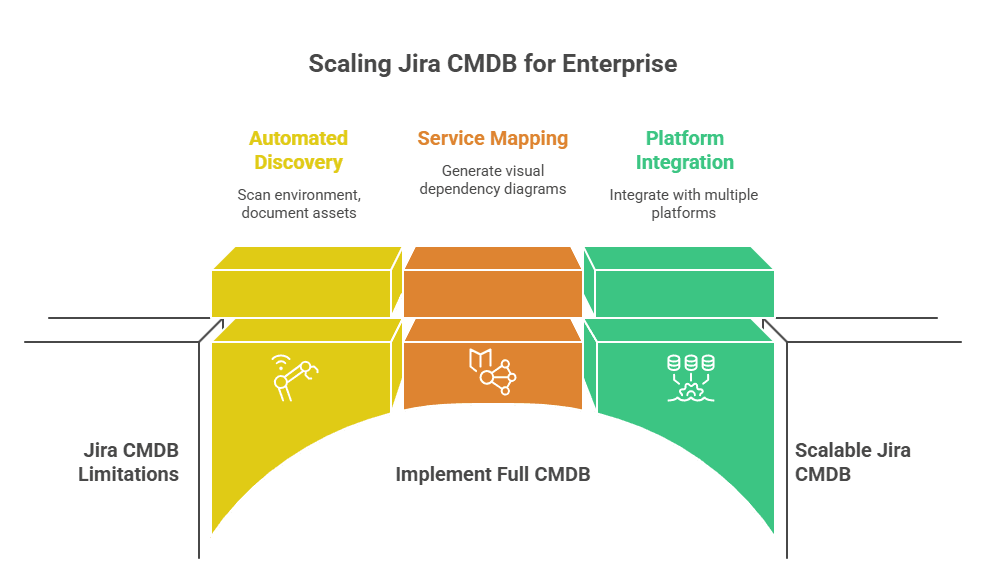
Jira Service Management handles incidents, changes, and service requests well. Its built-in Assets module (formerly Insight) provides CMDB functionality too, but teams often hit practical limits once they try to scale it. These are the most common problems and how to work around them.
Your CMDB is only as good as the data inside it. Manual data entry introduces errors from day one. Staff turnover means ownership records go stale. Frequent hardware and software changes widen the gap between what the CMDB reports and what actually sits on the network. Gartner estimates that poor data quality costs organizations an average of $12.9 million per year.
Set up validation checks on CI records and schedule regular audits to catch drift. The better approach, though, is to automate discovery so assets get documented as they appear—not when someone remembers to log them.
Lack of automation
Without automated discovery, your IT team burns hours on manual inventory updates. That effort competes with higher-value work and still leaves coverage gaps.
Automated asset discovery solves this by scanning your environment on a recurring schedule. It documents assets consistently, cuts down errors, and frees your team for work that actually needs a human.
Difficulty in dependency mapping
Knowing how IT assets depend on each other matters for both change planning and incident response. Without visual tools, figuring out those relationships means digging through spreadsheets or relying on whoever happens to remember how things connect.
Service mapping tools that generate visual dependency diagrams make this practical. A map showing which servers support which business services turns impact analysis from guesswork into something you can point at in a meeting.
Flexibility and scalability
As IT environments grow, tracking every physical, virtual, and cloud-based component gets harder. Hybrid setups spanning on-premise data centers, AWS, and Azure need a CMDB that adapts without someone manually rebuilding schemas every quarter. In fact, over 75% of enterprises now operate in hybrid or multi-cloud environments, which makes scalable, automated CMDB capabilities essential.
As IT environments grow, tracking every physical, virtual, and cloud-based component gets harder. Hybrid setups spanning on-premise data centers, AWS, and Azure need a CMDB that adapts without someone manually rebuilding schemas every quarter. With the vast majority of enterprises now running hybrid or multi-cloud environments, scalable and automated CMDB capabilities are no longer optional.
Pick a CMDB tool that integrates with multiple platforms and scales alongside your environment. It should support API-based discovery for cloud providers and container orchestration platforms, not just traditional network scanning.
How Virima strengthens your Atlassian Jira CMDB
Virima adds automated discovery, CMDB population, and service mapping to the Jira Service Management CMDB. Here’s what that looks like in practice.
Service mapping and Virima Visual Impact Display (ViVID™)
Virima’s service mapping builds visual representations of business service dependencies, infrastructure relationships, application dependencies, network topologies, and system communications.
ViVID™ then layers Jira Service Management records on top of those maps. Open incidents, recent changes, and planned changes all show up as overlays. Teams see at a glance what’s happening across their service landscape, which speeds up impact analysis for proposed changes and root cause identification when something breaks.
Code-free integration
Connecting Virima with Jira Service Management takes no custom coding. The setup runs entirely through Virima’s and JSM’s user interfaces. Virima provides bi-directional API integration with JSM, so asset and configuration data stays synchronized across both platforms.
During setup, you pick which Virima CI blueprints map to your existing JSM schemas and which ones create new schemas. Virima works with whatever CMDB foundation you’ve already built in Jira. Nothing gets overwritten.
Automated discovery for hybrid IT environments
Virima runs agentless IP-based scans supplemented with over 140 extendable probes to discover assets across your hybrid IT environment. API integrations extend that coverage to hypervisors, cloud platforms (AWS and Azure), container orchestration tools, network storage, and monitoring solutions.
Discovery runs on recurring schedules, keeping your Atlassian Jira CMDB current without manual work. Virima also offers optional agents for Windows, Linux, and macOS when agent-based discovery works better for remote or work-from-anywhere setups.
Autonomic Social Discovery™
Automated scans catch a lot, but not everything. Ownership information, business criticality ratings, lifecycle status, SLA assignments, and policy details tend to live in people’s heads rather than in any system.
Autonomic Social Discovery™ handles that side. It routes targeted questions to the right people, captures their responses, and feeds the answers back into the CMDB. The result is a more complete asset record without chasing people through email threads.
Why Virima is the right CMDB for Jira Service Management
Virima plugs into Jira Service Management to fix the three problems that hold back most Jira CMDBs: empty schemas, stale data, and invisible dependencies.
- Recurring discovery scans keep your JSM CMDB accurate without manual CSV imports or spreadsheet work.
- Service maps and ViVID™ overlays turn raw CMDB data into something incident, change, and problem managers can actually use during an outage or a change window.
- IT Asset Management capabilities go beyond configuration data. Virima tracks hardware and software inventory and supports financial and licensing audits for ITSM teams on JSM.
Virima syncs bi-directionally with JSM, so both platforms stay consistent. Discovery, service mapping, and ViVID™ all work together as part of the Virima platform.
If you’re looking for a reliable CMDB for Jira that fills itself and stays current, book a demo with Virima and see how it works with your environment.
FAQ
What is ViVID and how does it help with impact analysis?
ViVID (Virima Visual Impact Display) overlays operational data onto service dependency maps. It pulls incident and change data from Jira Service Management, along with vulnerability alerts, and shows everything in context so you can see which assets are affected and how they connect to business services.
In practice, that means you stop bouncing between screens and tickets. Open a ViVID map and you’ll see active incidents on dependent CIs, recent changes that may have caused the problem, and vulnerability alerts. Teams use this to prioritize remediation based on actual service impact, not gut feel.
What is the difference between Jira Assets and a full CMDB?
Jira Assets gives you the structure: object schemas, object types, and the ability to link assets to Jira issues. What it does not include out of the box is pre-built CMDB schemas or any form of automated discovery to populate those schemas. You can compare this in detail against Virima’s approach.
A full Atlassian Jira CMDB solution layers automated asset discovery, relationship mapping, and pre-defined CI blueprints on top of that structure. It maintains the database through recurring scans instead of CSV imports. In practice, that’s the difference between spending weeks building a CMDB from scratch versus having one that populates itself on day one.
How does CMDB integration reduce MTTR in Jira?
Mean Time to Resolution (MTTR) drops when responders can quickly see what broke, what depends on it, and who owns it. Virima’s service mapping and ViVID™ overlays give Jira Service Management users that context without switching tools.
Instead of tracing dependencies through spreadsheets, responders open a ViVID map and see the affected CI, its upstream and downstream dependencies, any recent changes on those dependencies, and active alerts. That visual context cuts root cause investigation time and helps teams restore service faster.





