
Simplify IT discovery and gain full visibility with Virima’s automated tools

IT environments don’t stand still. A developer spins up a cloud instance on Friday. An employee installs unapproved software on Monday. A contractor plugs a personal laptop into the network on Tuesday. By Wednesday, your asset inventory is already wrong — and your team doesn’t know it yet. According to Uptime Institute’s Annual Outage Analysis, over 60% of failures result in total losses of at least $100,000, highlighting how costly visibility gaps can become.
Automated IT discovery tools, including a modern auto-discovery tool approach and advanced network auto-discovery tools, fix this by scanning your infrastructure on a recurring schedule.
They identify hardware, software, applications, network devices, and their relationships without manual effort. The result is a current, accurate picture of what’s on your network and how it connects.
Virima’s IT discovery platform uses both agentless and agent-based scanning to map your entire environment. But discovery on its own isn’t the full picture. What makes it valuable is how that data feeds into your CMDB, your asset management workflows, and your service maps. That’s what gives your team the visibility to make faster, better-informed decisions.
This post covers why automated IT discovery matters, how it works in practice, and what Virima brings to the table.
Why automated IT discovery tools are essential for IT operations
Manual tracking breaks down as environments grow. Spreadsheets go stale, audits miss shadow IT, and nobody has a clear answer to “what changed since last week?” Automated IT discovery tools address this by running scheduled scans that detect changes across your infrastructure and updating your records without anyone opening a spreadsheet. New devices, removed assets, software installs, and configuration drift — all captured automatically.
For IT operations teams, this means three things:
- Accurate, current asset data. Every device, application, and service is cataloged and kept up to date through recurring scans.
- Fewer surprises during changes and incidents. When your dependency data reflects reality, change impact assessments and incident triage are faster.
- Less manual work on low-value tasks. Discovery automates the data collection that used to eat hours of your team’s week.
Virima’s automated tools handle this at scale, whether you’re managing a single-site network or a distributed, hybrid environment.
Keeping up with a constantly changing IT environment
Every IT environment is in motion. IDC projects that global data will grow to 175 zettabytes by 2025, dramatically increasing the scale and complexity of IT environments. Devices get added, decommissioned, or moved. Software licenses expire or get reassigned. Cloud workloads scale up and down. Without an auto-discovery tool or robust network auto-discovery tools, your team is always one step behind.
Virima’s IT asset discovery tools run scheduled scans across your network to identify and catalog every asset: physical servers, virtual machines, desktops, network gear, and cloud instances. Each scan updates your inventory so you’re never working from stale data.
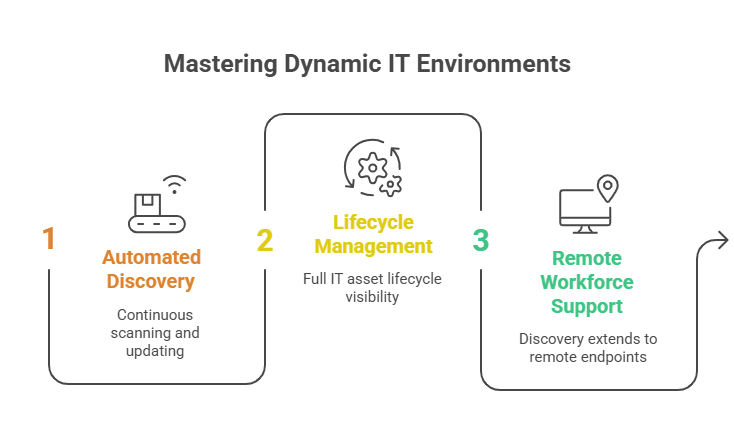
Beyond finding assets, Virima’s ITAM platform manages the full asset lifecycle from procurement through deployment, usage, maintenance, and disposal. You get a single view of every asset, who’s using it, what software is installed, and where it sits in the lifecycle. For teams managing hundreds or thousands of assets, this replaces guesswork with structured, current data.
Virima also supports remote and distributed workforces. Discovery tools scan remote networks and work-from-home endpoints, so your asset data doesn’t have blind spots just because employees aren’t on the corporate LAN.
Tighten internal asset management across the full lifecycle
IT assets move through distinct phases: procurement, deployment, active use, maintenance, and disposal. Tracking hundreds of assets through each stage manually is a recipe for lost licenses, missed renewals, and compliance gaps.
Virima’s IT Asset Management tools monitor the full lifecycle. You’ll know exactly:
- Which assets are active and who’s using them
- Which software licenses are approaching expiration or are underused
- Which devices are unregistered or non-compliant with company policy
This gives IT asset managers the data they need to optimize spend, recover unused licenses, and stay ahead of audits without relying on quarterly manual reconciliation.
Reduce audit errors by replacing manual discovery
Your team counts 51 devices and four servers, but nobody catches the 12 BYOD laptops, three shadow IT cloud instances, and a decommissioned server that’s still answering requests. When the auditor asks for a complete asset inventory, those gaps become findings. When an attacker finds them first, they become incidents.
Virima’s IT discovery tools uncover these hidden assets through scheduled scans that require minimal input from your team. The scans run daily, or on whatever schedule you configure, catching assets that manual audits overlook. You still have full control to add or modify CI details as needed. Automation handles the heavy lifting; your team handles the exceptions.
Identify and address vulnerabilities faster
Unidentified assets are the biggest security blind spots. You can’t patch a server you don’t know exists, and you can’t assess risk for devices missing from your inventory.
Virima’s IT discovery tools map your entire infrastructure through recurring scans, ensuring no asset goes untracked. Discovery data is then automatically checked against known CPEs and CVEs from the NIST National Vulnerability Database (NVD), included at no additional cost. ViVID™ (Virima Visual Impact Display) overlays this vulnerability data onto your service maps, so your team can see which assets are exposed and prioritize remediation based on each asset’s criticality to business services.
Virima’s discovery capabilities: network and application discovery
How network discovery maps your infrastructure
Virima’s network discovery uses both agentless and agent-based scanning to identify every IT asset on your network. The process covers physical servers, virtual machines, desktops, hypervisors, network devices, storage, and edge components, all cataloged with their relationships and dependencies.
A practical approach is to start with the assets that are easiest to discover and provide the most operational value: Windows servers and desktops on the corporate network. From there, expand to other operating systems, network infrastructure, and peripherals. Remote sites, cloud environments, and work-from-home endpoints come next, and for those, agent-based discovery or API-based collection may be required.
Virima also captures application dependency mapping data, showing how applications relate to the infrastructure they run on. This is critical for change management. If you’re planning to decommission a server, you need to know which applications depend on it before pulling the plug.
For assets that resist standard discovery (legacy devices, specialized equipment), Virima’s Autonomic Social Discovery fills the gaps by gathering non-discoverable attributes like ownership, business criticality, lifecycle status, and SLA details through automated human intelligence collection rather than network scanning.
How application discovery enhances IT visibility
Application discovery identifies and catalogs every installed application across your environment. It maps the relationships between applications and the infrastructure they depend on: which servers host which apps, which databases feed which services.
This visibility matters when you’re deploying new applications, planning changes, or assessing risk. If you know that a critical business application depends on three specific servers and a shared database, you can plan maintenance windows and change requests with confidence. Without that mapping, you’re guessing at impact.
Virima’s application discovery feeds directly into service mapping, building a visual picture of how applications, infrastructure, and services connect. ViVID™ then overlays ITSM records — open incidents, planned changes — and NIST NVD vulnerability data onto those maps, so your team sees not just what’s connected but what’s at risk or in flux.
Drive operational efficiency with automated IT discovery
Automated IT discovery goes beyond asset inventory. It builds the data foundation that every IT operations process depends on. Accurate asset data improves change management, speeds up incident response, strengthens compliance posture, and reduces wasted license spend.
Virima’s discovery platform connects this data across your CMDB, ITAM, and service mapping workflows. It also integrates with ITSM platforms, including ServiceNow, Jira Service Management, Ivanti, HaloITSM, and Cherwell, with bi-directional CMDB sync, so configuration data stays consistent across systems regardless of which ITSM tool your team runs.
Request a demo to see how Virima’s IT discovery tools work in your environment.
FAQ
What’s the difference between agent-based and agentless discovery?
Agentless discovery scans network assets remotely using protocols like WMI, SSH, and SNMP without installing software on the target device. It’s fast to deploy and covers most on-premises infrastructure with minimal overhead.
Agent-based discovery installs a lightweight agent on the target device. This is useful for endpoints that aren’t always on the corporate network: remote laptops, work-from-home desktops, and devices behind firewalls that block inbound scans.
Most organizations use a blended approach. Virima supports both methods and supplements them with API-based collection for cloud environments (AWS, Azure) and third-party platforms. This ensures full coverage regardless of where assets live.
How does IT discovery help with CMDB accuracy?
A CMDB is only useful if its data is current. When asset records go stale (retired servers still listed as active, missing dependencies, outdated ownership), every process that relies on the CMDB suffers. Change impact assessments become unreliable. Incident responders waste time tracing connections manually.
Automated IT discovery solves this by feeding scan results directly into the CMDB. Every discovered asset becomes a configuration item (CI) with its relationships and dependencies mapped through Virima’s machine-learning-based discovery. The result includes infrastructure relationships, application dependencies, and host-to-host communications, all kept current through scheduled scans. If something changes between cycles, the next scan picks it up so the CMDB reflects what’s actually on the network, not what was there six months ago.
Virima’s configuration management processes are PinkVERIFY certified for ITIL 4, covering service asset and configuration management — so the CMDB isn’t just current, it’s built on a verified framework.
How automated discovery keeps your team focused on high-value work
Manual discovery is slow, repetitive, and error-prone. Every hour your team spends cataloging assets or reconciling spreadsheets is an hour not spent on incident response, capacity planning, or process improvement.
Virima’s automated IT discovery tools take over the data collection. They discover hardware, software, applications, network devices (routers, switches, load balancers), and network services (DNS, DHCP, Active Directory). The optional Discovery Agent tracks software usage on Windows, macOS, and Linux endpoints, while Autonomic Social Discovery gathers ownership and business context that standard scans can’t capture. Changes get detected automatically with each scan cycle, so there’s no lag between a configuration change and your records reflecting it.
This matters most for growing organizations. Manual processes don’t scale. If your network doubles in size, you’d need to double the audit effort. Automated discovery scales without adding headcount. The same tools cover 500 devices or 50,000.
How often should IT discovery scans run?
Scan frequency depends on how fast your environment changes. Most organizations start with daily scans for their core network: physical and virtual servers, desktops, and network infrastructure. That’s frequent enough to catch routine changes without overloading the network.
For environments with high churn (cloud workloads, DevOps pipelines), more frequent scans or event-triggered updates may be appropriate. For stable environments like storage arrays or peripherals, weekly scans often suffice. Virima lets you configure scan schedules per subnet or IP range, so you can match frequency to the rate of change in each segment of your network.





