
Transform your IT Operations: Integrating Jira Service Desk with Virima

In fast-paced IT environments, having the right tools isn’t just an advantage; it’s table stakes. Jira Service Desk (now Jira Service Management, or JSM) is one of those essential tools. But JSM on its own doesn’t give you full visibility into what’s running across your environment, what depends on what, or which assets take the hit when something changes.
That’s where Virima fits. By integrating Virima’s IT discovery, ViVID™ service mapping, CMDB automation, and Autonomic Social Discovery with Jira Service Desk, your team gets accurate, up-to-date infrastructure data flowing straight into the service desk. The payoff: faster ticket resolution, better change decisions, and fewer blind spots across your IT operations.
This blog walks through how each Virima capability strengthens your JSM setup and what that looks like in practice.
How does Virima address core IT operations challenges?
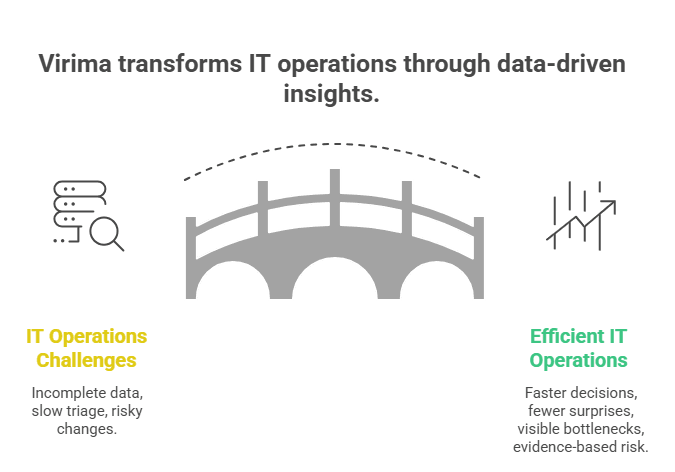
IT operations teams deal with a familiar set of problems: incomplete asset data, unclear dependencies, slow incident triage, and change windows that feel like a gamble. Discovery and visualization tools solve these by giving your team a clear, current picture of the environment. Here’s how Virima maps to those needs:
Better data for faster decisions
When a P1 incident hits, your team needs to know what’s affected. Don’t spend 20 minutes pulling stale data from a spreadsheet. Virima’s service mapping and ViVID™ give you visual dependency maps showing which services, applications, and infrastructure components are connected. Your incident response team sees the blast radius immediately, not after three escalations.
Fewer surprises during change windows
Every change advisory board meeting runs better when the dependency data is accurate. Virima’s recurring scheduled scans keep your CMDB current, so when a change request comes through in JSM, the impact assessment reflects what’s actually running, not what someone documented six months ago.
Operational bottleneck visibility
Process bottlenecks hide in the gaps between what your tools see and what actually exists. Virima’s discovery maps your full infrastructure across on-prem, AWS, and Azure so your team can pinpoint where slowdowns originate instead of guessing.
Dependency-aware risk management
Virima’s IT discovery, service mapping, and ViVID™ work together to map dependencies across your environment. Planning a server migration or a network change? You see exactly which services sit downstream. That dependency clarity turns risk assessment from guesswork into evidence.
ViVID™: Visual impact analysis for JSM teams
Virima Visual Impact Display (ViVID™) overlays ITSM incident and change data, NIST NVD vulnerability information, and event management alerts onto your service dependency maps. For JSM users, that means you see the operational impact of any event right on the map, without switching between tools.
How ViVID™ supports change management in JSM
When a change request lands in JSM, your team needs to know who’s affected and what could break.ViVID™ overlays planned and recent changes onto service dependency maps alongside open incidents and alerts. When reviewing a change request, IT managers can see which CIs in the affected service already have open incidents or other planned changes, spot potential change collisions, and approve or hold the change based on current data, not assumptions.
Cutting downtime with visual root cause context
When a service disruption hits, ViVID™ shows which CIs are involved and how they connect. Instead of tracing dependencies by hand, your ops team sees the affected path visually. That context speeds up root cause identification and gets services back faster, directly reducing MTTR for incidents tracked in JSM.
Connecting ViVID™ to your JSM workflow
Virima’s integration with Jira Service Management keeps the data ViVID™ displays in sync with your ITSM records. When discovery updates a CI, that change flows into JSM through bi-directional sync. Your service desk agents see accurate CI data attached to tickets without typing a thing.
Proactive event management
ViVID™ visualizes system alerts and maps their potential impact on business services. When an alert fires, your team sees not just the affected device but every service that depends on it. That turns event management from reactive firefighting into proactive impact assessment, helping your team catch outages before they cascade.
How does Virima integrate with Jira Service Desk?
Virima’s JSM integration uses bi-directional synchronisation to keep CI and asset data consistent between Virima’s CMDB and JSM’s configuration management. When Virima discovers a new asset or detects a configuration change, that data syncs into JSM through frequent, automated updates. And when a service desk agent updates a CI, say, assigning an owner or flipping a status, that update flows back to Virima. The sync runs on a scheduled cadence, not as a continuous stream, but it keeps both systems aligned without manual intervention.
This bi-directional flow means your team works from one source of truth, whether they’re in Virima or in JSM. No manual exports. No stale CSV imports. No debates about which system has the right data.
What is the difference between Jira Service Desk and Jira Service Management?
Jira Service Desk was Atlassian’s original IT service management product. In 2020, Atlassian rebranded it to Jira Service Management (JSM) and expanded its scope to cover change management, incident management, and asset/configuration management. JSM is the current product name. Throughout this blog, we use both terms because many IT teams still search for Jira Service Desk when looking for JSM resources. Virima integrates with JSM and supports its full ITSM capabilities, including CMDB population and service dependency visualisation.
Flexible IT discovery that feeds your service desk
Virima’s IT discovery runs agentless IP-based scans across your network using extendable probes for deep analysis of hardware and software configurations. Agent-based discovery covers Windows, macOS, and Linux endpoints that need continuous monitoring. API integrations with hypervisor, cloud, container, orchestration, network, storage, and monitoring platforms round out the coverage.
For JSM teams, the value is direct: every asset and CI that Virima discovers populates your CMDB automatically. Service desk agents don’t hunt for asset details when handling a ticket. The data is already there, attached to the CI, kept current by recurring scans.
CMDB accuracy that your service desk can trust
A CMDB is only useful if its data is accurate. Virima’s CMDB automation keeps CI records current through intelligent automation that begins with discovery and includes granular business rules to maintain data accuracy. Data normalization and reconciliation maintain consistency across your CMDB as your infrastructure changes, and relationships between CIs update with each discovery cycle.
For JSM users, the CI attached to a ticket reflects what’s actually deployed, not what was last manually entered. Accurate CMDB data also means deeper, more reliable CI attributes. Virima’s discovery collects detailed hardware and software configuration data with what the IT Discovery page calls “astonishing accuracy,” giving your team more confidence in the data behind their decisions.
Autonomic Social Discovery: Capturing what scans can’t
Virima’s Autonomic Social Discovery (ASD) automates the gathering of human intelligence for CI attributes that technical scans miss. Asset lifecycle status, ownership, business criticality, associated policies, and SLA assignments are all human-knowledge attributes critical for service desk operations but invisible to network scans.
ASD workflows route targeted questions to the right people, capturing this data systematically instead of relying on tribal knowledge. For JSM teams, ASD-populated attributes give your team members better context during ticket handling. When an incident arrives, you see more than just device details. You also know who owns the asset, how critical it is, and which SLA applies. Because of this, you can resolve requests faster and with fewer errors.
In addition, this rich context supports your knowledge base over time. Your team can document common issues and solutions more clearly. As a result, you can improve service quality and consistency. This helps your team work faster and deliver a better user experience.
How ITAM integration strengthens Jira Service Desk efficiency
Virima’s IT Asset Management capabilities track assets through their full lifecycle, from procurement through production to retirement.
When ITAM data syncs with JSM, service desk agents can access the asset’s lifecycle information through the CMDB data attached to tickets. A request about a decommissioned server gets handled differently than one about a production database, and the lifecycle data makes that distinction automatic.
This integration also gives IT asset managers full-lifecycle visibility into hardware and software assets, helping them manage inventory and track asset status without leaving the ITSM workflow. Less time investigating asset status during ticket resolution means faster closes and fewer re-opens.
Why Jira Service Desk works better with Virima’s discovery and CMDB
Virima’s discovery, CMDB, ViVID™, ITAM, and ASD capabilities plug directly into Jira Service Management through bi-directional sync. The result is a service desk running on accurate, current, dependency-aware data instead of whatever someone last typed into a spreadsheet.
For IT operations teams, this integration means faster incident resolution, safer change management execution, and a CMDB that actually mirrors your infrastructure. Those show up in reduced MTTR, fewer failed changes, and service desk agents who trust the data they work with.
If your service desk runs on incomplete or stale data, you already know the cost: longer resolution times, risky changes, and a CMDB nobody believes. Virima fixes that at the source. Ready to see what Virima + JSM looks like in your environment? Schedule a demo and see the Jira Service Desk integration in action.





