Software Normalization Fails Quietly, and Your License Position Pays for It

An Oracle Java audit can expose software records your team thought it understood. A device may show “Java” in inventory, while its publisher, version, and licensing terms remain unclear. Without those details, an ITAM manager cannot confidently connect an installation to the right agreement.
Oracle introduced its employee-based Java SE Universal Subscription in 2023. In a 2025 survey of 500 ITAM and software asset management professionals who use Java, 73% reported an Oracle Java audit within the previous three years. Azul and the ITAM Forum authored the survey report. Azul also sells Java products, including an alternative to Oracle Java.
Software normalization helps the ITAM team separate product identities before comparing installations with entitlements. The work starts with publisher names, but it must preserve the version and edition details that can affect licensing.
Can Virima Normalize Software and Flag Over- and Under-Licensing?
Virima standardizes software publisher and product names and tracks licenses against discovered installations. Its license records support a comparison between seats used and seats licensed, helping teams identify potential gaps or excess.
The ITAM team still needs to confirm product identity, discovery coverage, contract terms, and the applicable license metric. A seat comparison is a starting point for review, especially when an agreement uses employees, processor capacity, or another measure.
What Is Software Normalization in ITAM?
Software normalization connects inconsistent inventory descriptions to a usable product identity. An inventory may contain several publisher spellings for one vendor, or product names that omit an edition or version.
A useful normalized record preserves four pieces of information:
- Publisher: Which company supplied the software?
- Product: Which application or platform was discovered?
- Version and edition: Which release and edition are installed?
- Evidence: Which device reported the installation, and when?
The team can then match that identity to the relevant purchase record and licensing terms. Keep the original discovery string available for review, particularly when a match is uncertain.
NIST’s Common Platform Enumeration specification illustrates a structured naming approach using attributes such as vendor, product, and version. It helps describe product identity, but a product identifier alone does not establish license rights.
| Inventory situation | Potential effect on the count |
|---|---|
| One publisher appears under several names | Installations can be split across separate totals. |
| Different editions share one broad product name | Installations with different rights can be grouped. |
| A version is missing from the record | The team may be unable to match the correct agreement. |
| The same device appears twice | Duplicate inventory can inflate the apparent installation count. |
A normalized name is most useful when the underlying evidence remains available. Reviewers need to understand why two strings were grouped and whether the agreement permits them to be counted together.
Why Software Normalization Matters for Your License Position
An effective license position compares relevant consumption with the entitlements available under an agreement. Both sides need the same product scope and the same unit of measure.
The U.S. Government Accountability Office described this challenge in a 2026 report on the Department of Veterans Affairs. GAO found that the department had not regularly compared software licenses in use with purchase records. The resulting gap made it difficult to determine whether the department had purchased too many or too few licenses.
Three inventory problems can distort a position before contract review begins:
- Split identities: One product appears under several names, so each list shows fewer installations than the combined estate. Result: A shortage can remain hidden.
- Merged editions: Records combine products with different licensing terms. Result: The team may compare installations against the wrong entitlements.
- Missing or duplicate devices: Scan gaps omit installations, while duplicate records can count one installation twice. Result: Either direction can produce a misleading variance.
A license position should also show when inventory was collected and which systems were outside the scan. Those boundaries give the reviewer a reason to trust, qualify, or investigate the count.
What an Indefensible Position Costs
For an ITAM manager, an audit request often brings two tasks at once: produce a count and explain how it was calculated. If the team cannot trace an installation back to a device and a contract, each questionable line requires investigation.
For finance, the exposure can appear in different forms. A genuine shortfall may require an additional purchase or negotiated settlement. An apparent surplus can prompt a renewal reduction, but only after the team confirms the licenses are transferable and the installations are no longer needed.
Publisher rules can make those decisions more demanding. Under IBM’s sub-capacity guidance, eligible products and environments must meet specific requirements, including use of IBM License Metric Tool or another approved validated tool. Failure to meet applicable requirements can lead to full-capacity charging under the relevant terms.
Microsoft’s core-based licensing guidance describes product-specific rules for physical and virtual deployments. Oracle Java agreements can use an employee-based metric. IBM products may use processor value units or other capacity measures.
These examples call for different evidence. An installation list helps locate software, while a defensible position also requires the contract, the applicable metric, and any publisher-required reporting.
How Normalized Discovery Data Produces Over- and Under-Licensing Flags
A useful review begins with evidence from discovery, then connects it to an agreed product identity and entitlement. Each stage can reveal a different reason for a variance.
Start with discovery evidence
Run discovery across the devices and environments included in the review. Record successful scans, failed credentials, unreachable systems, and the date of the latest results.
For each installation, retain the reported publisher, product, version, and device association. A device serial number or cloud instance ID can help distinguish assets when names change. Hostnames alone should not be treated as durable identifiers.
Discovery coverage affects the conclusion. A low installation count may reflect an inaccessible server rather than a genuine reduction in deployments.
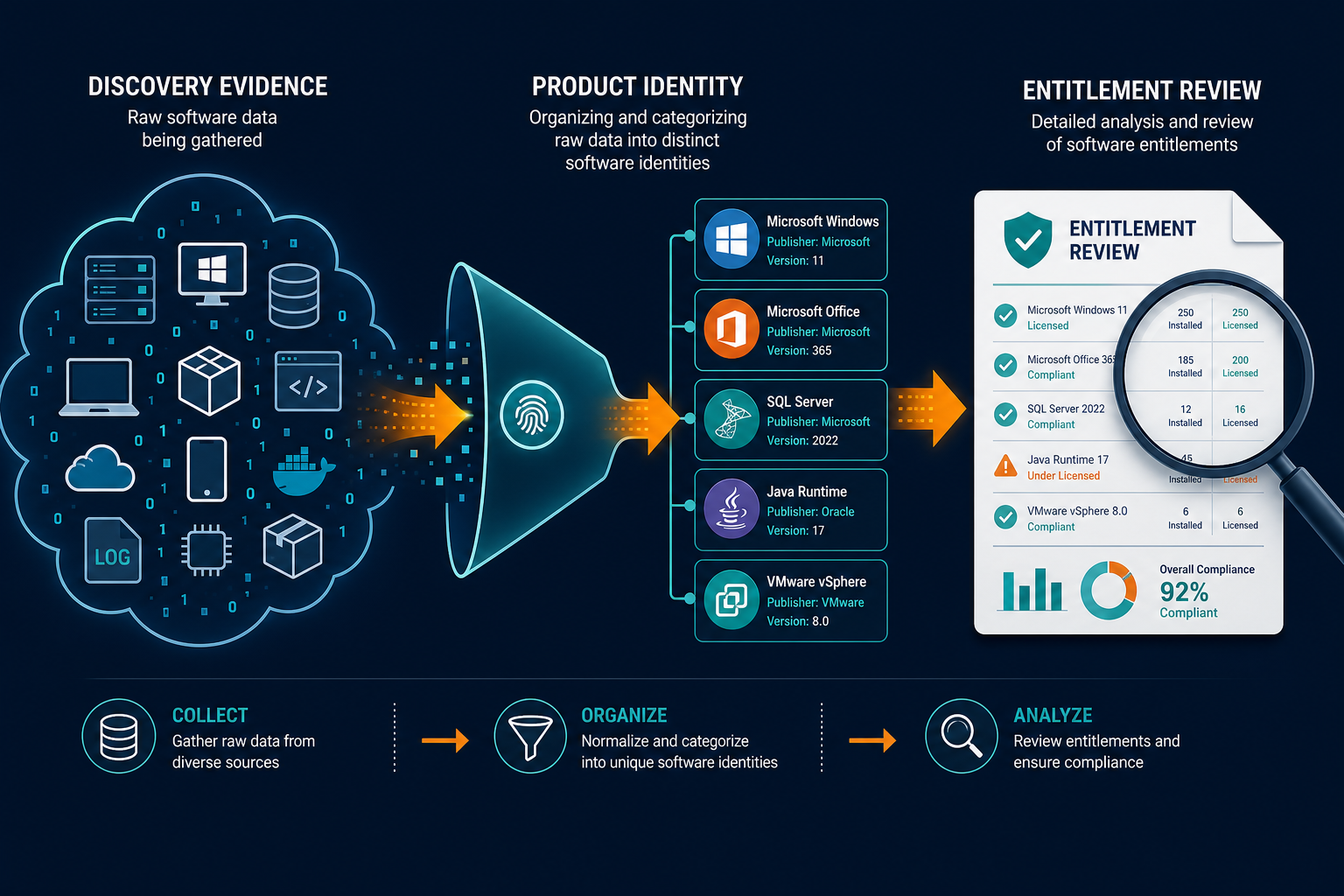
Resolve the product identity
Group equivalent publisher and product names after reviewing the evidence. Keep distinct editions or versions separate when their agreements or usage rights differ.
An ambiguous record belongs in a review queue until the team can identify it. For example, a Java entry without a publisher or build may need investigation before it is assigned to an Oracle entitlement.
Virima’s software normalization standardizes publisher and product names. For a specific evaluation, ask the product team to demonstrate how your edition-level records are identified and reviewed.
Connect the applicable entitlement
For a seat-based agreement, compare the relevant installed or assigned seats with the entitlement recorded for that product. Confirm the contract period, purchase evidence, assignment rules, and permitted uses.
For capacity- or employee-based agreements, gather the additional evidence required by the publisher. A count of installations cannot substitute for an employee calculation or an approved capacity report.
A negative difference can indicate a possible shortfall. A positive difference can identify a possible surplus. In both cases, the ITAM team should validate the inputs before reporting a compliance finding or changing a renewal.
| Review method | Evidence available | Question for the ITAM manager |
|---|---|---|
| Separate spreadsheets | Inventory and purchase lists may use different names and dates. | Can each count be traced to a device and agreement? |
| Normalized records with linked licenses | Product identities and license records provide a clearer basis for comparison. | Are coverage, identity, and the license metric correct? |
Check each variance before acting
For a possible under-licensing result, check whether duplicate assets or an incorrect edition inflated the count. Then confirm that all relevant purchases and contract rights are included.
For a possible over-licensing result, check whether systems were missed by discovery or licenses are reserved for planned deployment. Review transfer rights and renewal terms before treating unused entitlement as reclaimable.
Where the comparison depends on a seat count, Virima can support the review through its linked license and software records. The final interpretation remains with the people responsible for the agreement.
Software Normalization Examples in Practice
Java before an audit request: Separate identified Oracle builds from other Java distributions. Investigate records with an unknown publisher or version before applying the relevant agreement.
SQL Server on virtual hosts: Confirm the edition and deployment location, then examine the applicable physical or virtual core rules. An installation count alone does not establish the required licenses.
IBM sub-capacity reconciliation: Use discovery to help identify installations and their hosts. Compare that inventory with the required IBM-approved reporting and investigate differences.
A retired laptop: Confirm that the device is retired and the software has been removed or reassigned. Keep the historical record, then review whether its license can be reused.
What Virima Handles, and What Stays With Your Team
On day one, the ITAM team can configure discovery for its selected estate and establish an inventory baseline. Virima can identify installed software and maintain records for the assets where it is found.
The team can then review normalized publisher and product names against its agreements. Virima tracks licenses against installations, giving the manager a basis for investigating potential over- or under-licensing.
Between audits, scheduled discovery cycles provide new evidence about the scanned environment. Failed scans and exclusions still need attention because the recorded position depends on the systems reached.
Virima also works alongside service management workflows. Teams can use discovered asset records for operational context, while keeping license interpretation and publisher-specific calculations with the responsible specialists.
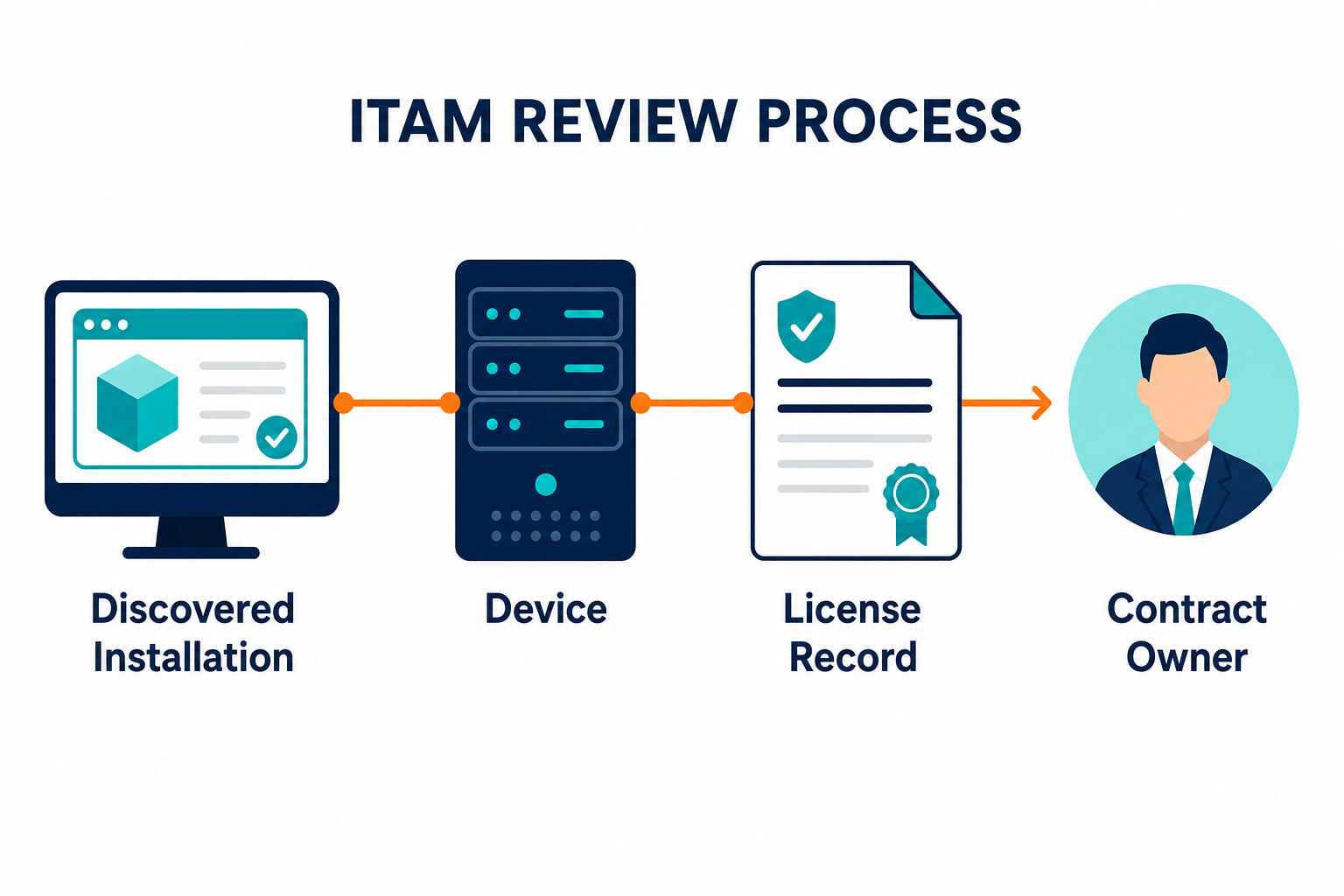
The ITAM team remains responsible for checking contract rights, publisher rules, and approved reporting requirements. It should also confirm whether a surplus can be reassigned and whether a potential shortfall represents a contractual exposure.
For broader asset context, explore Virima’s Trusted Runtime Truth, including what exists, how assets connect, what changed, what could break, and who owns them.
Moving From Spreadsheet Reconciliation to Normalized Evidence
A move away from disconnected spreadsheets starts with two changes:
| Current practice | Change to make |
|---|---|
| Counts are assembled from files with different product names. | Review product identities against discovery evidence before combining totals. |
| Purchase records are checked only when an audit arrives. | Connect entitlements to the relevant products and review variances on a schedule. |
This approach gives audit preparation a traceable starting point. It also gives procurement stronger evidence for renewal discussions and helps the team investigate licenses that may be available for reassignment.
Getting started
- Choose three publishers. Select agreements with meaningful audit exposure or an upcoming renewal.
- Define the scope. List the devices, environments, and exclusions included in the review.
- Review discovered identities. Resolve uncertain publisher, product, version, and edition records.
- Match entitlements and metrics. Link the relevant agreements and gather any publisher-specific reports.
- Investigate each variance. Assign an owner, document the evidence, and record the decision.
Start with a manageable set of agreements, then expand once the team can explain how each count was produced.
Test It on Your Top Three Publishers
Bring your highest-priority agreements to an ITAM demo with Virima. Your team can review discovery coverage, software identity, and the evidence needed for each license metric.
Frequently Asked Questions
What is software normalization in license management?
Software normalization connects inconsistent inventory names to a usable product identity. ITAM teams review publisher, product, version, and edition details before matching installations to the relevant entitlements and contract terms.
How does normalization affect an effective license position?
Normalization helps teams group equivalent records and separate products with different rights. The resulting count supports an effective license position when the team also checks discovery coverage, entitlements, and the applicable license metric.
Can an installation count establish software license compliance?
An installation count provides useful evidence, but compliance depends on the agreement. Some products use employee, processor, core, or other metrics that require additional records and publisher-specific interpretation.
Can Virima identify potential over- and under-licensing?
Virima tracks license records against discovered installations and supports seats-used versus seats-licensed comparisons. The ITAM team should investigate a variance and confirm the applicable contract before making a compliance determination.
Does Virima replace IBM’s required sub-capacity reporting?
Virima can provide discovery evidence for installed software and assets. For IBM sub-capacity licensing, follow the applicable agreement and IBM’s requirements for its License Metric Tool or another approved validated tool.