Understanding hybrid and multi-cloud network topologies

IT teams rarely run everything in one place. Instead, you spread workloads across on-prem systems and cloud platforms. As a result, you manage multiple environments at once.
Most teams choose between hybrid cloud and multi-cloud setups. However, each solves a different problem and comes with trade-offs.
If you choose the wrong setup, you waste budget and lose visibility. This can slow down your response to issues.
In this guide, you will learn how each model works and how to choose the right one.
What is a hybrid cloud topology?
A hybrid cloud combines public and private cloud infrastructure into a single architecture. Workloads and data move between on-premises systems and cloud platforms based on performance, cost, or compliance needs.
Hybrid setups give IT teams direct control over sensitive data while still tapping public cloud for burst capacity or less-critical workloads. An organization might keep its core databases on-prem, for example, but run analytics or customer-facing applications in AWS or Azure.
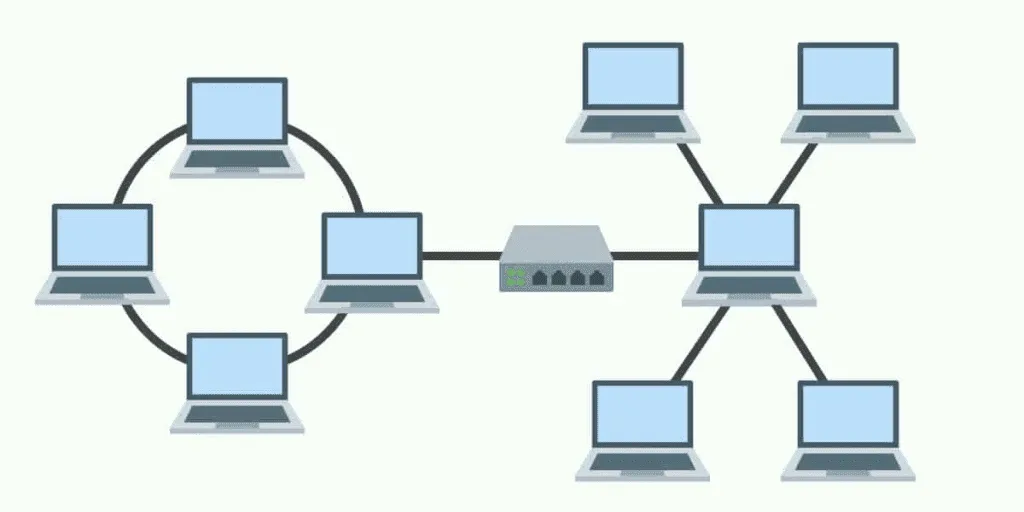
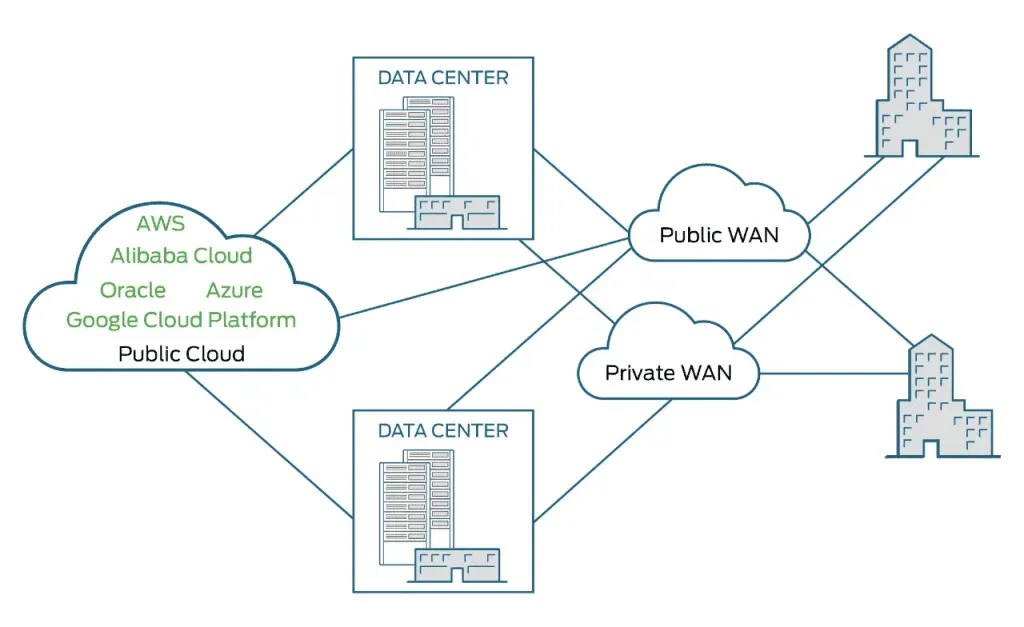
At the network level, hybrid topologies connect LAN and WAN segments. VPNs or dedicated interconnects (like AWS Direct Connect or Azure ExpressRoute) link on-prem infrastructure to cloud environments, letting teams route traffic based on latency, cost, or security requirements.
Why hybrid cloud is gaining traction
Hybrid cloud appeals to operations teams that want flexibility without giving up control. Keeping certain workloads on-prem satisfies compliance requirements. Scaling non-sensitive workloads into the public cloud avoids the capital expense of buying more hardware.
The operational upside: teams can place each workload where it performs best based on real cost, latency, and compliance constraints rather than a blanket cloud mandate.
What is multi-cloud topology?
Multi-cloud means running services from two or more cloud providers — AWS and Azure, for example, or GCP and Oracle Cloud. The goal is to pick the strongest provider for each workload and avoid depending on a single vendor. It’s a strategy that has clearly caught on: 89% of enterprises report having a multi-cloud strategy in place in 2025, with the average organization now using 3.4 different cloud providers.
This reduces vendor lock-in. If one provider’s pricing shifts or service quality drops, teams can migrate workloads without rebuilding from scratch. It also improves availability since an outage on one cloud doesn’t bring everything down.
Multi-cloud environments distribute data and compute across providers and regions, giving teams built-in redundancy. Workloads can run closer to end users in different geographies (which helps with latency), and spreading data across providers shrinks the blast radius of any single security breach.
Where multi-cloud fits best
Multi-cloud works well when different teams or applications have different cloud requirements. A data engineering team might prefer GCP’s BigQuery while the DevOps team runs Kubernetes on AWS EKS. Multi-cloud lets each group use the right tool without forcing everyone onto one vendor.
The trade-off: managing multiple cloud consoles, billing relationships, and security policies across providers adds real complexity.
Advantages and disadvantages of hybrid cloud topology
Advantages of hybrid cloud topology
- Higher uptime through redundancy. Running workloads across both on-prem and cloud means a failure in one environment doesn’t take everything down. Teams can failover critical services between environments during outages.
- Scalability without losing control. Need more compute for a product launch? Burst into the public cloud. Need to keep patient records on-prem for HIPAA? Keep them there. Hybrid gives teams both options.
- Stronger security segmentation. VLANs and network segmentation isolate sensitive workloads on private infrastructure. Public-facing apps run in the cloud with separate security zones, limiting the blast radius of a breach.
- Cost optimization across environments. Teams avoid paying public cloud rates for workloads that run cheaper on existing hardware while also avoiding hardware purchases for temporary capacity spikes.
- Workload-specific infrastructure. Latency-sensitive applications stay on-prem. Storage-heavy workloads move to cheaper cloud tiers. Each workload runs where it performs best and costs least.
Disadvantages of hybrid cloud topology
- Security spans two trust boundaries. Data moving between on-prem and cloud crosses network boundaries. If either environment has weak controls, attackers can pivot from one to the other. Teams need consistent encryption and access policies across both.
- Networking complexity increases. Hybrid environments require VPN tunnels, interconnects, consistent DNS, and routing policies across environments. Setting this up correctly takes networking expertise, and troubleshooting gets harder as the environment grows.
- Interoperability between environments isn’t automatic. Different platforms use different APIs, authentication models, and networking standards. Applications built for on-prem may not move to the cloud without rearchitecting. Teams need to plan for compatibility before building hybrid workflows.
Advantages and disadvantages of multi-cloud topology
Advantages of multi-cloud topology
- Flexibility to match workload to provider. Each cloud provider has strengths. Multi-cloud lets teams pick the right one for each workload: best-in-class ML tools from one provider, best container orchestration from another.
- Reduced downtime risk through provider diversity. If AWS us-east-1 goes down, workloads on Azure or GCP stay up. Distributing across providers means no single outage takes everything offline.
- Cost arbitrage across providers. Different providers price compute, storage, and egress differently. Teams can place workloads where the per-unit cost is lowest for that workload’s profile.
- Simpler workload migration. Teams already running on multiple providers have experience moving workloads. If a contract renegotiation goes sideways or a provider deprecates a service, the migration path already exists.
Disadvantages of multi-cloud topology
- Deployment complexity multiplies. Each provider has its own CLI, API conventions, IAM model, and networking stack. Deploying the same application across providers means maintaining multiple infrastructure-as-code configurations.
- Inconsistent security policies. Security controls, logging formats, and authentication mechanisms differ across providers. Maintaining a consistent posture across AWS IAM, Azure AD, and GCP IAM takes deliberate effort and tooling.
- Cumulative costs can surprise you. Licensing, egress charges, support tiers, and reserved instance commitments across three providers add up fast. Without centralized cost visibility, multi-cloud environments often cost more than planned.
- Compatibility gaps between providers. A managed database on AWS doesn’t automatically work with a compute instance on Azure. Teams often need middleware, data replication layers, or custom integrations to bridge providers.
- Maintenance overhead grows with each provider. Patching, monitoring, and troubleshooting across different provider consoles and toolchains takes more time. Incompatible software versions across providers create debugging complexity that burns engineering hours.
How to choose between multi-cloud and hybrid cloud types of network topologies
The right topology depends on your team’s specific operational constraints. Five factors drive the decision:
Match the topology to your operational goals
If your team needs to keep certain data on-premises for compliance, latency, or data sovereignty, a hybrid cloud is the natural fit. If the priority is avoiding vendor lock-in and picking best-of-breed services across providers, multi-cloud makes more sense.
Start with the workloads. Map which ones need on-prem residency and which ones are cloud-flexible. That mapping usually makes the choice clear.
Compare the cost models
Multi-cloud gives teams pricing flexibility across providers, which helps for workloads with variable resource needs. Hybrid cloud often costs less for stable workloads because teams use existing on-prem hardware instead of paying cloud rates for everything.
Run the numbers for your top 10 workloads. Factor in egress charges, reserved instance pricing, and the cost of the networking layer (VPNs, interconnects) each topology requires.
Evaluate the security trade-offs
Multi-cloud spreads data across multiple providers and regions, limiting damage from any single breach. But it also means managing security policies across multiple IAM systems and compliance frameworks.
Hybrid cloud keeps sensitive data on private infrastructure, simplifying compliance for regulated workloads. The connection between on-prem and cloud is itself an attack surface, though, and it needs strong encryption and access controls.
Assess performance requirements
Hybrid cloud gives teams more control over data placement and latency. Workloads that need single-digit millisecond response times often need to stay on-prem, close to the data source.
Multi-cloud offers geographic distribution across provider regions, which helps for globally distributed users. It also provides natural redundancy if one provider’s region has performance issues.
Factor in compliance requirements
If you work in healthcare, finance, or EU markets, you must track your data closely. You need to understand data flows, the flow of data, and how your network design supports them. You also rely on the right network devices, clear nodes and connections, and stable paths to manage network traffic. As pressure grows, network administrators must ensure every system is secure and compliant. In fact, global spending on cloud compliance tools passed $8 billion in 2025, and 58% of teams faced more rules.
So, you must choose your cloud setup carefully. Multi-cloud helps you place data in specific regions to meet local rules. In many cases, systems are connected to a central control layer or central hub, similar to a star topology. On the other hand, hybrid cloud lets you keep sensitive data on private systems, much like a point-to-point topology or even a bus topology in simpler setups. Because of this, teams often mix models based on how devices are connected and how data moves.
However, there is no single right answer for everyone. Some designs, like ring topology, can break if one link fails and may cause the entire network to fail. This matters when you plan for future growth or manage small networks. So, when choosing the right network topology, you must also think about scalability and risk. In the end, your network configuration should match your workload needs and keep everything running smoothly.
How do you manage IT assets across hybrid and multi-cloud environments?
Managing assets across hybrid and multi-cloud environments requires automated IT discovery that scans every environment (on-prem, AWS, Azure, GCP) without requiring agents on every device.
Manual asset tracking breaks down once workloads span more than one environment. Cloud instances spin up and down faster than any spreadsheet can track. On-prem assets change configurations between audit cycles. The result is a CMDB full of stale data that teams can’t trust during incidents or change reviews.
Automated discovery fixes this by running recurring scheduled scans across all environments. Each scan identifies assets, fingerprints configurations, and maps relationships between them. The CMDB stays current without manual data entry. When a team needs to know what depends on a specific database server, whether on-prem or in AWS, the answer is already there. Thorough network infrastructure discovery also reveals which device vendors dominate each environment, helping teams standardize support and close coverage gaps before they cause incidents.
What tools do you need for hybrid cloud visibility?
Full hybrid cloud visibility requires three capabilities: asset discovery across all environments, dependency mapping that shows how services connect, and a visual layer that surfaces the impact of changes and incidents.
Discovery tools scan on-prem networks, cloud APIs, and virtual environments to build a complete inventory. Service mapping traces the relationships between those assets, showing which applications depend on which databases and which services call which APIs. A visualization layer like Virima Visual Impact Display (ViVID™) overlays ITSM incident and change records, event management alerts, and NIST National Vulnerability Database (NVD) data directly onto those dependency maps — at no extra licensing cost.
This combination gives operations teams a current picture of their hybrid environment. When a network switch fails, they see exactly which services are affected without manually tracing connections.
How does a CMDB work across multi-cloud infrastructure?
A CMDB in a multi-cloud environment is the single source of truth for every asset, regardless of which provider hosts it. It stores configuration items (CIs) from AWS, Azure, GCP, and on-prem, with relationship data showing how they connect.
The challenge is keeping that data accurate. Cloud environments change constantly as instances scale, containers restart, and configurations drift. A CMDB that relies on manual updates will be outdated within days.
The fix is automated discovery that feeds directly into the CMDB. Recurring scheduled scans across all providers detect configuration changes between cycles, update CI records, and map new relationships automatically. Teams working in ServiceNow, Jira Service Management, or Ivanti get accurate CMDB data synced bidirectionally, with no manual imports and no stale records sitting in the system for months.
How do you monitor dependencies in a hybrid cloud topology?
Monitoring dependencies in a hybrid environment means mapping every connection between assets that span on-prem and cloud, and keeping those maps current as infrastructure changes.
Static network diagrams go stale almost immediately in hybrid environments. A new cloud instance launches, a load balancer shifts traffic, and a database failover changes the dependency chain. If your dependency data isn’t updated through automated discovery, your incident response team is working from an outdated picture.
Effective dependency monitoring combines automated discovery (to find what exists) with service mapping (to trace how everything connects). An ITOM solution that brings discovery, mapping, CMDB, and ViVID together under one roof gives teams the context to spot issues before they cascade across the hybrid boundary.
Why understanding your network topology drives operational success
Hybrid and multi-cloud topologies each solve real operational problems. Hybrid gives teams control and compliance. Multi-cloud gives flexibility and provider independence. Most organizations end up using elements of both.
What matters more than which topology you choose is whether your team can actually see what’s running, where it’s running, and what depends on what across every environment. Without that visibility, neither topology delivers on its promises.
Virima’s IT discovery scans on-prem, AWS, Azure, and GCP environments through agentless and agent-based methods on a recurring schedule. Service mapping traces the dependencies between those assets, and ViVID™ overlays ITSM incident and change records, event management alerts, and NIST NVD vulnerabilities onto those dependency maps. The result: your operations team sees what’s running, how it connects, and what’s changed across your entire hybrid or multi-cloud environment.
Virima syncs bidirectionally with ServiceNow, Jira Service Management, Ivanti, HaloITSM, and Cherwell, and also integrates with Xurrent and Hornbill, so your ITSM platform always has accurate, current data from every environment.
Book a demo to see how Virima helps your team see what’s running, how it’s connected, and what’s changed across any type of network topology.